|
|
|
|
|
|
|
|
|
|
|
|
|
|
|
|
|
|
|
|
 |
|
|
Basic USB Communication (RS-232 Emulation Method) |
|
|
|
|
With the continuous decrease in the use of COM Port devices and COM Ports itselt, the need to migrate to the USB has become increasingly important. = ( . Just take a look at the laptop PCs nowadays, it is a miracle if you can even find just 1 COM Port on it. >< But the good news is... we have got a simple (very simple in fact) way of migrating from the old RS232 to USB, that is via RS232 Emulation method. This method alone has got quite a number of ways to implement, e.g. using USB Convertor ICs, like the FTDI232BM (this is UART-USB conversion), the Philips PDIUSBD11 (this is I2C conversion to USB) and many more. Sometime last year, Microchip released the USB 2.0 compatible microcontrollers, i.e. PIC18F4550, 18F2550 and etc. Presented here, is the example of using the CDC firmware provided by Microchip to emulate a COM Port when the device is connected to the USB Port. = )
When the device is connected to the computer, a Virtual COM Port (VCP) will be created. This is shown at the Device Manager Window under Ports(COM & LPT). In this case, COM5 was created when the PIC18F4550 was attached to the USB Port. It may be interesting to note that if you plug in your PIC in different USB ports, the
VCP created will be different. >< |
|
|
 |
|
|
|
|
|
A new COM Port is now created with the PIC connected to the USB Port. =) |
|
|
|
|
|
|
For a fast tutorial on the USB-RS232 Emulation, you can refer to this website here:
http://pic18fusb.online.fr/wiki/wikka.php?wakka=UsbBootload
This website provides all the necessary knowledge on implementing your first PIC18F4550 as a COM Port on the PC when it is connected. It guides you on setting up the Windows XP drivers for the PIC and show you how to setup the useful USB bootloader for the PIC18F4550. With this bootloader, you can very easily reprogramme the PIC18F4550 at a very fast speed. |
|
|
|
 |
|
|
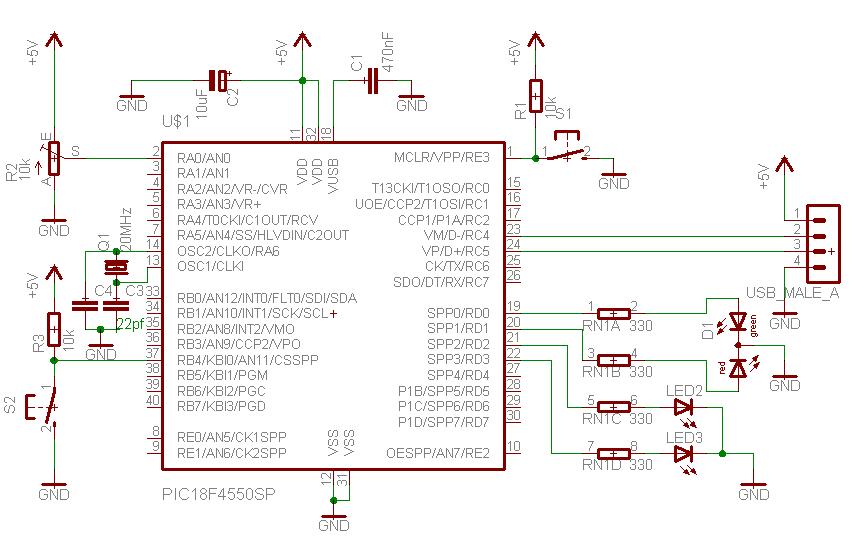
Since I do not have the PICDEM-2 USB board, I followed the schematics from www.sixca.com and the one provided above and produced a hybrid schematics of the two.
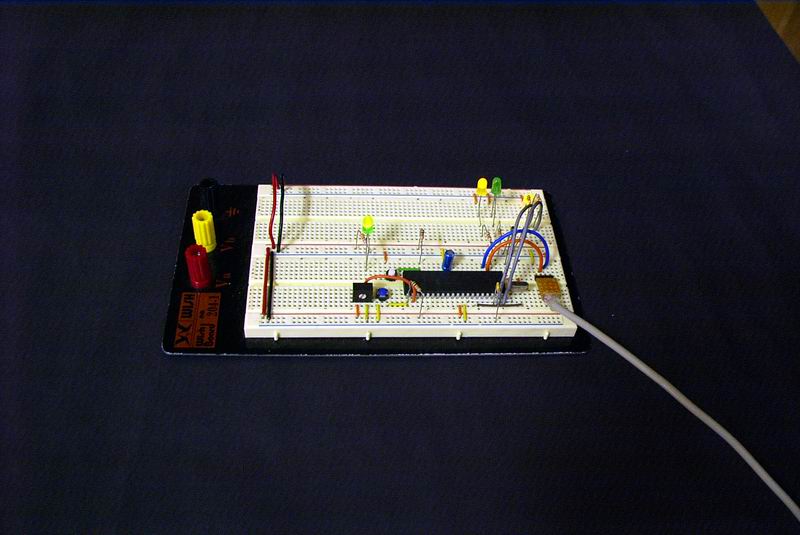
In other words, it is a combination of the bootloader circuit and the circuit shown at www.sixca.com. The prototype board is shown at the picture on the right. It is seen that the board is connected to the USB Port, which is providing all the power to the circuit. |
|
|
|
|
The prototype board is connected to the USB Port on the PC. |
|
|
|
 |
|
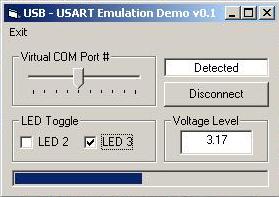
Here, I modified the CDC firmware provided by Microchip and wrote a Visual Basic programme to communicate with the device. An important thing to note when using the firmware and this schematics is that... to PLACE REMARKS ON THE FOLLOWING 2 LINES AT USBCFG.H like this...
//#define USE_SELF_POWER_SENSE_IO
//#define USE_USB_BUS_SENSE_IO
if not the when you attach the PIC to the USB Port, it will disconnect itself immediately soon after!!!! ><
|
|
|
|
|
Modified from the Delphi 6 version written by the author from www.sixca.com to work with Visual Basic 6. |
|
|
|
|
|
|
The concept of baud rates, parity bits and flow control is not important in this method of RS232 emulation as most of these matters are taken care of by Windows XP's internal drivers. Therefore, the settings for MSComm for these properties can be omitted altogether. It will still work.The VB software controls the 2 LEDs connected at RD2 and RD3 besides reading the analog voltage of the potentiometer connected at RA0. The correct VCP has to selected before the software can communicate with the PIC18F4550.
One last thing is that, when you want to switch back to the bootloader mode, just hold on to S2 (Enter Boot) while tapping S1 (Reset). When the bootloader firmware in the PIC detects a HIGH on S2, it will enter Bootloader mode where you can use the PDFSUSB.EXE to programme, erase or to read the PIC via the USB Port. When I do this project, I first went thru the quick USB tutorial at the website above before writing the firmware to communicate with the VB software. I would advice you to do the same too. The next time, I will present the HID version of USB Communication. =)
Schematics: USB_USARTSchem.jpg
Microchip C18 modified CDC firmware : cdc.zip
Visual Basic 6 programme : usbusart.zip
Last Updated : 6th December 2005, 2.48am Eastern Time.
|
|