First, I may as well show you my code. It's very simple. Then we'll break it down.


/*
SCOTTISHPIG PRESENTS
"The House"

Basic modelling example.
-----
*/
Version: 1.2

//Our Camera:
Camera[(5, -5, 8), (1.5,1.5,3), (0,0,1) FieldOfView 90 Format (640,480) ]

//MATERIALS:
Declare RedBrick=Shader [PlainSurface [Color '0.5, 0, 0'] ]
Declare GreenRoof=Shader [PlainSurface [Color '0, 0.3, 0'] ]
Declare BlueGrey=Shader [PlainSurface [Color '0.25, 0.25, .5' Kr 1.5] ]
Declare Wood=Shader [PlainSurface [Color '0.5, 0.25, 0' ] ]
Declare DrkWood=Shader [PlainSurface [Color '0.35, 0.125, 0' ] ]
Declare FlatWhite=Shader [PlainSurface [Color '0.5,0.5,0.5'] ]
Declare Grass=Shader [PlainSurface [Color '0.0,0.5,0'] ]


//House itself:
Shape [ Box((0,0,0), (3,5,5)) RedBrick]

//Window:
Shape [ Box((1,0,1), (1.25,-0.3, 3)) Wood] //Frame, vertical I
Shape [ Box((1.75,0,1), (2,-0.3, 3)) Wood] //Frame, horizontal I
Shape [ Box((1,0,1), (2,-0.3, 1.25)) Wood] //Frame, vertical II
Shape [ Box((1,0,2.75), (2,-0.3, 3)) Wood] //Frame, horizontal II
Shape [ Box((1.25,0, 1.25), (1.75, -0.1, 2.75)) BlueGrey ] //Glass

//Roof
Shape [ Polygon (3, (0,0,5), (3,0,5), (1.5,0,7)) FlatWhite] //Roof Triangle
Shape [ Polygon (3, (0,5,5), (3,5,5), (1.5,5,7)) FlatWhite] //Far roof triangle
Shape [ Polygon (4, (0,0,5), (1.5, 0, 7), (1.5, 5, 7), (0,5,5)) GreenRoof] //Green Rectangle
Shape [ Polygon (4, (3,0,5), (1.5, 0, 7), (1.5, 5, 7), (3,5,5)) GreenRoof] //Green Rectangle

//Door
Shape [ Box ((3.125, 1, 0), (3, 1.25, 4)) Wood]
Shape [ Box ((3.125, 1.25, 3.75), (3, 2.75, 4)) Wood]
Shape [ Box ((3.125, 2.75, 0), (3, 3, 4)) Wood]
Shape [ Box ((3.0625, 2.75, 0), (3, 1.25, 3.75)) DrkWood]

//Ground
Shape [ Polygon (4, (-50, -50, 0), (-50, 50,0), (50,50,0), (50,-50,0)) Grass]

//FOG!!!
Fog(10, 0.2, '0.5, 0.5, 0.5')

//Let there be LIGHT!
PointLight [ (5, -5, 8) Intensity '1,1,1' ]


Now, for to break down all that stuff

By now, your third tutorial, you should know what the camera and lighting stuff does, and I'd also venture to guess that you've seen our friend the box before... in the million spheres example. However, today I have introduced a new partner in crime.... (roll the dramatic music)...

THE DREADED POLYGON

All right... it's not so bad. It's usage is quite simple,

Shape [ Polygon (n, (X1, Y1, Z1), (X2, Y2, Z2), (X3. Y3, Z3), (Xn, Yn, Zn)...) texture]

All right, now for the clever explaination.
You should have already seen the Shape [] stuff, and Polygon makes good sense....

n is the number of points (or vertices) your polygon will have. Think of a polygon as a square/rectangle/ triangle/n-angle/n-gon. It can have anywhere from 3-32 sides, so it's fairly versitile...
After that, our good ol' friends X,Y,and Z remain the same. The number of points you have MUST EQUAL n. texture is just the texture... like we've done before...

Now, for the fog.

Also, in our primitive scene, we see fog. This cool effect is created using the Fog keyword.

Fog (dist, thickness, 'R, G, B')

dist is our word for distance. This is how many units away the fog starts.... a very simple concept. The thickness may not be so easy. It is how dense the fog is, or rather, it's fading effect. When you look outside on a foggy day, there are different amounts of fog... it could be nearly transparent or it could be so dense that you cannot see your hand afront your face... well, thickness is something like that.... the larger the number, the denser the fog is. You should already be aquainted with R G B values by now, so I wont go into that either...
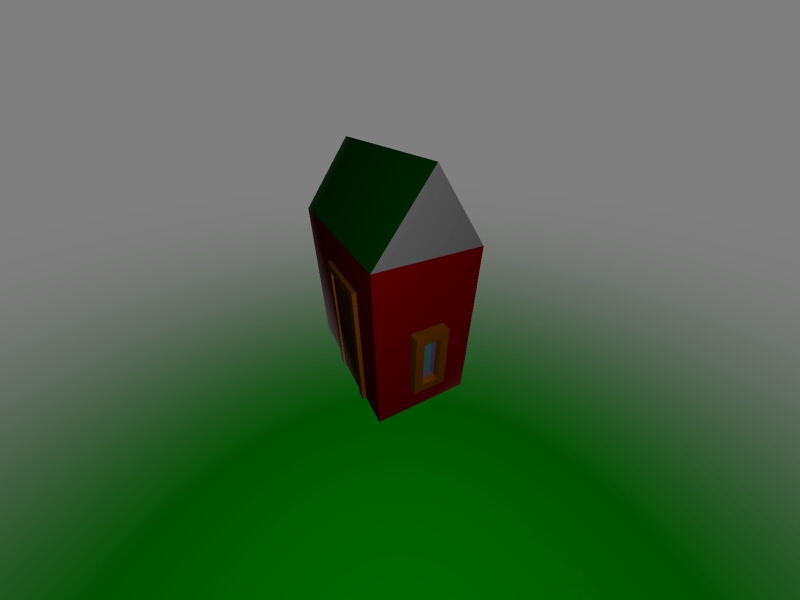

I hope this tutorial was helpful to you. :) 1
Hosted by www.Geocities.ws