 James,
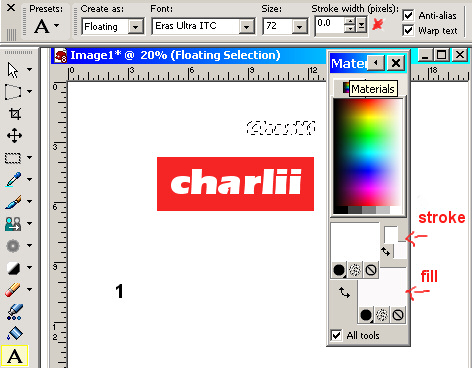
this is a screen shot of most likely what is happening, in your
materials pallet the stroke and fill are the same colour as the
background of your image. the ---- around the text is running and when
you select none[ found under selection] the text disappears, I
have place it on a red background so it would show.
James,
this is a screen shot of most likely what is happening, in your
materials pallet the stroke and fill are the same colour as the
background of your image. the ---- around the text is running and when
you select none[ found under selection] the text disappears, I
have place it on a red background so it would show.I have the stroke set at 0 in this shot as it made no difference to the example.
 Example
2.
Example
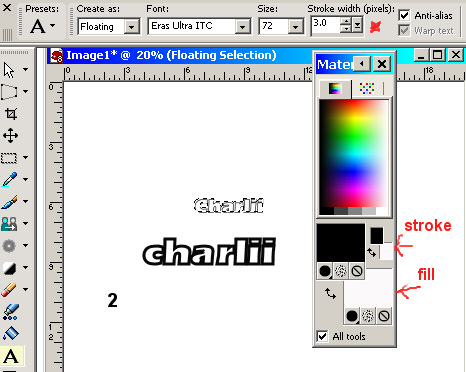
2.I have set the stroke to 3 pixels. And stroke colour to black.
We still have the ---- around the text until I select none.
Now we have text with a 3 pixel black stroke around a white fill.
 Example
3.
Example
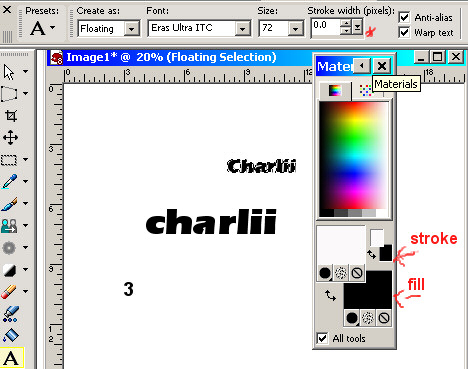
3.In this example I went back to 0 pixels in the stroke stetting and set my fill to black
you still have the running ---- around the text but when you select none
your text appears without them.
I hope this helps.