Sequence Diagram
In our software system, there are four cases to be considered:
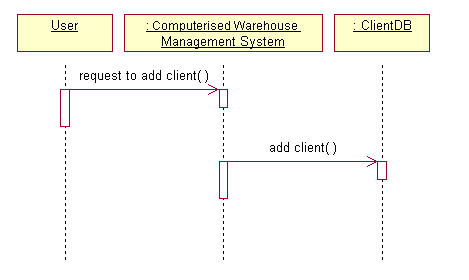
Case 1: Add Client
The User is an object instance, where Computerized Warehouse Management System (main system) and ClientDB are the classes. The User will first request the main system to process the add client option, then the main system will call the ClientDB class to run the add client option, where the add client option is under the ClientDB class.
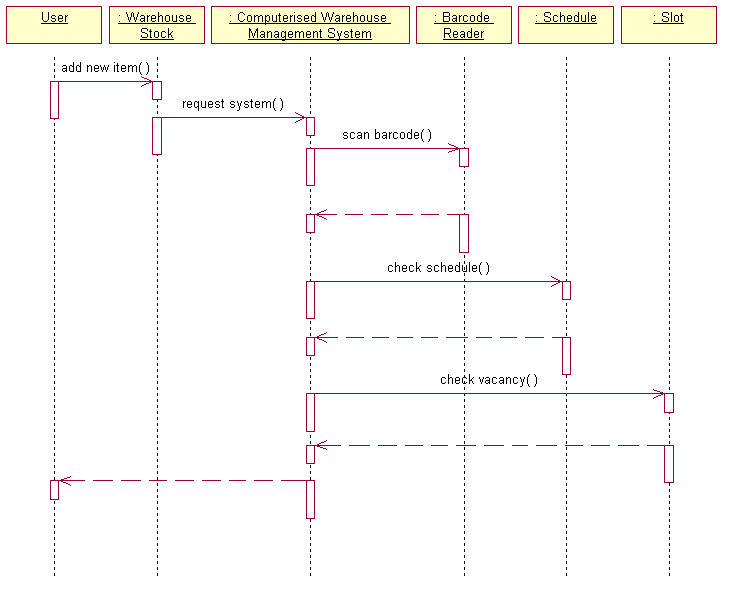
Case 2: Add New Item
The User will call the add new item option which is under the Warehouse Stock class, then the class will request the main system to process the consequences options. The main system will call the scan barcode option which is under the Barcode Reader class and the Barcode Reader will response to the main system to tell whether the barcode was scanned successfully. After that, the main system will call the check schedule option which is under the Schedule class and the Schedule will response to the main system to tell whether there is a time slot to add the new item. The main system will then call the check vacancy option which is under the Slot class to check the space availability and the Slot will return a message to tell the main system. Finally, the main system to return a message to tell the User whether the item was added successfully.
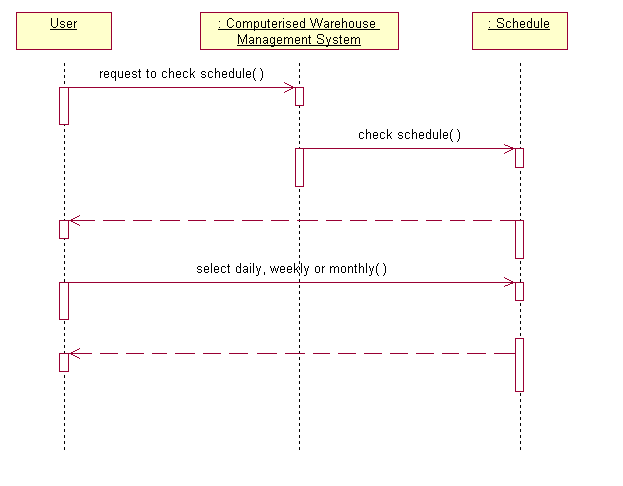
Case 3: Checking Schedule
The User will request the main system to process the check schedule option, and then the main system will call the Schedule class to run the check schedule option, where the check schedule option is under the Schedule class. The Schedule will prompt the User to select the type of check schedule by daily, weekly or monthly. Then after the user select the type, the Schedule will present the schedule by the type (daily, weekly or monthly) that the user selected.
Case 4: Remove Item
First the User will call the remove item option which is under the Warehouse Stock class, and then the class will request the main system to process the related options. The main system will call the check schedule option which is under the Schedule class to check whether there is a free time slot to remove the item; the Schedule will then notify the main system. If there is free time slot, the main system will return a message to tell the User that the item was removed successfully.
