Detailed / Procedural Design
Program Design Language
Program Design Language (PDL) is also known as Structured English as it is a subset of full English language with some major restrictions on the kind of sentences that can be used and the manner in which sentences can be put together. The purpose is to strike a reasonable balance between the precision of a formal programming language and the casual informality and readability of English language.
Nassi-Schneiderman Chart (Box Diagram)
Box Diagrams were introduced as a structured procedural design technique. They are found on the fact that any structured algorithm can be presented as a combination of exactly three basic constructs: sequence, selection, and repetition. The box diagram is a graphical design tool that may be used to develop a procedural design representation that would not allow violation of the structured constructs.
Examples
Followings are a few example of detailed design for some procedures in our product:
File Management
Program Design Language (PDL):
Procedure FileOption
Begin
While not exit
Show page
If find files Then
Show dialogue box find files
If file exist
Error message
Else
Go to file
Endif
Endif
If delete files Then
Show dialogue box “are you sure”
If (reply is ok) Then
Delete current file
Endif
If add file Then
Show empty test boxes
If text box incomplete Then
Show error message
Else if invalid input Then
Show error message
Else if file already exist Then
Show error message
Else
Update database
Endif
Endif
End while
End
Nassi-Shneiderman Chart (NS Chart):
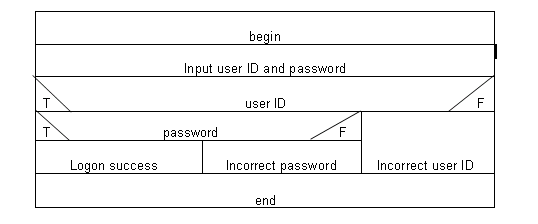
Login Process
Program Design Language (PDL):
Procedure Login
Begin
Input userID and password
If userID is correct Then
If password is correct Then
Output message logon success
Else
Output error message wrong password
Endif
Else
Output error message wrong userID
Endif
End
Nassi-Shneiderman Chart (NS Chart):
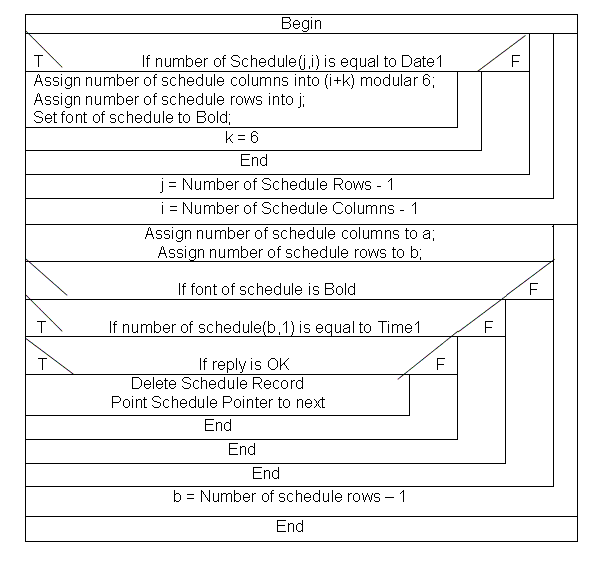
Add Confirmation
Program Design Language (PDL):
Procedure ConfirmAdd
Begin
Repeat until i is the number of schedule columns – 1
Repeat until j is the number of schedule rows – 1
If schedule number(j,i) is equal to Date1
Then repeat until k = 6
Assign the number of schedule columns into (i+k) modular 6
Assign the number of schedule rows into j
Set the font of the schedule to Bold
End repeat k
End if
End repeat j
End repeat i
Repeat until b is the number of schedule Rows – 1
Assign the number of schedule columns to a
Assign the number of schedule rows to b
If the font of the schedule is Bold
Then if schedule number(b,1) is equal to Time1
Then if reply is OK
Delete the schedule record
Set the schedule pointer to next
End if
End if
End if
End repeat b
End
Nassi-Shneiderman Chart (NS Chart):