 Inventory listing with thumbnail
option
Inventory listing with thumbnail
optionDesign Testing
The objective of test cases is to ensure that all the client requirements are met and all the functions created are working with little or no bugs.
A checklist is made based on the client requirements:
Inventory listing with thumbnail
option
Security option
Stock scheduling manager
Delivery scheduling manager
Warehouse status
Goods status
Database of client and goods
Barcode reader
Summaries
Implementation Testing
Our testing was done by looking at the cases elaborated in the sequence/collaboration diagrams.
Collaboration Diagram

This diagram shows the first step in using the software, a user has to log in for security reasons before he can proceed with the program. When a user has logged in he is able to give authority to another user to log on by adding him to a user database. The process is shown in the above collaboration diagram.
Things to test in the scenario:
Ø Adding the same user twice should produce an error message
Ø Test the new user log on

The above diagram is the add item diagram. In this part the user can add new item to the database.
Test cases involved:
Ø Check if database is updated
Ø Check the barcode reader
Ø Check if invalid input is handled

The above diagram is the remove item diagram. In this part of the program the user is allowed to remove certain goods info from the database.
Test cases involved:
Ø Check if database is updated
Ø Check if invalid input is handled
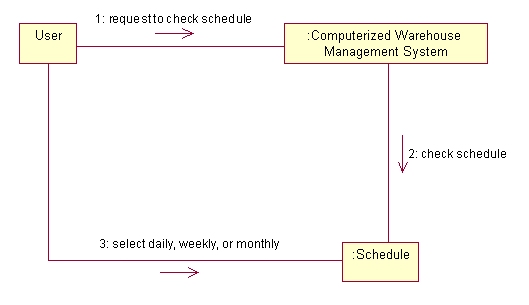
The above diagram shows the Check Schedule Diagram, this can be said to be the main part of the software. A user can access to this part of the program to view the work schedule of the warehouse and add schedule. This scheduler will in turn cause the movement of goods and increase or decrease the number of goods in the warehouse.
Things to check in the program:
Ø Put in two task in one slot
Ø Test whether database is updated
Ø Incomplete information should generate error message