Database Design
In a general application, data requirements could be large and complex. Different data requirements could also have complex relationships with each other. Straightforward selection of primary data structures using data dictionary may not be adequate. Subsequently, there is a need to perform a more comprehensive analysis of the data requirements. We need to perform complex data design which is well-known as database design.
The data design process mainly comprises of three steps:
Entity-Relationship Diagram
The key idea of the Entity Relationship (E-R) Approach (Data Case Analysis) is to provide a diagrammatic technique. This would also support design independent analysis work. The database analyst first identifies the entities and relationships which are of interest to the application. At this stage, the data should be viewed from the point of view of the application and not the software designer's perspective.
An entity is a thing which can be distinctly identified. Entity can be classified into different entity types, and represented by a rectangular box.
Relationships may exist between two person entities. Relationships can be classified into different relationship types, which are represented by diamond shaped boxes with lines connected to related entity types.
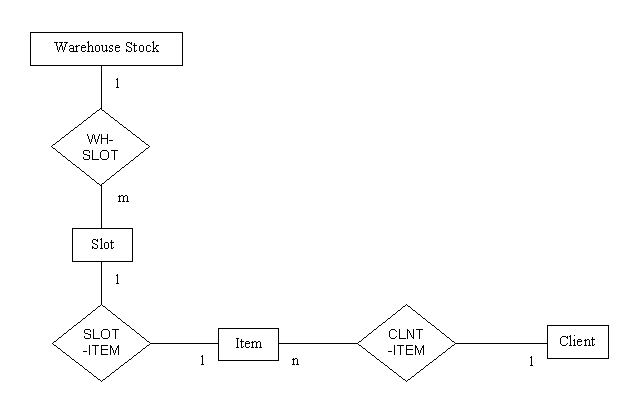
From the Software Statement of Scope previously given by our client, we can identify the entities and the relationships. These can be represented by the Entity-Relationship Diagram (ERD) given as follows:
Data Structure Diagram
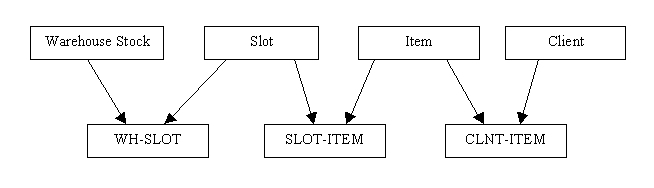
After the data requirements analysis was done by the E-R Approach, the next step is to go into the logical/physical design. This can be done by constructing the Data Structure Diagram (DSD) from the ERD. DSD is chosen as it is very close to the logical design. Another possible reason is that it is closer to the physical design as well compared to the ERD.
Our DSD for the given ERD can be seen as follows:
Database Details
Item Database
|
Field Name |
Type |
Description |
|
ID |
AutoNumber |
The item’s ID/barcode |
|
goods name |
Text |
The item’s name |
|
Cost |
Currency |
Price of one item |
|
Volume |
Number |
Volume of one item |
|
Location |
Number |
Location of the item (the slot) |
|
empty slots |
Number |
|
|
Maximum |
Number |
Maximum number of items in a slot |
|
Quantity |
Number |
Number of items currently |
Primary Key: ID Type: AutoNumber
Access Functions:
To get an item’s detail, to get an item’s quantity, to get an item’s location, to get an item’s maximum number in a slot, to get an item’s volume.
Dependency to other table: none
Time Slot Database
|
Field Name |
Type |
Description |
|
Date |
Date/Time |
Date and time of transaction |
|
Time Slot |
Text |
|
|
Transaction IN |
Text |
Item moving in to the warehouse |
|
Quantity IN |
Text |
Quantity of item moving in to the warehouse |
|
Transaction OUT |
Text |
Item moving out of the warehouse |
|
Quantity OUT |
Text |
Quantity of item moving out of the warehouse |
Primary Key: Date Type: Date/Time
Access Functions:
To get a transaction information on specified date and time.
Dependency to other table: none
Client Database
|
Field Name |
Type |
Description |
|
ClientID |
AutoNumber |
Client’s ID/code |
|
ClientName |
Text |
Client’s name |
|
Address |
Text |
Client’s address |
|
PhoneNumber |
Text |
Client’s phone number |
Primary Key: ClientID Type: AutoNumber
Access Functions:
To get a client’s detail.
Dependency to other table: none
Administrator Database
|
Field Name |
Type |
Description |
|
User Id |
Text |
Administrator’s User ID |
|
Password |
Text |
Administrator’s password |
|
Name |
Text |
Administrator’s name |
|
Address |
Text |
Administrator’s address |
|
Contact Number |
Text |
Administrator’s contact number |
Primary Key: User ID Type: Text
Access Functions:
To get the administrator’s password and to get the administrator’s detail.
Dependency to other table: none