 Protect your privacy on email?
 Please set up your own secure e-mail with business associates and close
friends, so that you can start sending secure e-mail communications .
We strongly recommend that PGP and WinZip for teacher, trader ,retailer,
close friends, private correspondence and so on.
Only we may use VeriSign for company, business associates.
PGP PGP
First you should go to http://www.pgpi.org/
Next to click Versions on the left screen and then select Freeware versions(112),note number112 is changing,it is now at this time July3,2001.
download and setup PGPversion6.0.2i
size 6699KB
Supposing that you refered to PGP language support
but you may not be able to find the further link url address on that your own language page. If so ,you should go back to the above website http://www.pgpi.org/.
Do not enter the version 6.5.1.
It does not include pgp disk for freeware version6.0.2i. It is impossible to update freeware PGPversion6.0.2i.
And so it will cease to work.
PGP is based on a widely accepted encryption technology known as
public key cryptography in which two complementary keys- key pair
are used to maintain secure communications.
Setup is easy.
The following may be rather important and difficult to understand
the meaning of the sentence continue to move in processing, the sentence continue to move means that
the pointer are moving about in the PGP inner screen
from 0 percent to 100 percent. 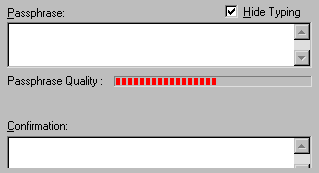
If you refer to PGP Help,( only our contents has to be read.
you can omit the following help to read in the case of the normal use. )
the following No 6 and No 7 are important and difficult to understand.
Help Help Topics
PGP Desktop Security Creating Keys To Create a Key Pair
To create a key pair
1 Choose New Key from the Keys menu.
2 The PGP Key Generation Wizard asks you to enter your name and email address.
You do not have to enter your real name or even your email address. However, using your real name makes it easier for others to identify you as the owner of your public key.
3 Click Next.
4 Select a key type. (If your version of PGP does not support RSA functionality, this option will not be available to you. The key you create will be a Diffie-Hellman/DSS key.)
5 Select a key size, or enter a custom key size from 768 to 4096.
6 Choose when the key pair expires (enter a specific date or accept the default, Never).
7 Type a passphrase. What is an adequate passphrase? enter 8 alphabets and digits ,please.
Note: If you are creating a key with the same user name or email address as a previous key, you are given the opportunity to sign the new key with your older key. This endows the new key with the same level of validity and trust as your older key when someone adds it to their keyring.
8 If applicable, sign your new key with the older key and enter the passphrase for the old key, then click Next.
9 Choose whether to send your public key to the default key server.
10 Click Finish.
11 A pair of keys representing your newly created keys appears in the PGPkeys window.
See also
Why is my key generation taking so long?
Establishing preferences
Key size
Updating your key
1998 Network Associates, Inc.
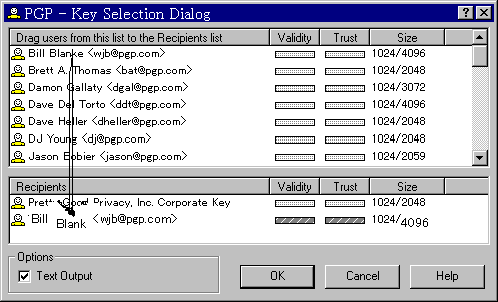
How to use it. In case you want to send email,if you get public key
from website or email sent to you,you must import it and select the public key from the upperscreen and then you can drag
and drop pubic key to the screen of the bottom.
If you refer to PGP Help,( only our contents has to be read.
you can omit the following help to read in the case of the normal use. )
the following No4, No4 is rather important and difficult to understand.
Help Topics
PGP Desktop Security
Using PGPtools to encrypt and sign
To encrypt and sign using PGPtools
1 Open PGPtools application from PGPtray
2 In the Windows Explorer, select the file or files that you want to encrypt. You can select multiple files, but you must encrypt and sign each of them individually.
3 Drag the file(s) onto the Encrypt, Sign, or Encrypt and Sign button in the PGPtools window. The PGP Key Recipients dialog box appears. You can select the recipient public keys for the file you are encrypting or signing.
4 Select the public keys by dragging them to the Recipients list, then click OK.
The file is encrypted and/or signed and the resulting file appears in the folder with the original. 1998 Network Associates, Inc.
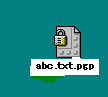
Only you can send secure email, attaching encryption file.
In case you want to read encryption email,first you must set up PGP.
You make key a pair of key, public key and private key. Next you only
send public key of key pair to sender whom you want to communicate with,
or send to website.But you must not send private key to others,it is
secret. When you receive encryption email, you click and click it,
and then enter password into dialog. That is O.K
note:both sender and the recipient need to install PGP.
WinZip
Beside, you can use WinZip software. it is not difficult method. But
it is shareware. Setup is very easy.
How touse it. First you can click right on the file that you want
to send and next you go to add to zip ( only it means add to zip ),and so can see Add screen and then you can press password button
and last you enter secret alphabets ,that is finished. Only you can send
email attaching password zip file that is encoded . But you must tell
password before, if not so ,anyone receiveing your email can not decode
your password zip file. note:only sender needs WinZip,but in communication
with each other,both need as well.
NOTE: About above two kinds of method
The contents of the body of the email letter can not be encoded, the attachment file
only turns to encryption and to send.
Both PGP and WinZip are designed for security, but not anonymity.
Whenever you encrypt a message, provider can see what the body of
contents of the email letter and files name are, how to trace from
you to others,even if they can not read the attaching message files.
VeriSign
If you want to send and receive email made encoding and decoding automatically
and the contents of the body of the email letter are encoded completely, too.
But the size of file becomes bigger by encoding, and at modem a big file
happens error easily. Practical use is a little poor.
Only you should use Microsoft OutlookExpress and go to
http://www.verisign.com/
You get Digital ID from Step1 to Step4 and so you
should install it into MicrosoftOutlookExpress.
then press Digital ID and select Digital ID and last press O.K.
However, Netscape language version 4.7 later is not available to receive free
trial Digital ID ,virtually,you can't try it.
It is difficult for an individual to use VeriSign.
It is good to try ZixMail for the personal use. It can be tried for 30 days free.
ZixMail and PGP are both based on public key cryptography
(as are numerous other products currently on the market).
The following are elements of ZixMail encryption technology:
-ZixIt encryption technology uses 1024-bit Public Keys.
-ZixMail message encryption uses Triple-DES with three independent keys.
By clicking on the following link:
http://www.zixmail.com/zixmail.pdf
(If the above link is not active, please cut and paste the link into
your browser's Address or URL bar.)
If you have comments,please write it here.Sign Guestbook
View Guestbook
And If you want to contact,send email
Only English is available.Because server in U.K does not understand Chinese Character and kana.
For reference,if you are interested in the anonymous surfing ,click this though it is rather old and may be no useful.
Lastmodified July27,2001 All Rights Reserved 2000-2001 by Irena Australias Beauty