Welcome
Darlene's Home Page
Click on a topic.
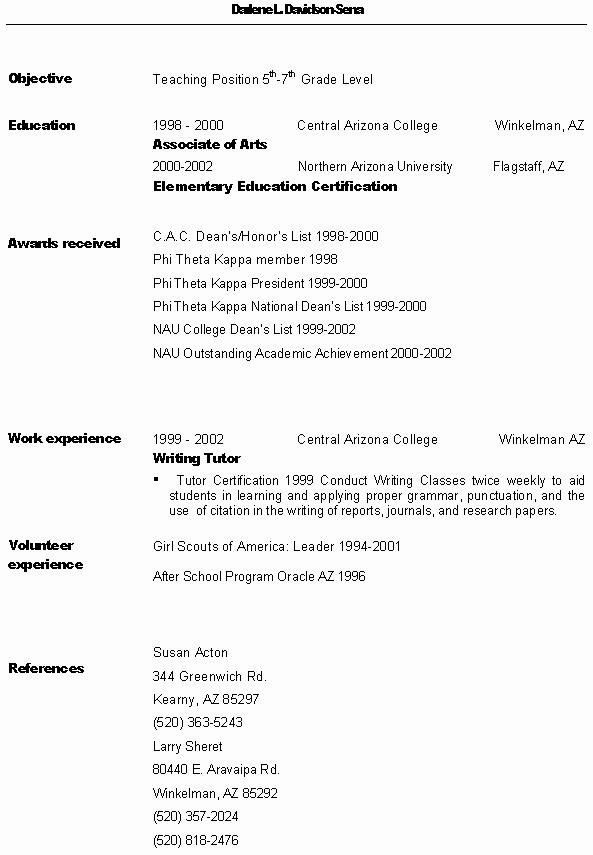
Resume
 Click here to return to menu.
Lesson Plan
Title
Owls
Subjects
Science
Learning Level
5th, 6th, and 7th Grade Level
Snapshot
The goal of this lesson is to ensure that the students will be capable
of demonstrating their ability to meet Arizona's Science Standards.
Invitation
Read aloud the book, Owl Magic by Neal Niemuth. discuss
the storuy and illustrations with the students. Ask the students
the following questions, "Have any of you ever seen a live owl."
"Where did you see the owl?" " Was the owl in a zoo or was it in the wild?"
Situations
This lesson will take place in the classroom and will be for two one
hour class periods.
Procedure (Day One)
The first task to be completed will be a KWL chart. Each student
will be asked to tell one thing they know about owls, one thing they would
like to know about owls, and one thing that they want to know or are curious
about that they would like to know about owls.
1. Write the words Predator and Prey on the board.
2. Ask students to identify which classification the owl belongs under.
3. Use KWL and student participation to list characteristics that classify
the owl as a predator.
4. List the responses under predator.
5. Use KWL and student participation to list some prey that the owl
hunts and eats.
6. Record responses under prey.
7. Ask students for characteristics of a creature that is classified
as being prey.
8. Ask the students if they have ever heard of the classification Raptor
(if the term has not yet been recorded as a response. If it has draw
attention to the term and define it).
9. Explain to the students that a Raptor is a Bird of Prey, which means
they hunt other living things for their food, using special adaptation
and unique abilities that set them apart from any other creature.
10. Ask students if they can tell you what adaptations are.
Make sure that everybody understands taht adaptations are changes that
have occurred over time that help the species survive.
11.Ask students to tell you some things about the owl that help it
to survive.
12. List student responses on the board.
13. If the responses did not include vision, hearing, talons,
beak, and flying silently try to generate those responses through discussion
with the class.
14. Explain to the students that some of the adaptations or unique
abilities that an owl has are its' exceptional vision and acute hearing.
15. Discuss why these play a major part in an owls hunting technique.
16. Discuss how and why the talons and the beak are a characteristic
that owls and birds of prey share. Use pictures of owls and compare
them to pictures of other birds so that the students can see the differences
in the shape and size of the beaks and talons.
17. Explain to the students that the owl's talons and beak are
extremely powerful and have been adapted for tearing meat.
18. Explain to the students that the ability to fly silently
is another unique adaptation and that these adaptations combined together
are why the owl has survived and has become a formidable predator, and
an excellent hunter.
19. Ask students if they have any questions about what they just
went over about owls.
20. Point out terms that students may be unfamliar with, define,
and clarify.
21. Write terms and phrases as they are encountered on the board.
Define with the students, creating a word box (these terms and phrases
are already compiled on a vocabulary list to be given to the students as
specified during the unit lesson).
22. Distribute Owls Reading for Comprehension handout to each
student.
23. Instruct students to read the handout silently.
24. Tell students that they have only 3-5 minutes to read the
selection.
25. After the allotted time is up read the selection aloud either
to or with the students and discuss it with the students. (This handout
reemphasizes the information already presented in an alternate format).
26. Tell students to pass the Owls Reading for Comprehension
handout to the front of the row they are sitting in.
27. Distribute Questions for Reading for Comprehension handout
and pick up the Owls Reading for Comprehension handout.
28. Instruct students to write their name on the handout and
answer the questions.
29. Tell the students that when they are finished with the questions
they may quietly place the handout on your desk.
Procedure (Day Two)
Have the URL address http://www.owlpages.com already on the board.
Have the directions for research written on the board as follows:
Group 1
1. Enter the URL address that is written on the board into the address
area of the computer.
2. Press the enter key to bring uup the website
3. Click on List of all World Owls.
4. Scroll down to words that are written with blue ink "sort
list by common names" click on it.
5. You will see Family Tytonidae Strigidae.
6. The students that I assign to computers #1-#5 will click on Tytonidae.
Under that classification, you will see a list of names of owls.
I want you to only click on Barn Owl, Eastern Grass Owl, and Sooty Owl.
One at a time.
7. When you click on each name, a photo of the owl will come up.
Click on the photo to enlarge it so that you can see the owl clearly
8. Scroll down to the bottom of the page and click on the words "Species
List".
9. Click on the name Barn Owl.
10. Click on Print
11. Do the same thing to the other two names that are on the board.
Group Two
1. Enter the URL address that is written on the board into the address
area of the computer.
2. Press the enter key to bring up the website.
3. Click on List of all World Owls.
4. Scroll down to words that are written with blue ink "sort list by
common names" click on it.
5. You will see Family Tytonidae Strigidae
6. The students who I assign to computers #6-#10 will click on
Strigidae. Under that classification, you will see a list of names
of owls. I want you to only click on Madagascar Scops Owl, White-Faced
Scops Owl, and Screech Owl. One at a time.
7. When you click on each name, a photo of the owl will come up.
Click on the photo to enlarge it so that you can see the owl clearly.
8. Scroll down to the bottom of the page and click on the words
"Species List".
9. Click on the name Barn Owl.
10. Click on Print
11. Do the same thing to the other two names on the board.
Interactions
Together the students and the instructor will explore and discuss owls
and the classification of predator and prey.
Students will work in groups on the computer and discuss and compare
pictures located there as well as pictures provided by the instructor.
The instructor will be an active listener and observer of the students.
Standards
Life Science Standards
4SC-E1: Construct classification systems based on the structure of
organisms.
PO-1: Describe how organisns are classified.
PO-2: Construct classification systems for grouping organisms.
PO-3: Identify organisms based on existing classification systems.
4SC-E5: Describe changes or constancy in groups of organisms over geologic
time.
PO-1: Describe organism adaptations or constancy over geologic time.
PO-2: Identify environmental factors that may determine adaptations
or constancy of an organism over geologic time.
4SC-E7: Explain and model the interaction and interdepence of living
and non-living components within ecosystems, including the adaptation of
plants and animals to their environment.
PO-1: Explain the role of living/non-living conponents in an ecosystem.
PO-2: Create a model of the interaction of living/non-living components
within an ecosystem.
Assessments
By asking each student to respond to two separate pronpts, the students
will participate in filling out the KWL chart.
Students will be evaluated on their participation in the discussion
and classification of predator and prey based on their being actively involved
and giving answers and responses that are appropriate to the discussion.
Owls Reading for Comprehension questions will be completed by the students
and handed in to be graded.
Active observation and listening to assess participation and understanding
of the students.
Tools
Bird Illustration
Talon Illustration
Beak Illustration
Owl Illustration
Owls Reading for Comprehension handout
Questions for Reading Comprehension handout
Computers with Internet Access
Printers
Paper
Project
Students will be able to demonstrare their ability to meet the
standards in Life Science that are listed above.
The students will be able to demonstrate their ability to classify
based on characteristics that are shared adaptations.
The students will create a bulletin board of the owls that they print
out and compare and classify the owls into families.
URLS
http://www.owlpages.com/
http://www.rci.rutgers.edu/~au/owl.htm
http://owling.com/
http://www.ai-design.com/stargig/raptor/global/content/IndexOwls.html
Click here to return to menu.
VirtualLibrary
A link to the U of A library -
http://www.arizona.edu/shared/libraries.shtml#libraries
A link to the ASU library (main campus) -
http://www.asu.edu/lib/
A link to the NAU library - http://www.nau.edu/library/
A link to articles about telecommunication crimes -
http://www.rcmp-grc.gc.ca/html/cpu-cri.htm
A link to Assistive technology in the K-12 classroom - http://www.bcpl.lib.md.us/~adorich/index.htm
A link to articles about copyright laws - http://www.fplc.edu/tfield/copynet.htm
A link to articles about freedom of speech via the Internet -
http://www.ciec.org/
A link to technology in the curriculum - http://edweb.gsn.org/stories.intro.html
Class Links
http://www.usgs.gov/
Excellent science lesson plans
http://www.edhelper.com/
Crosswords, Math Sheets, Reading Lessons
http://www.ed.gov/
U.S. Department of Education.
http://www.pbs.org/kcet/publicschool/
You can explore the American Public Education System.
http://www.edgate.com/
Internet for research.
http://www.mhln.com/
Preview textbooks and sample lesson plans.
http://www.abcteach.com/
Offers educational help for teachers, students, and
parents regarding student progress.
http://www.middleschool.net/
A website built by teachers for teachers.
http://dnie.com/
This website offers weekly lesson plans intended for
using newspapers and other public information
periodicals for educational purposes.
http://www.proteacher.com/
This site offers interaction for the student and
teacher. Teachers can communicate with one another to
generate ideas for their classroom in Social Study,
Math etc. Parents can voice their opinions and visit
with other parents, teachers, and children. Students
can get extra help on homework.
http://www.dogpile.com
This search engine is grea When you find the right
words, you can search over 300,000,000 search
engines at one time. This site has been a big help
with every class that I needed to find information
quick and fast.
http://quest.arc.nasa.gov/
It has great lesson Science plans for teachers and
parents.
http://dir.lycos.com/Reference/Education/
Answers any question about education.
http://www.education-world.com/
Lots of info. for teachers to use
http://www.educationindex.com/
Annotated guide to the best links on the web for
educators.
http://wwww.google.com
Search engine
http://www.lessonplanspage.com/ScienceSSMars1IntroSolar56.htm
This is a link to an introduction for a thematic unit
showing what would be involved to colonize Mars. It is
targeted for 5th and 6th graders
http://www.alternativeparenting.com/lesson_plans/K_through_3/science_nature/dinosaurs.htm
This page is targeted toward K-3rd graders, to
introduce them to dinosaurs.
http://www.lessonplanspage.com/ScienceSSMars1IntroSolar56.htm
This is a lesson plan on the most heavenly bodies of
the solar system.
http://encarta.msn.com/alexandria/templates/lessonFull.asp?page=1575&lvstart=K&lvend=12&majorsubject=Science&minorsubject=&source=%2D99&keyword=&search=1
This is a lesson plan on space and the solar system
and what it is.
http://www.lessonplanspage.com/ScienceSSMars1IntroSolar56.htm
This article described the bodies of the solar system.
http://www.crayola.com/index.cfm
http://www.gamekids.com/
http://www.teach-nology.com/teachers/
http://www.proteacher.com/030000.shtml
Click here to return to menu.
Projects
Copy/Paste Assignment
This project is used to allow the student to capture images from internet
sites and paste them into any other area that they choose.
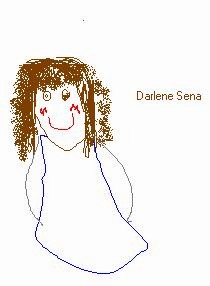
Self Portrait
Newsletter
Gradebook
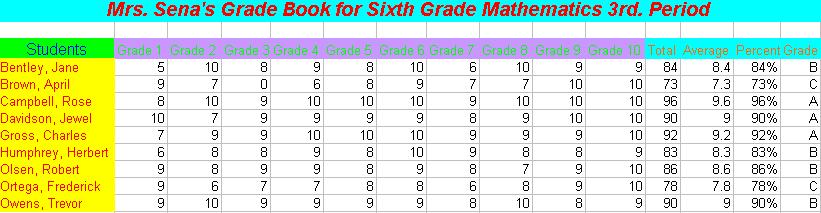
Using Microsoft Excel, create a Grade Book Layout that meets the following
criteria:
-
A centered heading with colored text, bold, and italic
-
Columns for each student's name, all grades (assume ten grades for ech
student), total, grade average, percentage, and corresponding letter grade
(14 total columns for each student).
-
Ten rows of student data
This program can be used by students in the classroom as a tool to present
their work in a format that incorporates a wide variety of areas.
I feel that by using this in the Mathematics classroom the students will
see that formulas etc... that they are learning have real life application.
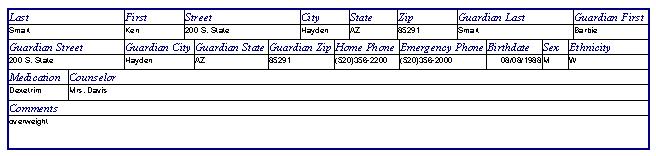
Record Database
Storyboard
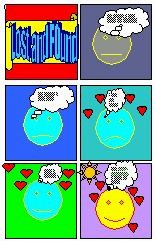
Using Access Microsoft Word and the Drawing Toolbar (View*Toolbars*Drawing),
create sic equally sized rectangles on your page. Using the AUTOSHAPE
tool, create a six-screen cartoon. Use the textbox tool to add information
on each of the six boxes.
This assignment is a unique way to have students express themselves
in a way that is nonthreatening; in a format that is fun and easy to follow.
Power Point Presentation
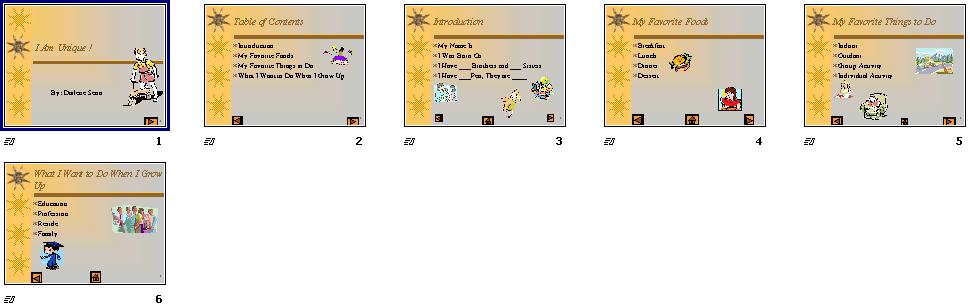
Using Microsoft PowerPoint, create an instructional presentation.
The presentation must meet the following criteria:
-
Six slides (including a Title Slide, Menu Slide, and four content slides)
-
Minimum of one graphic per slide
-
Tect objects
-
Forward, back and home buttons (connect to Menu slide)
-
Sound
-
Animation
This assignment is a unique way to have students express themselves.
It is also a way for the instructor to present information in a format
that is easily followed and holds the students attention. For visual
learners this is an excellant tool to aid them in their learning.
Kinetic learners will find this exercise to be a tool that they can use
in their learning.
Click here to return to menu