IP Network Traffic Analysis
Some etchings on monitoring the ether.
Alan Whinery, U. Hawaii ITS September, 1997 (edited for content,
and to fit this screen, June 2001)
The need for analysis:
In order to maintain and design an enterprise network, one must have
some understanding of the attributes of the traffic that the network carries
and delivers.
Tools and issues:
Problems:
1) The task of analyzing large numbers of datagrams on an IP
network increases in complexity as the "Internet" becomes more prominent
in the public consciousness, since there are more and more individual applications
using the UDP and TCP protocols as transport. This presents the prospective
analyzer with a problem; after one categorizes the traffic present on an
IP network by well-known port services, there is still a large percentage
(on the order of 40% currently) which remains in the "miscellaneous" category.
In order to know what traffic sources are using the network, one must identify
services with more resolution.
(findings)
2) In order to judge the impact of new services on the existing
network, one must be able to characterize current traffic with respect
to the attributes of the new service. For example, if you intend
to implement multicast-multimedia services on your network, you need
to know how the high packet rates associated with such services will compare
to the aggregate packet distibution that is already present. At first glance,
it seems that audio/video services can present packet rates which will
either have significant negative impact on network performance, or they
will be limited to the extent that they are not useful, except as a last
resort. On the other hand, a preliminary look at the traffic to and from
the UH Manoa network shows that there are at least 1,000 TCP-borne data
streams flowing over our mainland link at any given second. This does not
even account of UDP-borne services active at the same time!
(findings)
(problem 1)
Seeing what they're doing
The first question in analyzing the port based services to identify
services as they are distinct from semi-random port numbers generated by
clients, is "Just how big is our data set?"
[September 27, 1997, 13:35]
Given that there are a number of known services, we can throw away the
semi-random ports
that are paired with well-known services:
tcpdump -tt -lne -i bf0 ip and not icmp and not port www and not
port smtp and not port 23 and not port 20 and not port 53 | port-ident.pl
OK, so I forgot a couple, but the strategy may not be based on valid
assumptions anyway (it may not affect the output), plus doing it wrong
once allows us to evaluate the strategy later by doing it right and comparing.
Graph #1:
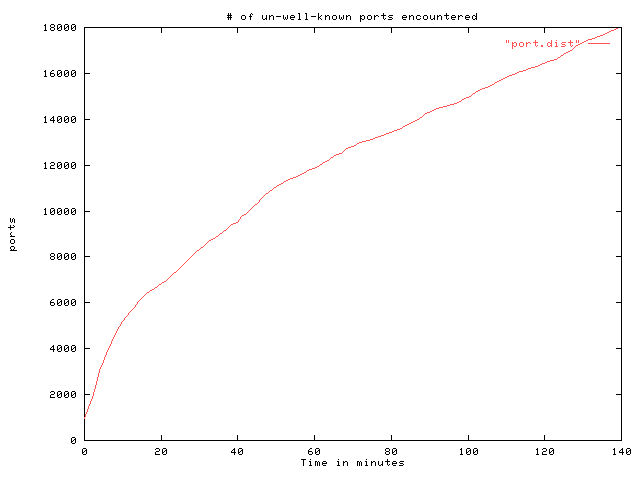
This graph shows the number of TCP and UDP ports encountered by TCPDUMP
on our FDDI over time. There are obvious breaks in slope at about 10 minutes
and 50 minutes, and then the graph just might be linear from there on out.
There is a necessary asymptote at 65,536, since TCP and UDP use 16 bits
for port numbers, but do all possible instances occur?
Graph #2
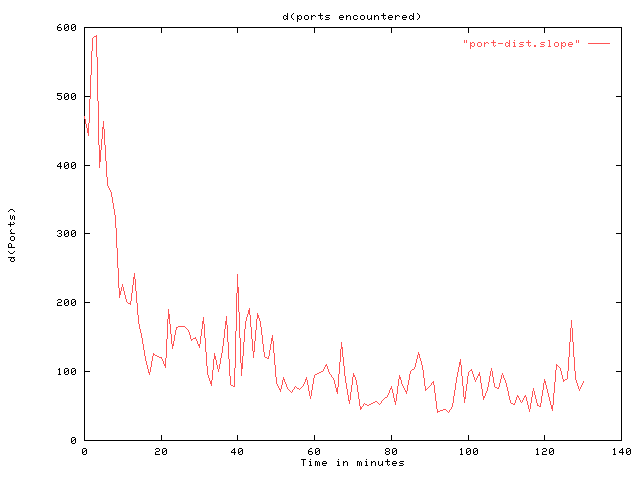
If we graph the derivative of graph #1, we can see a general trend
of decreasing slope (I think).
There are numerous implementations of TCP and UDP using the network.
How well-behaved is each one?
[Oct. 1, 1997 17:00]
I have re-done the strategy on this thread -- we need to keep track
of port PAIRS, not just the number
of times a port has appeared. Notice each port encountered and keep
track of the ports it has been connected to. Count looks like:
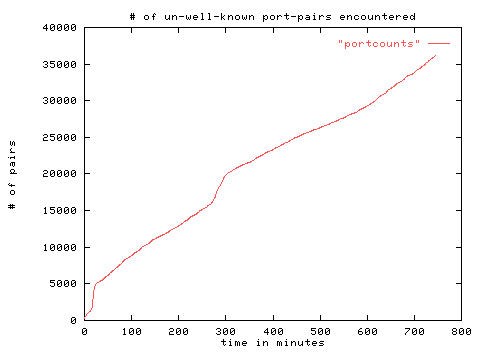
And the (d) of counts looks like:
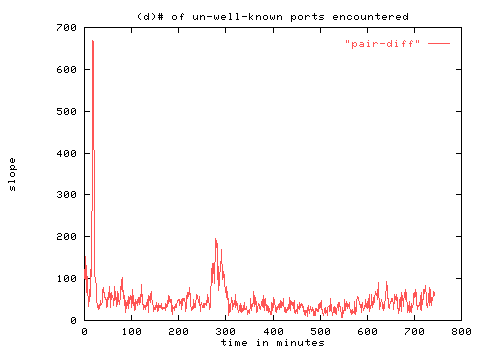
The burst of new port pairs at 5 hours is interesting -- it was probably
at about 6 or 7 AM on
Sunday morning.
The results -- acquired by a 2 pass method -- go through once, and count
the number of times a port occurred in a pair -- go through again and for
each port pair, take the partner with the lower count and decrement the
count by one, take the partner with the higher count and increase the count
by one.
Does it identify a list of ports to pursue?
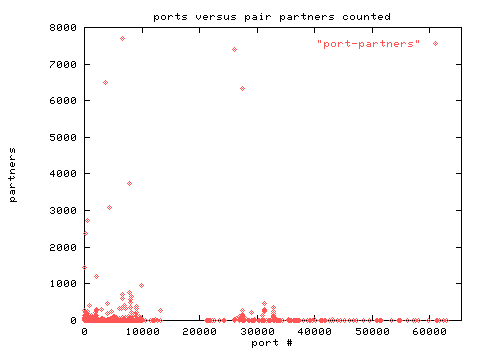
Yes. Interesting that there are no ports shown between about 13000 and
21000. Is this space reserved?
A list of the top contenders and their adjusted partner counts -- along
with some discovered uses:
Count Port # Service
7696 6543 Some sort of UUencoded
stream
7412 26000 Quake
6502 3636
6338 27500 Quake
3736 7776
3096 4380
2726 443
2382 111
Sun RPC
1438 37
time
1214 2001
944 9898
766 7777
698 6667
646 8189
590 6666
584 8000 Probably HTTP
504 8080
" "
466 4000
454 31337
420 7000
404 808
386 9000
Le PIE:
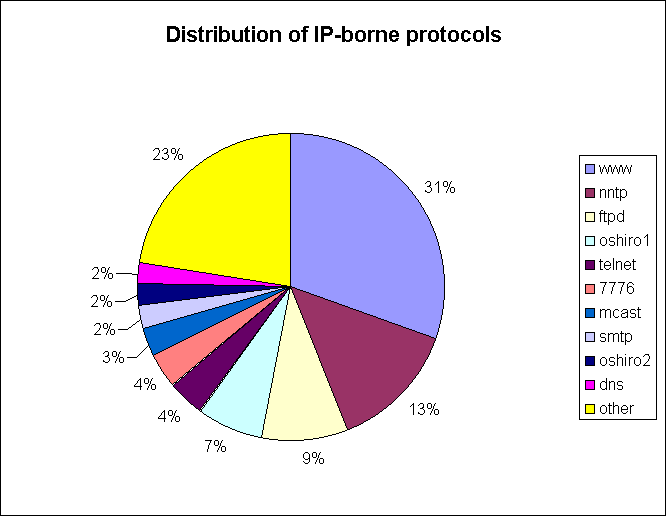
Still a pretty big "other" category. Pie chart shows about 13 hours
accum (overnight and morning). The adventure continues...
(problemo 2)
[Sept. 29, 1997 17:40]
Whither throughput?
A quick look (33 hours on the FDDI) examining:
Large TCP "Objects" -- all TCP sessions from SYN to FIN, with duration
from SYN to FIN, and size based on SEQ numbers, with 5KB minimum size.
Shows that:
The average WWW hit acquires about 2K Bytes/Sec of throughput.
The average TELNET/RLOGIN Session acquires about 200 Bytes/Sec of throughput
The average FTP session acquires about 19K Bytes/Sec of throughput.
The average throughput on for all sessions is about 3KBps, or about
24000 bps.
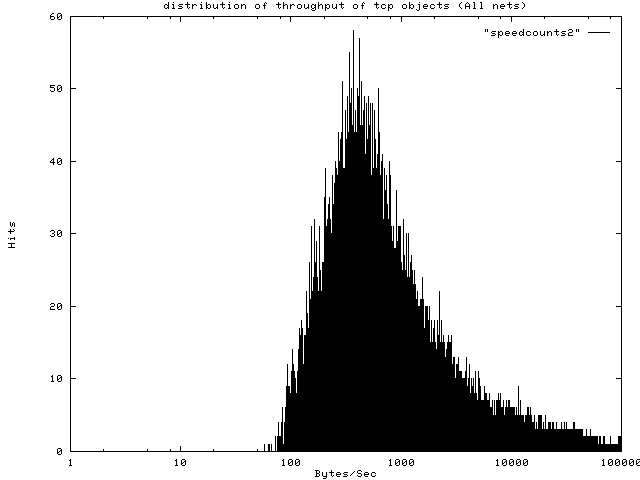
Graph #1: Throughput of all TCP objects larger than 5K Bytes to all
destination nets.
If you limit the scope to 128.171.0.0 hosts (both sources and destinations:
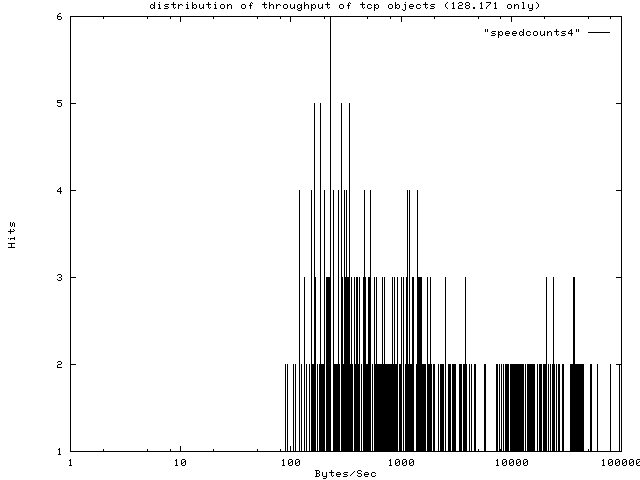
Graph #2: Throughput of all 128.171.0.0 (source and dest) TCP "objects"
And if you limit the scope to sessions to/from outside sites:
(You pretty much get graph #1 again) You can see that most of our traffic
is to/from external sites.
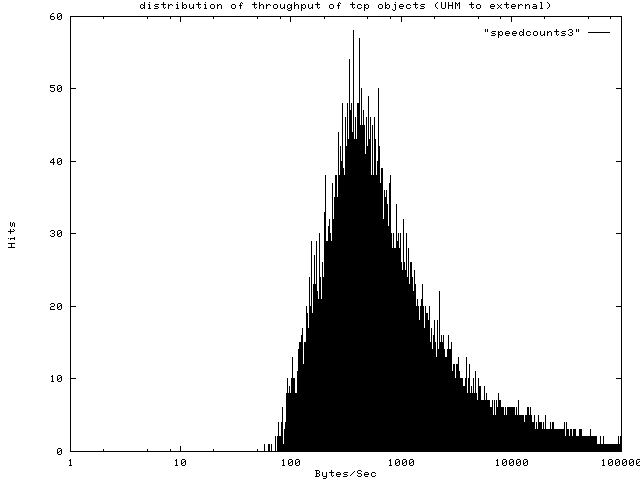
Graph #3: Throughput of all TCP "objects" larger than 5 KB to/from
external sites.
[Sept. 29 20:20]
Regarding the impact of multicast multimedia on network performance:
Putting it in perspective:
Consider:
Take a look at the comparitive packet rates of the audio/video in a
connection with 32Kbps
H.261 video and GSM audio (program content is "Lois & Clark" a
silly syndicated series which
has a kinetic cinematic style (MUCH change in every frame):
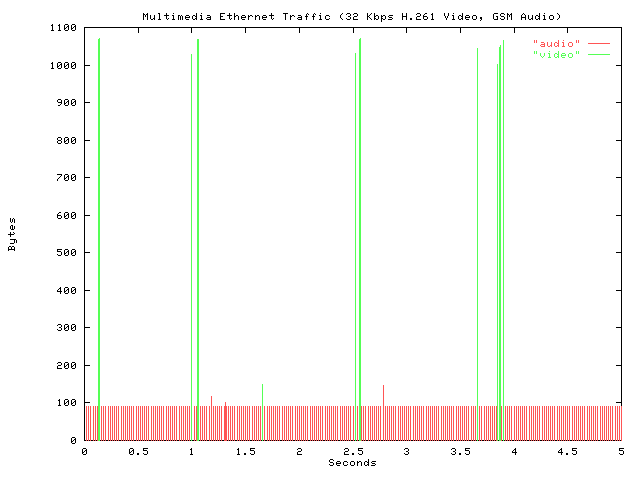
The audio (in red) consists of many short packets, which, although
they may not take long to transmit, will set carrier on the wire many times
per second, chopping up the collision domain into little pieces
the video (in green) gets it over with with large frames, which allow
lots of space in between for other ethernet speakers.
How do they compare in terms of absolute bandwidth?
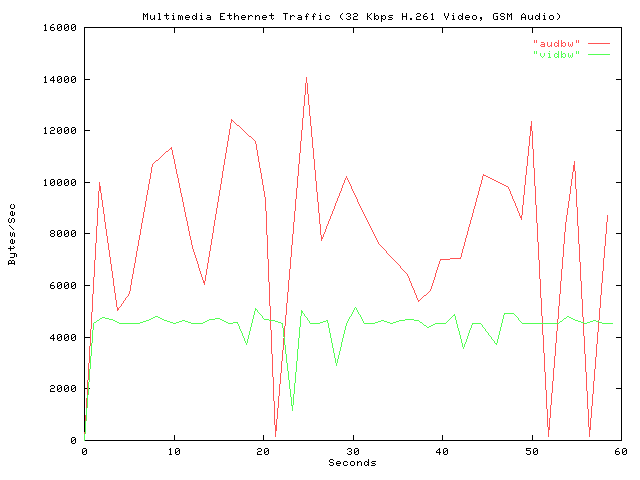
Surprise (or maybe not). The audio is even more expensive in terms
of bandwidth (going by
the total length of each ethernet frame) than the video.
But how does all of this compare to regular, everyday traffic like WWW,
Email, Internet Quake servers, etc?
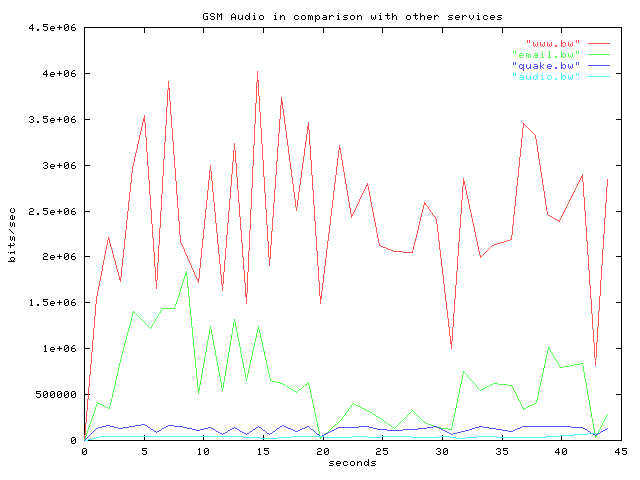
From the Manoa FDDI. 43 seconds of 4 different services, with the GSM
audio that looked so nasty above coming in last (the little flat, sky-blue
line at the bottom).
How does such conservative multimedia conflict with things on the local
wire?
Using ftp as a yardstick, I did 10 iterations of a 9 Mb download in
several situations:
Downloading to the same machine that was displaying the audio/video:
From a local host (ether-fddi-ether):
With the audio/video on: 309 KBps (avg)
With the audio/video off: 736 KBps (avg)
From sunsite.unc.edu:
With the audio/video on: 50 KBps (avg)
With the audio/video off: 55 KBps (avg)
BUT -- the multimedia has a pretty pronounced effect on the load of
the system. What about another
system on the same wire which has to deal with all of the collisions,
but none of the interrupts or the load of the CODECs, or the delay of sharing
the input buffer among applications?
From a local host (ether-fddi-ether)
With the audio/video on: 857 KBps (avg)
With the audio/video off: 862 KBps (avg)
Apparently, the machine load is much more of an inconvenience than the
collisions, at this moderate
level of audio/video transmission. The packet rate ingested by the
audio/video client machine, either because of the speed of the ACKS, or
because of the processing of the shared network buffer, or both, was reduced
by the machine load.
(problemo 3)
(problemo 4)
Tools:
libpcap and tcpdump:
To capture and analyze IP network traffic, the combination of libpcap
and tcpdump, conceived and implemented by Van Jacobson of LBL, is more
than adequate for most purposes. Tcpdump can be run on almost any hardware
platform, such as a Sun Sparc or even my Linux
486DX notebook with 4 MB of memory. The performance of libpcap/tcpdump
is high enough that capturing from ethernet usually provides comprehensive
data sets, and capture from FDDI usually provides data set with a known
loss.
[Addendum June, 2001] tcpdump for windows: http://netgroup-serv.polito.it/netgroup/tools.html
GPL GUI-fied tcpdump for windows, uses pcap libraries from above: http://www.ethereal.com/
PERL:
With its automatic context-relative casting and use of hashes, PERL
(available for all platforms,
everywhere) is a tool for quick (maybe dirty) effective visualization
and statistical analysis of tcpdump traces, even on-the-fly. Try look at:
http://www.perl.com/pub/
GNUPlot:
Ah, Unix. Pipe stuff into a file as a list of numbers in ASCII, plot
it immediately and see your
results. Examples throughout this page. (The pie chart was done with
MS-Excel.)