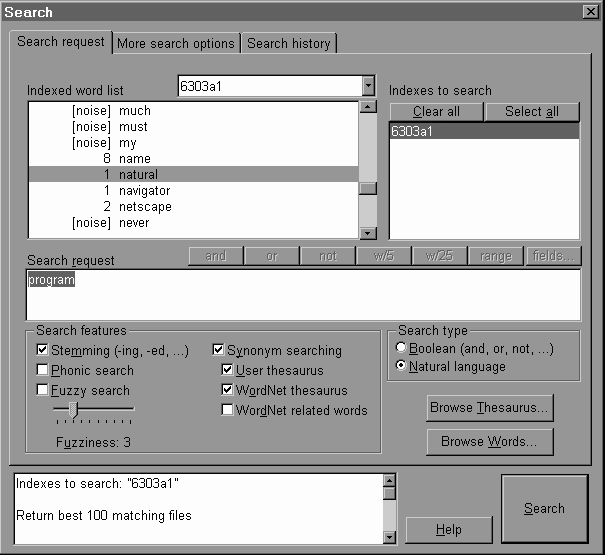
 User can simply compose the search statement in the Search request area and turn on/off a number of search features below it and then click Search button to proceed with a search.
H6303 INFORMATION STORAGE AND RETRIEVAL
ASSIGNMENT 2
NAME: CHU HO CHEUNG DOMINIC
COMPARE AND CONTRAST THE INFORMATION RETRIEVAL FEATURES OF DTSEARCH SOFTWARE AND HOTBOT
This report discusses the information retrieval features of an IR software dtSearch and a web search engine HotBot. The focus is on comparing and contrasting search features and presentation of retrieved results using appropriate examples of searches. The report concludes with comments on the strengths and weakness of each.
A) dtSearch
dtSearch can perform searches on textbase of megabytes size in a split of second. The index is built by storing the location of words in the files instead of the documents and therefore the documents must be kept accessible to be retrieved for viewing.
Search features
User can browse the whole index file as shown in a complete Indexed word list, showing number of occurrence of the indexed word(e.g. name occur 8 times in the example below). Common words, which are not useful in searches, are called noise words(e.g. must in the example shown).User can simply compose the search statement in the Search request area and turn on/off a number of search features below it and then click Search button to proceed with a search.
Many search features are available:
i) Stemming
e.g. function will retrieve records with words function or functions
apply will retrieve records with apply or application etc.
ii) Truncation
Wildcard search at any position is supported (* for any no. of characters and ? for single characters)
java* for Java and Javascript, etc
*a?a for Lava and Java and Strata, etc
iii) Phonic
search for words supplied and also words of same pronunciation
For example, a phonic search for program will also find programme
iv) Fuzzy
this search feature helps to find even words that are misspelled. The degree of acceptable misspelling is controlled by the Fuzziness bar, the greater the Fuzziness the higher extend of misspelling will be accepted.
This is particularly useful for documents scanned and translated from image to text using OCR where 100% recognition is not always guaranteed.
e.g. raising the Fuzziness to 3 and searching a word Jaza will match records with word Java
v) Synonym search
A thesaurus is used to find synonyms of words in your search request.
The thesaurus can be user defined for from the Wordnet concept network which can cover Synonym, Antonym(opposite meaning), Hypernym(sub categories of search word), Hyponym(search word belongs to this category), Meronym(member of search word) and Holonym(search word is a member of it).
Search type radio button allow user to specify if a search is a Boolean search or natural language search
vi) search options exclusive to Boolean search type
a) Boolean (AND, OR, NOT)
e.g. easy AND data
retrieves records with both words easy and data
b) Proximity (w/5 – within 5 words, w/25 – within 25 words are supported)
e.g. examples W/5 action
return records where action is within 5 words from examples
c) Range
user will be prompt with a dialog box to key in the numeric range by specifying the lower and upper bound which translate into the syntax lower bound~~upper bound
e.g. 1~~8
returns records indexed with numbers between 1 and 8 (inclusive).
User can also choose to specify just lower or upper bound.
d) Field search
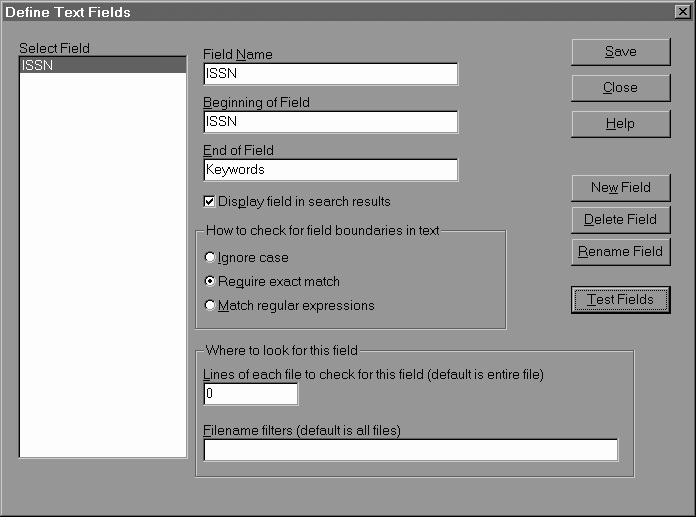
supported provided fields are defined by user like ISSN field beginning marker is ISSN and end marker is next field tag Keywords
and then user can use fields search option to specify the field to search
vii) search type Natural language (when Boolean, proximity, range, fields are disabled)
A natural language search request is any combination of words, phrases, or sentences. After a natural language search, dtSearch sorts retrieved documents by their relevance. Weighting of retrieved documents takes into account: the number of documents each word in your search request appears in (the more documents a word appears in, the less useful it is in distinguishing relevant from irrelevant documents); the number of times each word in the request appears in the documents; and the density of hits in each document. Noise words and search connectors like NOT and OR are ignored..
e.g.
java illustrated
returns results with scored in rank terms of % of relevance
viii) Variable term weighting
e.g apple:5 AND pear:1
would retrieve the same documents as apple and pear but dtSearch would weight apple five times as heavily as pear when sorting the results.
ix) More search options
user can specify combination of indexed or unindexed search, filtering by filename, date and size and limit number of search results records.
x) Search history provide a means to refine search statements using all previously conducted searches statements and the following strategies:
|
Strategy |
Resultant search statement Eg. Current search statement: illustrated Selected historical search statement: java |
|
Insert – append a current statement to the selected historical one |
|
|
Broaden – apply an OR Boolean operator with a selected historical search statement on the current one |
(java ) OR (illustrated) |
|
Narrow – apply an AND Boolean operator with a selected historical search statement on the current one |
(java) AND (illustrated) |
|
Exclude - apply a NOT Boolean operator with a selected historical search statement and AND with the current one |
(NOT java) AND (illustrated) |
Presentation of search results
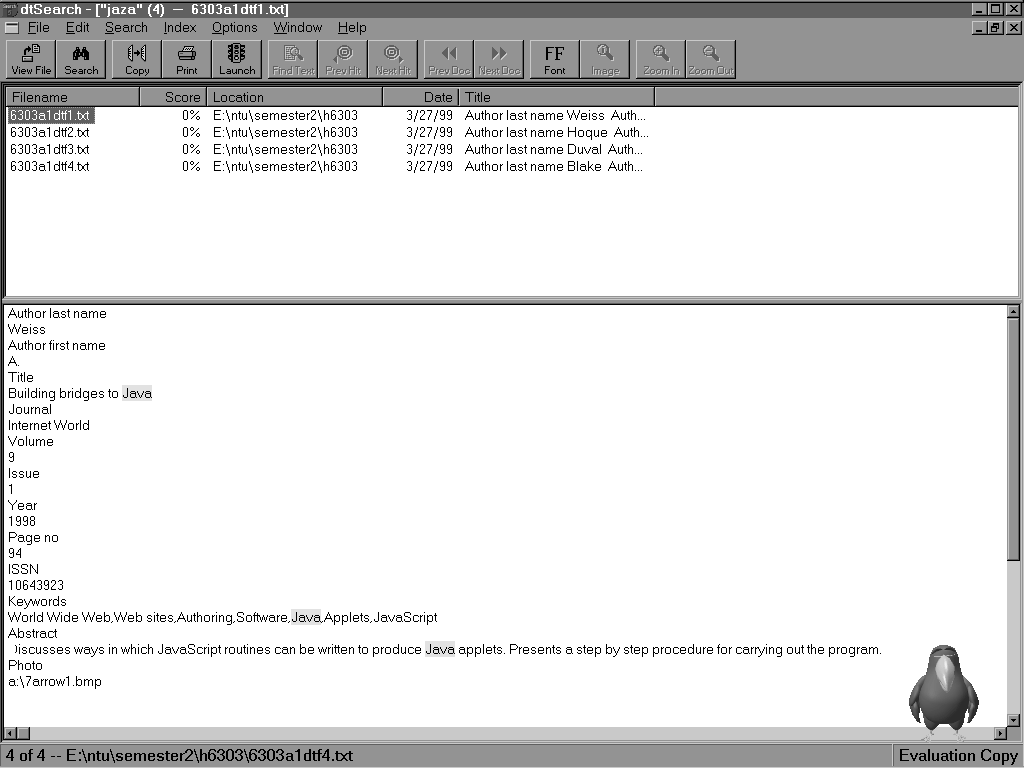
All search results are presented by a list of files with words indexed meeting the search criteria, listing in he upper pane the information of the subjected filenames, order by relevance score in % or no. of hits, path of file, date of creation and title of the file. The lower pane shows the contents of the subjected file and hits(match in searches) are highlighted in yellow. User can press the previous / next button to view all the hits.
Search report can be generated with options to select the amount the contents to be included.
B) HotBot (http://www.hotbot.com)
HotBot is rated as the best web search engine in a recent review in CNET (Keizer, 1999) as it delivers the most relevant results of any search engines in the tests conducted. It combines the standard Inktomi search technology with a new, popularity-based service called Direct Hit. Direct Hit tracks which search results links users click and how long users stay at each site. The longer a user stays at a site, the higher it's ranked.
Search features
Basic search (in the default search panel of HotBot homepage)
When a user first visit the HotBot homepage, the basic search panel is displayed.
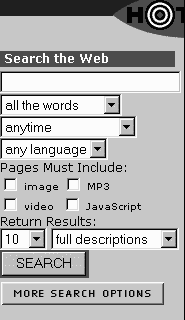 User can just key in word(s) or phrase in the box and press the SEARCH button to submit the search. This straightforward search actually performs a full text search on the 110 million documents index database.
i) One can choose be more specific by using the following droplist options:
E.g. repair bicycle would be processed as repair AND bicycle
E.g. repair bicycle would be processed as repair OR bicycle
E.g. repair bicycle would be processed as "repair bicycle" as a phrase
Alternatively user can specify a phrase using quotes (" ") enclosing the words which compose it.
E.g. "broken hearts" will return only web pages with phrase broken hearts appearing in the title
E.g. cindy crawford will return pages about Cindy Crawford
E.g. repair AND bicycle would be processed as a Boolean search repair AND bicycle for pages with both words
ii) Time/Range options:
User can creation/last modified date: web pages that are created/modified any time or last number (n) of days
anytime, in the last week(7), in the last 2 weeks(14), in the last month(30), in the last 3 months(90), in the last 6 months(180), in the last year(365), in the last 2 years(730)
iii) Resource type: one can specify the criteria the return web pages must contain image, MP3, video or Javascript by checking the option boxes.
E.g. for a search on Claudia Schiffer , by clicking image and video option boxes only web pages with both images and videos resources will be returned.
iv) Language : one can specify the language of the returned web pages
9 languages are supported: Dutch, English, Finnish, French, German, Italian, Portuguese, Spanish, Swedish
v) Content categories
A YAHOO!-like content categories are available for use to perform specific search for information in a particular category.
The current 1st and 2nd level of the categories are as follows:
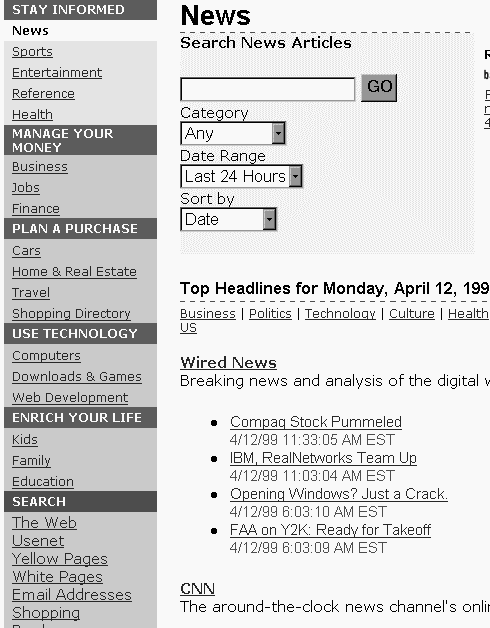
STAY INFORMED
MANAGE YOUR MONEY
PLAN A PURCHASE
USE TECHNOLOGY
ENRICH YOUR LIFE
For instance, in the STAY INFORMED – News category, user will be presented with a specific search panel tailored for news articles. Once can further specify the news category as business, politics, technology, etc.; date range as last 6 hours, last 24 hours, last week, last month, and sort the retrieved results by date or relevance.
Besides, below the search panel is a list of links to which user can click and browse through, in this case, the top headlines from multiple news source.
Therefore users are empowered both searching and browsing capability on the links under these content categories.
vi) + and – query modifier
a plus operator (+) placed before any word/phrase/meta words requires that all returned pages contain fulfil that search term criteria.
e.g. JFK +CIA return only pages mentioning the CIA, but pages that also mention JFK will be ranked higher in the results
a minus operator (-) placed before a word/phrase/meta words excludes all documents containing that search term.
e.g. Searching for "Twelve monkeys" –zoo will look for books and movies without mistakenly getting articles on zoo.
Advanced search (accessible by clicking more search options button)
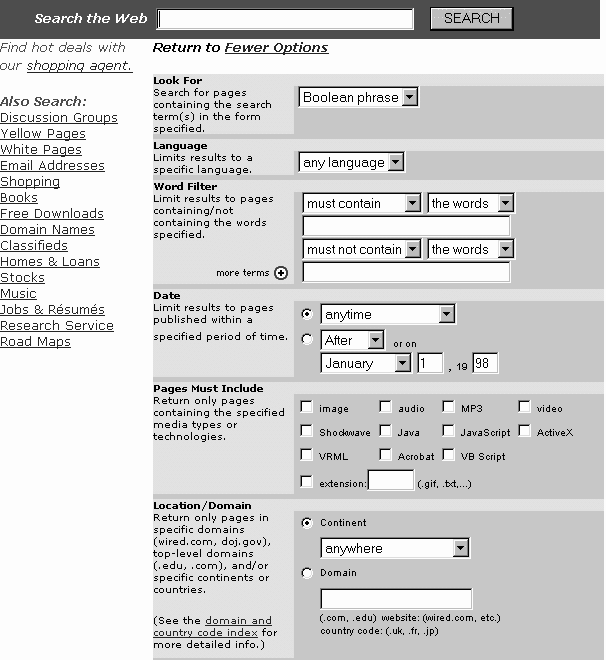
All the search features in the basic search panel are available here and more features to qualify the search:
i) Word filtering
must contain, should contain, must not contain options allow user to specific the importance of the search terms (the words/person/phrase). E.g. a search term followed by must contain is more important than another term followed by should contain
ii) Range/Date
Besides the same options as in basic search, user can specify Before/After a specific date to search based on creation/last modified date of web pages
iii) Resource type
more resource types criteria are available:
image , audio, MP3, video, Shockwave , Java , JavaScript, ActiveX, VRML , Acrobat , VB Script
and user can even specify file extension: (.gif, .txt,...)
iv) Location/Domain
User can specify location
(.com, .edu) website: (wired.com, etc.)
country code: (.uk, .fr, .jp)
e.g. thought machines will include return pages on thinking machines too
User can specify meta words search in the format keyword:value pairs separated by colon
e.g. meta word search title:president find documents with word president in their titles
Presentation of search results
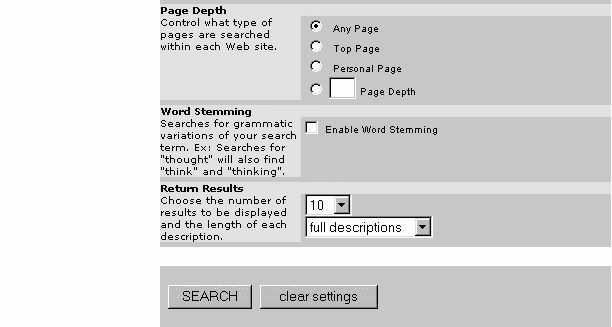
User are provided various options for presentation of returns results.
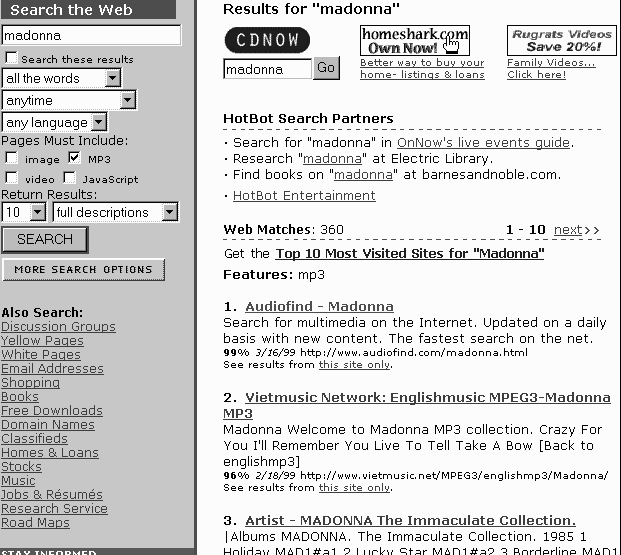
No. of return results can be 10, 25, 50, 100 which will return results on the first page with total no. of web matches, top 10, 25, 50, 100 records as specified and also the relevance score in percentage and creation/last update date of web page. The results are in descending order of relevance.
 In all cases, a list of links by HotBot search partners come before the web matches to lead users to the partners of HotBot to perform further searches.
Detail level of results is also flexible:
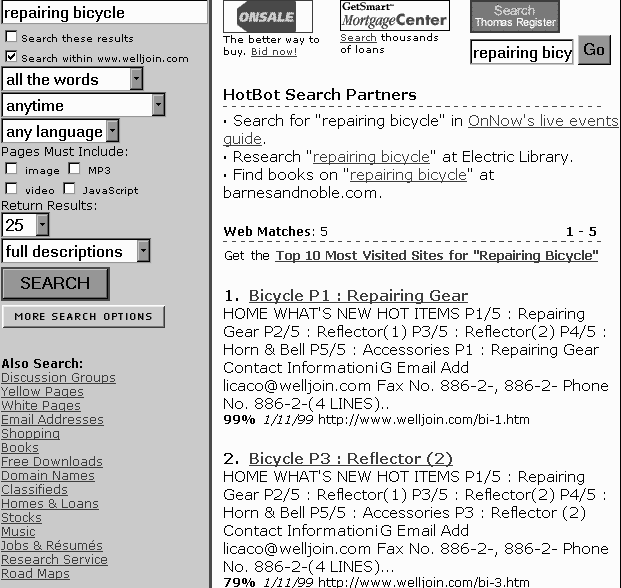
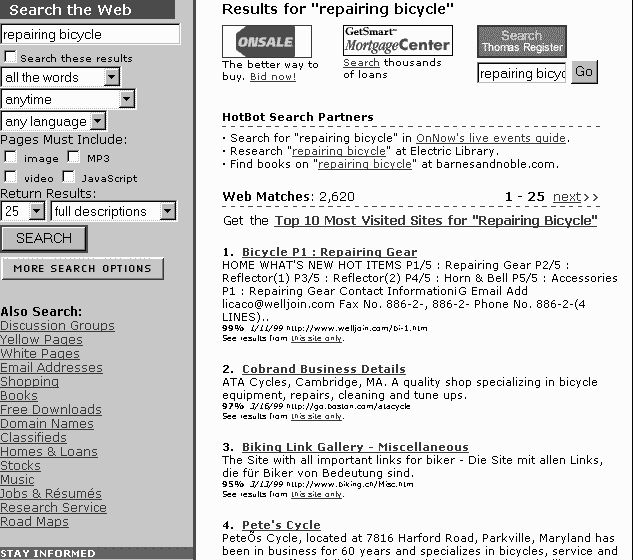
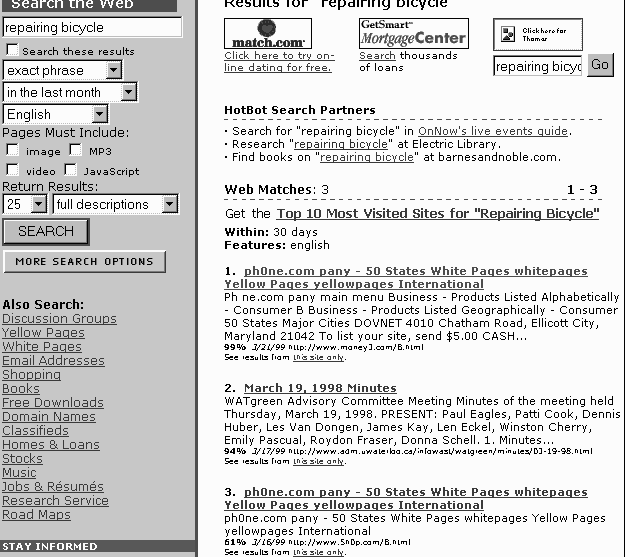
returns page title link, long description, relevance score in %, date, URL
There is also a See results from this site only link to refine a search by website’s domain
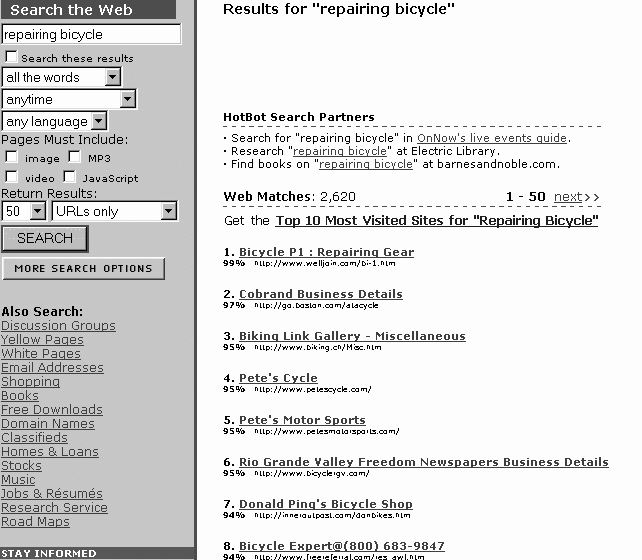
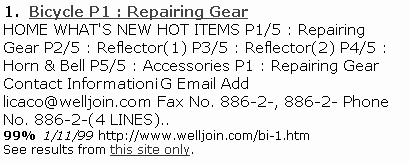 For example by click on the See results from this site only conducts another search on domain: www.welljoin.com
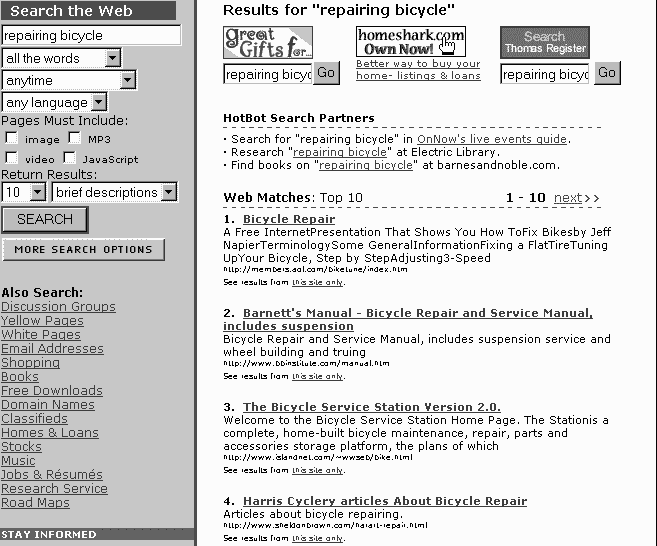
returns page title link, short description, relevance score in %
Returns page title link, relevance score in % and URL
User navigate through return results of more than one page using next/previous link.
C) Discussion
Comparison of search features between HotBot and dtSearch
The following table feature-to-feature comparison on searching capability:
|
Type of search |
DtSearch |
HotBot |
|
Browse contents category |
Not available |
Available for browsing and searching within contents category |
|
Phrase |
Available, no " " is required to indicate a phrase |
Available, use " " or select exact phrase option to indicate a phrase |
|
Term |
Available |
Available |
|
Truncation |
Flexible Wildcard search is supported using * for any no. of char and ? for single char at any positions |
Same syntax |
|
Comparison/range |
Only lower bound ~~ upper bound is supported equivalent to <=, >= and : in DB/Text |
Only applied on URL creation or last modified date. A specific date range can be specified |
|
Proximity |
Only w/5 and w/25 are supported, no preceding operators |
Not available |
|
Boolean |
AND, OR, NOT are used; ( ) to specify precedence |
Same; with option to use symbol &, |, ! instead of AND, OR, NOT. |
|
Natural language |
Relevance score is available |
Not available as both search and indexing is mostly based on hits/occurrence |
|
Refining search using historical search statements |
Available with query expansion / narrowing features |
Can only narrow search by another search on currently retrieved results |
|
Search using multiple indexes |
Available only when multiple indexes files are created |
Indexes are transparent to user |
|
Synonym |
Using user-defined or Wordnet thesaurus |
Not available |
|
Stemming |
Available |
|
|
Fuzzy |
Available |
Not available |
|
Phonic |
Available |
Not available |
|
Case sensitive |
Available if case sensitive option is enabled on advance index creation |
Available |
|
Resource type filtering |
Not available |
User can select various resource type. E.g. javascript, image, video |
|
Stop words support |
Available as noise words and viewable by user |
Available but not viewable by user |
|
Word filtering/Variable term weighting |
Extensive support that user can quantify the weight of each term by term:weight |
Use MUST CONTAIN, SHOULD CONTAIN, MUST NOT CONTAIN for a term, +, - query modifier |
|
Meta words |
Not available |
Available, e.g. domain, depth, feature, title |
Both dtSearch and HotBot supports common search features like word, phrase, Boolean, wildcard truncation, case sensitive search and stemming. The syntax are similar except that HotBot allows usage of symbol for Boolean operators.
Range search/comparison in dtSearch applies to contents where in HotBot it applies to creation/last modified date of documents only.
dtSearch is stronger in supporting natural language search, synonym, fuzzy, phonic, proximity and refining search using historical search statements which are not available in HotBot.
HotBot is stronger in meta data search and resource type filtering. An interesting feature is the page depth option that allow users to specify the depth of search on the web sites. All these are not available in dtSearch.
Comparison of retrieval features between DB/Text and dtSearch
Both dtSearch and HotBot can present results in descending order of relevance with score in %. dtSearch can provide info on hits on individual documents where HotBot only provide a overall total web matches on all returned results.
dtSearch allow user to the select amount of context of search results to be included in a search report. It also lets user browse the index file and export it to text files. User can speed up composition of search statement by choosing the indexed words in the index file shown.
HotBot only return results as a web page of links where user can only save the results as HTML or text files. If the search results spread over pages, users have to navigate to each of the page and manually save them individually.
Comments
dtSearch is an effective software in indexing various document types and it offers extensive search features and capability for user to modify and refine query. However the fact that indexes stored position of terms and location(full path) of documents required regular maintenance whenever document moves to ensure the search to continue to function properly, this limit the application to only a LAN/limited distributed environment. To work on the web environment, the product dtSearch Web is preferred.
HotBot is a web search engine and it applies to the web environment where documents come from millions of websites. It has a relatively easier to use interface compare to dtSearch and the availability of contents category make it a more useful tool for user to browse/search by subjects. However, the contents category classification is a mundane one without following any standards like LCSH.
While HotBot has good technology like Inktomi and Direct Hit, it could be enhanced with addition of synonym or thesaurus features as in dtSearch. An infusion of advanced search features in dtSearch to HotBot will make it a even better web search engine.
APPENDICES
REFERENCE
Keizer, G. (1999). Search engine shoot-out. CNET (April 7, 1999). [Online]
Available: http://home.cnet.com/category/topic/0,10000,0-3817-7-276915,00.html
HOTBOT SEARCH EXAMPLES
The follow are some sample search results screen in HotBot
Search for pages with both words repairing and bicycle with returns results option: 10, brief descriptions
Search for pages with both words repairing and bicycle with returns results option: 25, full descriptions
Search for pages with both words repairing and bicycle with returns results option: 50, URLs only
Search for English web pages in the last month with exact phrase repairing bicycle, returns results options: 25, full descriptions
Search for webpages on Madonna with MP3 audio files