The Aim of the Game
The aim of Cyber Battles is to destroy your opponent's commander, while keeping yours alive. The commander is the unit you start with, on the first turn. Each turn you can call upon your resources to either beam units to fight beside your commander, or use other special abilities that can help during combat.
Just Starting
As with the other games in the DuelBoard suite, you will start will 100 points by default. These points will either go up or down depending on if you win or lose. While in the lobby, the current amount of points that you have are displayed next to your username, in parentheses. It is suggested that, if possible, you try and play others users who are close in point range until you understand the workings of the game.
Basic Overview
Cyber Battles is turn based, meaning each player will have a certain amount of time to go through their turn, before it moves onto another player. In the Cyber Battle's lobby, players can socialize and set up games. You can either host a game, or choose to join someone else's game. If you host your own game you control all the settings of gameplay, while if you join someone else's game, you are under their settings. Games can be played with anywhere from 2-6 players, depending on when the host of the game chooses to start. You can also play a game by yourself. This can be used to get you familiarize with the game, but it isn't suggested because you will have to restart the client to continue play. Each player is given a commander, and 17 random units/actions with "Holodetector" which can one per turn. You and the other players will then go through their turns. Each player will first choose a unit/action to use, leading to the movement and attacking of units. After the last two players left fight, and one commander dies, the player with the surviving commander will be awarded the points(if the game is rated). Points are distributed 2 per player, so each game every player has 2 points at stake. The winner of the game will collect all the points from the game corresponding with the number of players(see table below). The losers will forfeit their 2 points.
2 Player-2 points
3 Player-4 points
4 Player-6 points
5 Player-8 points
6 Player-10 points
Lobby and Choosing a Game
Waiting Players: These are the players that are not playing a game or currently in a game waiting to be started. If you choose to chat only the players listed under this heading will be able to read it.
New Games/Create Game: New games are games that haven't started play yet, and can still be joined(as long as they aren't full).If you don't wish to join a game, or there are none to join, you can start your own. Above the "Create Game" button, you have the choice to make a game rated, or non-rated. Rated games will effect your points, while non-rated games will not. After you create a game, and feel a sufficient number of players have joined, you can start it.
Games in Progress Here you will see games that are currently in play. These games can not be joined. They display the original creator's screen name, and the original number of players that the game started with.
Best Players This is a scrolling list of the top 20 players, based on points. It displays their screen names, current points, number of games played, and number of games one. Maybe one day you can also be up there!!
Game Turns-Selection
Unit/Action Selection:
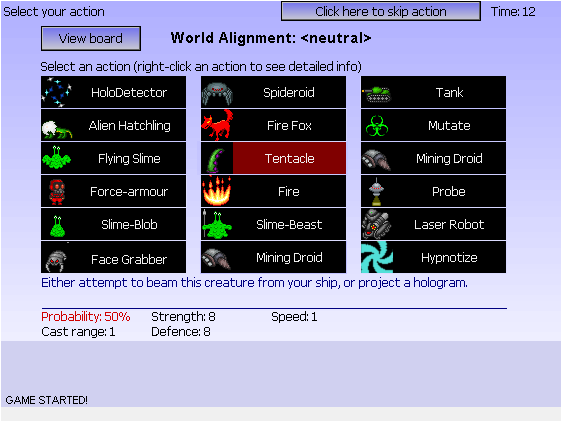
After you or the host starts the game every player will be taken to the Selection Page, which contains 17 random units/actions, and "Holodetector". Every player has their own bank of 18 units/actions, and can use it however they please. The selection screen looks like this
During selection, you can choose which unit/action you want to use. The above picture shows a player mousing-over a tentacle. On the bottom of the screen you can see that tentacle's quick reference stats. You can also right click a certain action to view more information on the unit/item.
When you decided on a unit and left-click it, you will be asked to either "Beam Down" or "Project Hologram". To "Beam Down" a unit is to make a "real" unit. "Real" units have a percentage of beaming down, which for the above tentacle is 50%. This percentage is the same for each player, so your opponent's tentacle will also have a 50% chance. These percentages can change depending on the "World Alignment", which will be discussed later on. If you choose to "Project a Hologram" then that unit will have a 100% chance of being sent into the battlefield. But just as the name implies, it's a hologram and can be holodetected. Every player is given the action of "Holodetect" which is the only action that can be used over and over again. If your unit is a hologram, an opponent suspects that it is and uses "Holodetect", your unit will disappear. If an opponent uses "Holodetect" on a "real" unit, nothing will happen.
Also some actions, like Hypnotize in the above picture, do not beam anything. They do an action, which is one-time use only. What these actions do is summarized in the unit's quick reference information.
Unit/Action Stats:
Every Unit/Action has stats, which can be viewed in full by right clicking the unit/action in either selection mode, or during your turn while viewing the battlefield.
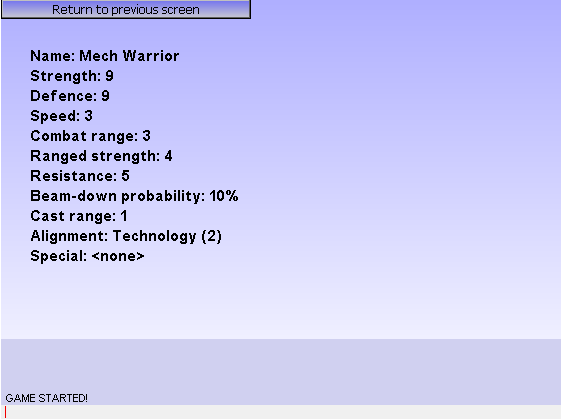
Name:
The name of the unit/action
Strength:
The unit/action's offensive power.
Defense:
The unit's defensive power.
Speed:
The amount of movement squares a unit can do per turn.
Combat Range:
If the unit has a range attack(will be explained later), the amount of squares it can be effective in.
Ranged Strength:
If the unit has a range attack(will be explained later), the offensive power of the unit.
Resistance: The unit's
ability to resist certain ranged actions. (i.e. Hypnotize)
Beam-down Probability:
The unit's chance of successfully beaming-down, if you choose to create a "real" unit.
Cast Range:
The number of squares a unit/action can be executed away from the player's commander.
Alignment:
The unit's effect on the World Alignment(will be explained later).
Special:
If a unit has a special ability (i.e. Flying, Slime) it will be listed here.
Game Turns-Usage
After each player selects the unit/action they want, all players will be brought to a view of the battlefield. This is where each player uses his/her unit/action. The order in which the players joined the game, will determine the order of their turns. Each unit/action has a cast range, which is represented in green. Some cast ranges depend on the commander’s line of sight, so if something is blocking the path, he can't cast beyond that. Click any green target to use that unit/action. Holodetector can be cast on any unit owned by and opponent, regardless of where it is. Once you use an action, it will be gone out of your selection the next turn, unless its "Holodetector". If you change your mind about using an action, you can click the button that says "Click here to skip action" which will skip your unit/action usage for that turn. After all players have used their actions, the game will move on to the movement/attacking phase.
Game Turns-Battle Area
Turns in the Battle Area are also determined by the order the players originally entered the game. Once it is your turn, you will be allowed to do all the actions available from your units. You can scroll over a unit to see its quick info, including the owner of that unit, on the right. The Battle Area is where movement and attacking will take place.
Movement
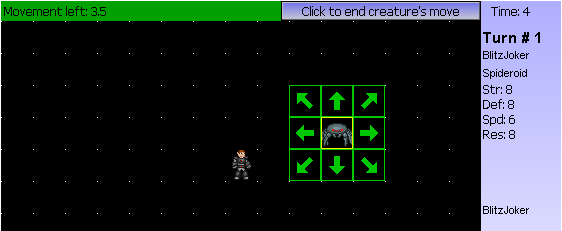
Once it is your turn to move and attack with your units, you will see a green box around them. This green box will be there for all units that still have availble actions. Once you click on a unit, you must execute all its availible actions before moving onto another unit. Once you either use up all of the units actions or click to end the creature's movement, that unit will no longer be able to be controlled again until the next turn. All units have movement points, which can be used to move across the battle area. Flying units(will be explained later) are not presented with the movement arrows, but are presented with a range that they could move to. A flying unit can only move once per turn, reguardless of where they move in their range.
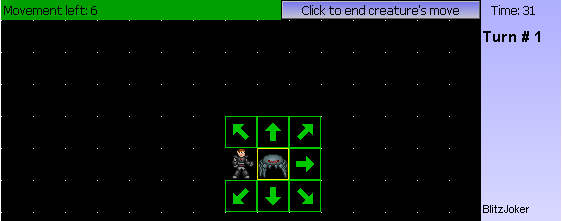
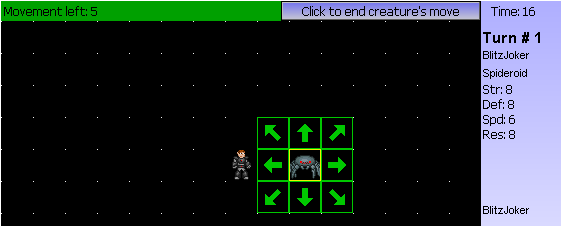
The spending of movement points for
non-flying units is as follows:
--A movement to directly up, down, right, or left is 1 point.
--A movement on a diagonal is 1.5 points.
--If a unit has only 1 movement point left it can still move on a diagonal,
but if it only has .5 movement points left they will be forfeited.
--If a unit touches an opponent's unit, then all remaining movement points are
forfeited and those units will be forced to engage.
Below is a breakdown of the movement of a unit, be sure to note the remaining movement points and the direction in which the unit moved.
Attacking
In the event that one of your units
came into contact with an enemy unit, those units would engage. You know your
units engaged when you see the red icon with two swords crossed. Now you have
the choice to either attack, or end your unit's turn. In the event that you
are moving a flying unit; if an enemy unit is in your flying units range, you
will be able to attack it without moving the flying unit next to it. If you
choose to attack with the engaged unit, the outcome of the attack will be based
on percentages, based on the defensive points of the defending unit, and the
attacking points of your unit.
Only the player whose turn it is will be able to attack, meaning if your unit
gets engaged by the player whom is going's unit, you won’t be allowed
to attack too, you must wait till you turn. After the attack if your unit killed
the other its dead body will fall to the ground and your unit will move in the
position of the one it just killed. If it did not kill the other unit then it
will stay in the place it was.
Ranged Attack
Certain units have to do a ranged
attack, or simply put, they have the ability to "shoot" projectiles
at opposing units or structures. If your unit has the ability to execute a ranged
attack, after it is done with either moving or (if it was engaged) attacking
you will see the attacking icons surrounding your unit. The area in which the
attacking icons are blinking shows the unit's combat range.
Think of a ranged attack like another physical attack, in respect to determining
if an enemy unit will die. Most unit's ranged attacks have a strength (labeled
"Ranged Strength") less than their physical attacks. Ranged attacks
can also only be executed on enemy unit/structures that it can "see",
if there is no line of sight the attack icons will not blink in that area.
If a transport(will be explained later) unit uses a ranged attack, and is then
entered by a commander it will allowed to do another ranged attack in that turn.
Special Notes
This section contains the explanation of anything that was noted as it will be explained later. It also has an explanation of certain other special notes about the game.
In-game items/actions
Slimes
The slime family is immune to normal enemy attacks. While still stopping enemy movement, most creatures are unable to attack these units. The only creatures that can kill slime are other slimes. They can also be killed by range attacks, or ranged actions.
Commander Upgrades
Several actions allow a player's commander to be upgraded. These upgrades will fail or succeed based upon the probability at the time. These bonuses in speed, strength, defense, and range with remain through the game. Commander upgrades are not cumulative, but rather the highest level upgrade for the stat is used. For example, if your commander has Force Armor(+3 defense) and you use Force Shield(+2 defense) it will not add two more defense, but will rather keep the dominant stat boost.
Ranged Actions
These actions: Disrupter, Disintegrator, Mutate, and Hypnotize are all used during the action phase. The Disrupter and Disintegrator can destroy a unit or commander within range of the attack. These are dependent upon the enemy's resistance and defense. Mutate changes any unit into a different unit. Hypnotize brings an enemy unit under your control. Both of these are resistance dependent.
Transports
Transports are units that are able to house commanders. The commander and transport are able to move at the transport's speed, and if the transport is destroyed, the commander is becomes exposed and open to enemy attacks. To enter a transport, move the transport next to the commander. Then select the commander and click on the transport. To remove a commander from a transport, select the transport and click on the button found on the bottom right of the game board. A commander must choose to leave the transport before moving the transport. Leaving and entering a transport stops the commander and transport's movement.
Structures
These are items that also have special abilities. The subspace beacon is a building that will house a commander for 3 turns before it disappears, and gives that commander a random extra action. These can be attacked by enemy units. Using the Gun Turret action will give you a various number(up to five, if there is room) of stationary turrets to attack enemy units with. The Fortress can be entered like Subspace Beacons, but the difference is that you are only given one, it can't be attacked, it has no exact length in turns, and you will not be given an item after you exit.
Alien Goo and Fire
These are two other items that also have special abilities. Alien Goo and Fire will spread randomly across the board over time. Alien Goo and Fire can cover enemy units. If Alien Goo covers any unit but the commander, that unit is not killed and can be used if the goo moves out of the space or is attacked and killed in that space. Fire will kill anything it moves over, and also can't be attacked.
World Alignment
There is both life and technology world alignments in the game. All items have life, technology, and neutral alignment. Neutral monsters and items will always have the same probability. By using many of one specific alignment, the world alignment changes, favoring that grouping. An increase by one in world alignment increases the probability of success on beam downs for that group by ten percent. Using monsters of the other alignment brings the alignment closer to neutral. A higher world alignment does not affect the monsters of the opposite alignment. The world alignment actions help raise or lower the world alignment during a game.