I am using my recently uploaded BNSF SD70M's
as examples for this tutorial
view in 1024x768 if possible
-------------------------------------------------------------------------------------------
Well, Lets get started
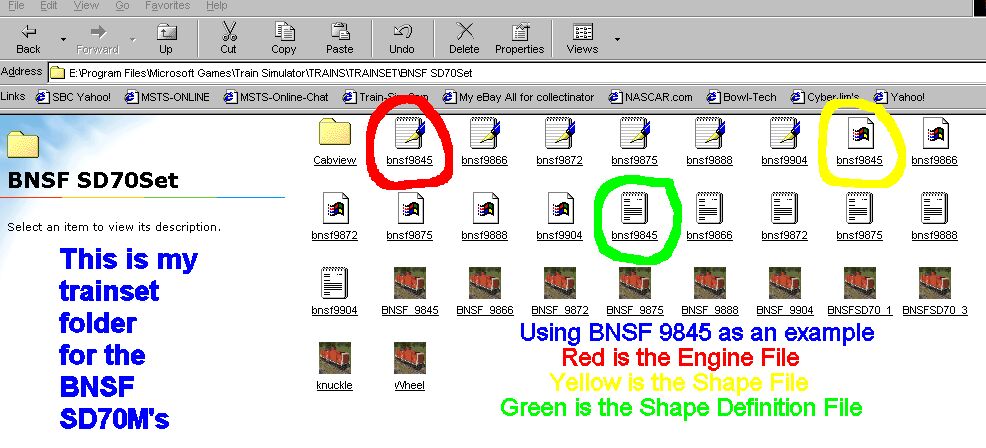
Above is a picture of my Trainset folder named BNSF SD70Set
Create a new folder in side your trainset folder
You can name this folder whatever you want to--this is just an example
there are also 2 extra engines in this folder that I didn't upload
So ignore them!!
I have circled the files we are going to edit in
RED, YELLOW, and GREEN for the 1st engine
RED is the .eng or Engine file
YELLOW is the .s or Shape file
GREEN is the .SD or Shape Definition file
There are also 2 sound file aliases circled in BLUE further down this tutorial
-----------------------------------------------------------------------------------------
First thing you need to do is go to your 3DTS_SD70M folder
and copy the 3DTS_SD70M_UP_4322.s .sd and ,eng files
and paste them into the BNSF SD70Set folder 4 times
------------------------------------------------------------------------------------------
Now you need to rename the all the engine files you just pasted in here
to BNSF9845,BNSF9866,BNSF9872, and BNSF9875
Do the same to the .sd files and then the same to the .s files
When finished go back to the 3DTS_SD70M folder and copy the
Cabview folder and paste it into the BNSF SD70MSet folder
-----------------------------------------------------------------------------------------
Next, Unzip the BNSF Ace files into the new folder
-----------------------------------------------------------------------------------------
OK-You are now ready to edit inside the files
Open Wordpad and browse to the BNSF SD70MSet folder
and click to open the BNSF9845.eng file
See the 3 pictures below to see what you need to edit or change
Note the page scroller on the right side on how far down to go down the page
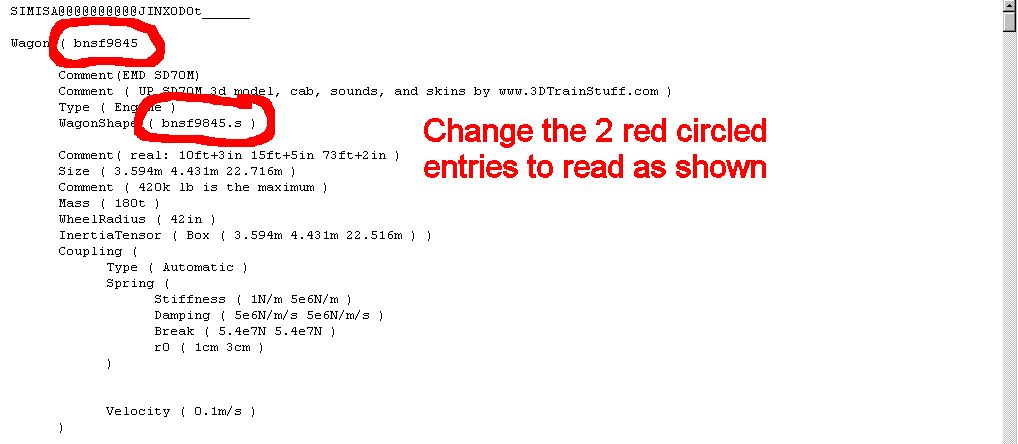
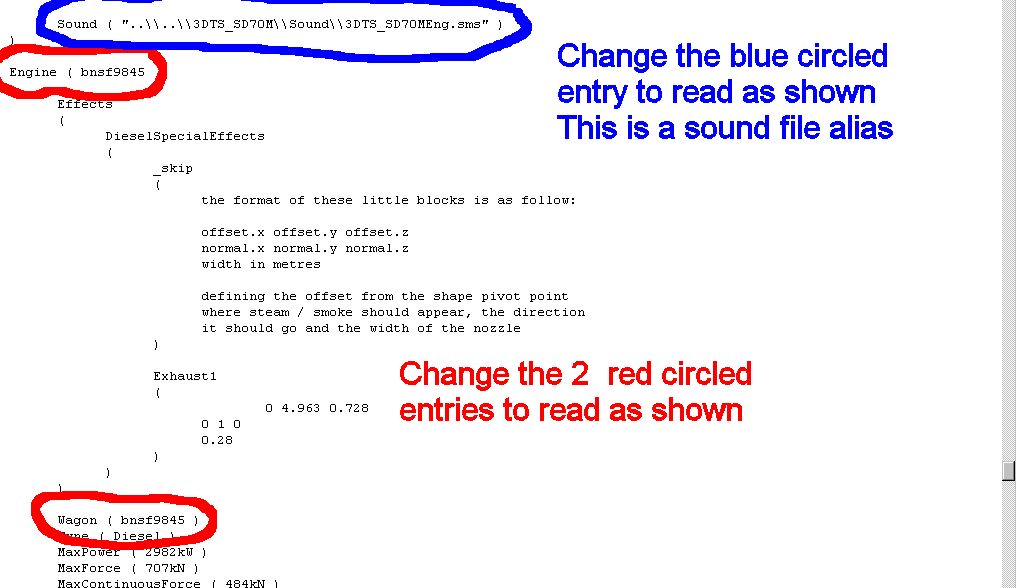
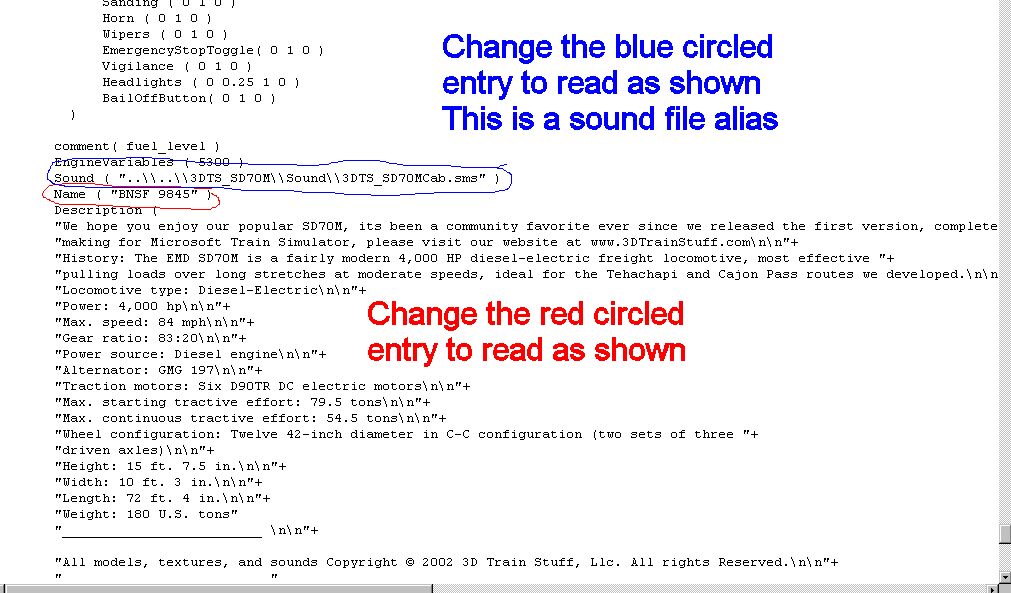
After you've changed all the circled
items to read exactly as shown
Click File, Save in the Wordpad
program and Exit
----------------------------------------------------------------------------------------------
Now lets edit the SD or Shape definition
file
Open your wordpad program again
and browse to the
BNSF SD70MSet folder and click
to open BNSF9845.sd
and edit the whats circled in the
next picture
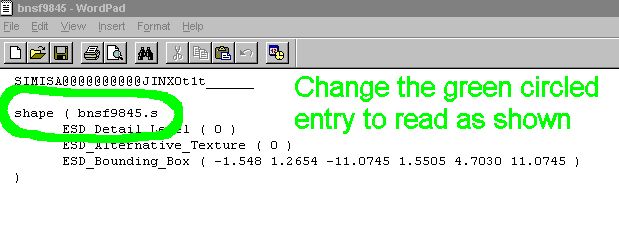
When finished, click File, Save
in Wordpad again and exit Wordpad
---------------------------------------------------------------------------------------------
Next, you need to edit the shape
file
See Route Riter tutorial for un-compressing
and re-compressing instructions
Open Wordpad again and browse to
the BNSF SD70MSet folder
after you have un-compressed the
BNSF9845.s file
and open it in wordpad by clicking
on it
Rename the 3 entries exactly as
you see in the picture below
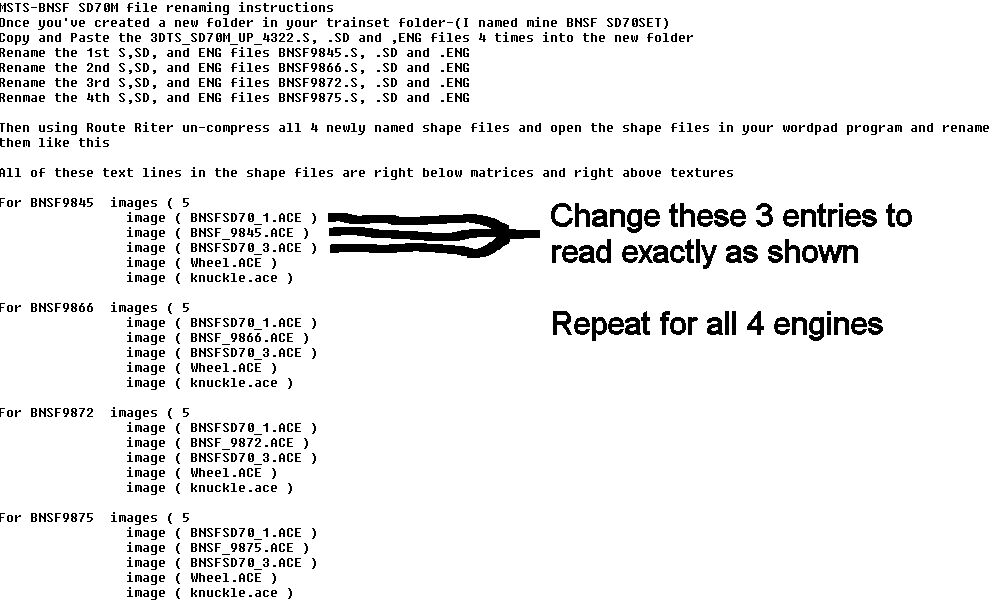
After you have finished editing
the shape file, click File, Save in
wordpad and exit again, then re-compress
the shape file using Route Riter
-----------------------------------------------------------------------------------------------
Repeat these steps for all 4 engines
Then go into Conbuilder and check
all the files for errors.
-----------------------------------------------------------------------------------------------
Now that wasn't too hard was it??
Just practice as you want and you'll
be a pro in no time flat!!
Tutorial by Jim England
------------------------------------------------------------
Back
to Homepage
