 |
|
|
|
|
|
|
|
|
|
|
|
|
|
|
|
|
|
|
|
|
|
|
|
Convert a long Real Audio file into a CD that can play in your car |
|
|
|
|
|
| 1. Convert .ram to .mp3 using Streambox Ripper. |
|
|
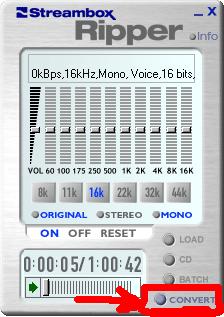
| 2.� Open Streambox Ripper and drag the file you want to convert into it. |
|
|
| 3.� Click on Convert. |
|
|
 |
|
|
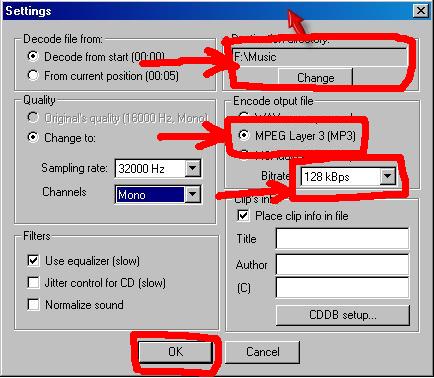
| 4.� Choose where you want your file to be converted.� Select MPEG.� Select the bitrate of at least 128 kBps. �Click OK. |
|
|
 |
|
|
| 5. When your file has finished converting, the mp3 needs to be split into smaller more manageable sizes. |
|
|
|
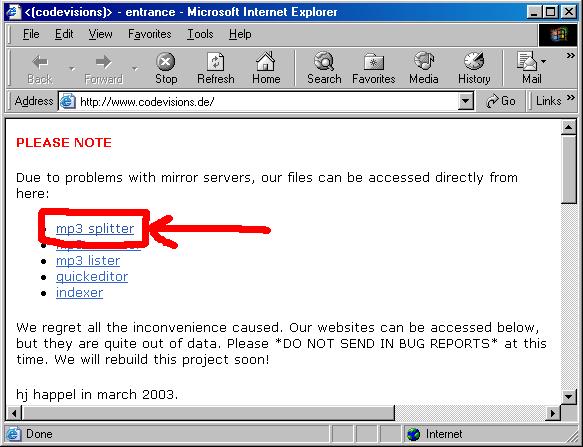
6. Open MP3Splitter. |
|
|
 |
|
|
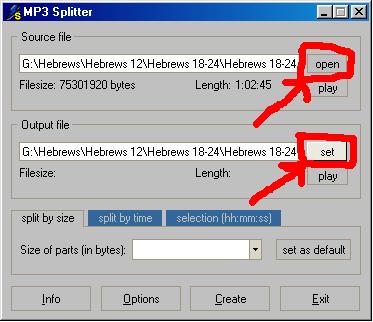
| 7. Select the source and output file by clicking open and set. |
|
|
 |
|
|
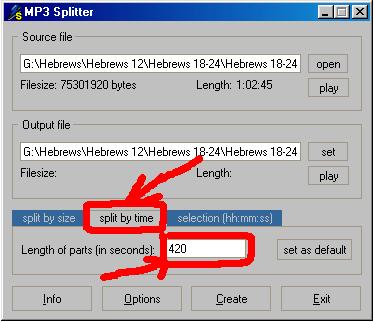
| 8. Choose how often you want the file to be broken. I chose to have it break every 7 minutes. |
|
|
 |
|
|
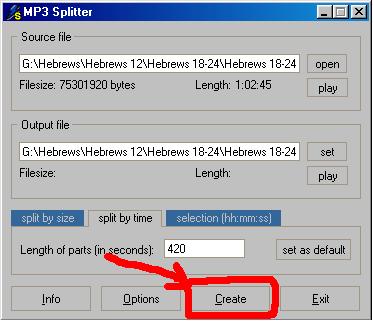
| 9. Click create. |
|
|
 |
|
|
| 10. Take all the broken files and open them in WinAmp. |
|
|
| 11. Convert the mp3s to wavs. |
|
|
| 12. Burn to a CD. |
|