Networking Links
An Educator's Guide to School Networks
http://fcit.coedu.usf.edu/network/
This web site offers information about Networks for
Educators. Here you will find information on :
What is a Network
Protocol
Hardware
Software
Cabling
Topology
A Guide to Networking a K-12 School District
http://devius.cs.uiuc.edu/schools/bl-thesis/toc.doc.html
This site will tell you everything you need to know
about a Network. You can find out how to plan and design a network, how
to implement a network plan, and gives sample networks local and wide area.
COSN Consortium for School Networking
http://www.cosn.org
This web page list's different conferences and classes
that can be taken to learn more about networking.
A Guide to Networking for K-12 Schools
http://www.netc.org/network_guide/
This web page will provide basic networking information
and planning assistance for technology coordinators and others involved
in building k-12 Networks.
School Networking Resources-Montana
http://www.netc.org/network_guide/f.html
The Northwest Educational Technology Consortium (NETC)
is a national program that was established to help states, local educational
agencies, teachers, school library media personnel, administrators, and
other education entities successfully integrate technologies in k-12 classrooms,
library media centers, and other educational settings, including adult
literacy centers and teacher education programs. Montana currently provides
an opportunity for rural school districts to obtain Internet access and
access to state government and university system resources. A request for
proposal is being developed by the state department of administration to
provide local Internet dial-up access throughout all local dialing areas
in Montana.
Resources
Networking a school can be a large and complex project. Sometimes this necessitates the need for outside help. The help can come in many forms, including money, labor, and knowledge. It can make the difference between getting the network to work or not work. Districts can find help found locally, from statewide or nationwide organizations, and online.
Locally- The parents of students in the district and the students themselves are a local resource. Parents with computer experience are often willing to share their knowledge and experience. Parents and can also provide money through activities such as fund-raising. Shown the benefits of new technology to their children, parents are often willing to help. Technology companies in the area can provide both equipment and services for the district in return for publicity for their donations.
Statewide and nationwide- Along with help from local resources, the state or federal government can also provide help. Many state boards of education plan to implement statewide networks and to provide access to this network for districts. On a national level, groups such as the National Science Foundation (NSF) and the National Center for Super computing Applications (NCSA) offer both help and money through grants. Getting a grant from one of these organizations can provide a starting point for networking the district.
Online-
Besides getting help and money from people, companies, and government institutions,
districts can look at what other school districts have done. Districts
can look at this information online, as most districts want to announce
their presence on the Internet as soon as they connect. Unfortunately,
the material that a district wants to look at is online and may be difficult
to access before the district networks its schools. One solution to getting
quick access to the Internet is to connected one or a few machines. Connecting
a single machine through a commercial provider such as America Online,
Compuserve, or a local Internet provider is relatively easy to do and most
of the companies provide excellent and extensive help during the process.
Another easy way to access the online information is to visit another district
that connects to the Internet. In the process, you can also speak with
that district about what they did right and wrong while networking their
district. Either approach will allow a district to access online material
before networking the district.
Important Networking Terms
Peer-to-peer networks- are networks where each client has its own storage area, which might be shared with other clients. They are often used in small classroom labs.
Client/server networks- are networks that have storage devices on the network that may hold data for users to share. This is a file server. a client may use the network to connect to one of these storage devices and get some documents to view or edit.
LAN- This is a local area network in which all clients share a common infrastructure (wires) and are usually in the same building, or group of buildings.
WAN- This is a wide area network which spans a larger geographical area. For instance, a network that links two or more LAN's that are separated by some distance might be called a WAN.
Topology- This is a shape or pattern
that the network takes on as it is built. Networks are patterned in three
general topologies: The star, the ring and the bus topology.
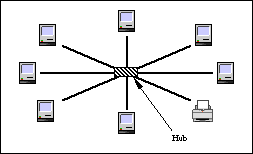
Star- This looks like a star. All networks wiring
runs from the client to a central location or hub.
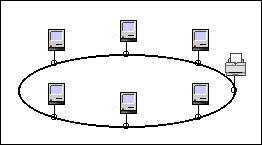
Ring- Connects computers in a continuos loop. The token is constantly passing around the network. A computer can transmit when it gets the token.
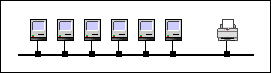
Bus- This was the first local area network topology in use. In this pattern network clients are strung along a single cable.
Each of the topologies creates different needs for support and troubleshooting. Most local area networks today use the star topology because it tends to be the easiest to troubleshoot.
Protocol- A protocol is a standard
for how devices communicate. Protocols can be broken down into layers.
For example,
physical protocols specify things like voltage levels
on wires, while network protocols might specify how a client might request
a re-transmit of some data that it needs. A group of protocols that work
together is called a protocol suite. An example of a common protocol suite
is TCP/IP, which defines communication on the Internet.
Fast Ethernet's -protocol has
Cat 5 twisted pair wiring, 100 mbs max bandwidth, 100 meters max length,
star topology and the cost is high.
Images provided by devius
A few technologies for networking the WAN
Plain Old Telephone Service (POTS)-
Just as its name implies, this technology relies on standard phone lines
to connect schools. Using current analog modem technology, this service
can run at speeds up to 28.8 Kbps in each direction. It is a cheap and
usually easy way to get a machine connected to the Internet quickly. It
has low start-up costs and low monthly rates. If an extra phone line is
already available, the school can reuse it with no installation charge.
An office can even share the line because it is only connected when it
is in use, although this is not recommended.
Wireless- With the phone company
charging on a monthly basis for any network services it provides, other
options apart from the phone company may be cheaper. One approach is to
use wireless communications to connect multiple buildings. Offering high
speeds and minimal or no recurring costs, these technologies deserve a
good look. When compared with the phone company solutions, the up front
costs are high, but over time this cost can amortize to the point where
it is cost effective. Wireless may require expensive towers to clear natural
and man-made obstructions around a school because all wireless communications
require a clear line of sight between the transmitting and receiving equipment.
Cable TV- Cable tv is another
alternative to the phone company that is emerging. It allows a district
to provide WAN connectivity using the cable tv wiring. Although still a
new technology, it promises to offer high speeds and low costs. However,
several technical problems need solutions. These are due to the current
implementation of cable tv systems that send the same signal from a central
office to many destinations.
Satellite- For districts located
in remote areas, where other technologies are prohibitively expensive or
unavailable, a satellite connection is a viable alternative. With this
technology, a district buys a satellite dish and the necessary hardware
needed to connect it to a network. The initial equipment cost is about
$15,000 for the satellite dish and equipment, and the monthly rate is about
$800/month. These rates are high when compared with other solutions, but
in some rural areas this may be the only option.
Network Equipment
Repeaters- are the most basic type of active network equipment. They operate solely at the physical layer, receiving a signal on one port, or connection, and rebroadcasting it on all of its other ports. They can extend a network beyond the limits imposed by the wiring by boosting the signal level.
Hubs- A hub is a device that serves as the center of a star topology network like 10BaseT. It is also called a concentrator. Hubs come in two basic models: stackable and modular. Stackable hubs have a fixed number of ports available to connect network devices. Modular hubs offer a great deal of flexibility. It is possible to have an Ethernet network, AppleTalk network, and token ring network running in the same hub. Greater flexibility also translates into higher costs, and modular hubs do cost more.
Bridges- operate at a higher level than repeaters, working at the data link layer and looking at the actual packets that are on the network. When they receive a packet, they store the entire packet in memory, verify its correctness, and retransmit it on the correct port. This allows them to connect different types of Ethernet networks together such as a 10baseT and a coax network. Like switches, they look at the destination of the packet and only send it to the port where the destination is located, reducing traffic on the network.
Routers- operate at the network level. They receive a packet, view its destination, and determine if the packet is destined for a network that is directly connected to the router or if it is destined for a network further away. If it is the first it sends the packet to the correct port. If it is the latter, it sends the packet to the next router along the path to the packet's final destination. For this reason, routers typically connect between a LAN and a WAN to limit the traffic on the WAN to only packets that need to cross it. Additionally, because routers look at the network information from a packet, they can convert between different network protocols.
NICs-The network interface card (NIC) is an add-on board that serves as the connection between the client computer and the network infrastructure. In other words, to hook all your computers together, a special electronic circuit card called a NIC goes inside each computer. That's where you plug in the cable that connects the computer to the network. Some computers come with built-in network interfaces and do not require an additional NIC.
Cables
1. Unshielded twisted pair has been used by telephone
companies for years to attach phones
for local service. Today it is used not only for voice
applications, but also in data-network
applications.
2. Fiber optic cable uses light instead of electricity
to carry data. This accounts for two of its advantages: (1) Data can be
moved at extremely high speeds without generating interfering RF (radio
frequency) signals and (2) Data transmission is not affected by the proximity
of electrical equipment or high-voltage transmission.
3. Coaxial cable is probably the most well-known type
of cable. The term coaxial denotes a class of cable that has several layers
of material surrounding a common axis. A center conductor, either solid
or stranded, is surrounded by a nonconductive material, covered by a shielding
material, then covered by an abrasion-resistant jacket. At one time, coaxial
cable was the only media available for use in data networking.
4. Wireless cable has several new technologies allow
for the use of radio or microwave transmission for data networks. Wireless
systems have special applications in inter building communication and might
be useful in your campus or district networks. Be aware that there are
trade-offs with wireless. Reliability, cost, and performance should be
carefully analyzed.
I think that either the wireless or the fiber optic
cable would be the best to use in a school because they are much faster
than the other options.
Wazza's School Computer Network Info
http://members.ozemail.com.au/~wazmac/
Networking and intranet explanations and suggestions for schools
All networks installed in schools are Ethernet networks.
Ethernet is an international, non-propriety standard. They use this because
Ethernet network can simply be "plugged in" to the computer.
The standard for schools is unsheilded twisted pair
cabling. It can operate effectively at up to 150MB/sec. This provides some
degree of "future proofing" your other components can be upgraded without
having to replace your cable. This cable is the recommended school standard.
Wireless school networking is another option. It is not actually a cable
, but rather an alternate means of connecting one site to another using
"radio transmission." You would want this in places that are difficult
to cable due to their construction or their layout.
Intranet is a term that describes an internal computer
network which uses tools and protocols normally associated with the internet.
This means that students using an intranet are able to feel like they are
using the internet- browse web sites and send e-mail though their computers
may have no connection to computers outside the school. The content students
experience can be controlled completely from within the school or used
as a "gateway" to the internet.
Networking Design and Research Center
http://www.alaska.net/~research/index.htm
This site exists to clarify the obscurity, confusion
and complexity of networking. A single location resource for networking
terms, with links to tutorials, information, downloads, white papers and
other resources.