Cue-Master "Pro"
Remote Control Features
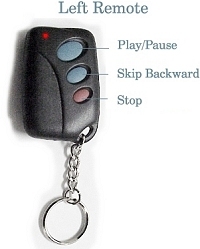
- Left Remote
- Button #1 - Play/Pause
- Pressing this button at any time will "Play"
the next track if unit is paused or
stopped,
or will immediately pause a track if
playing
- Remember, if unit is in "Auto-Pause"
mode the system will automatically
pause
at the end of playing each track, without
needing to press the "Pause"
button
- Button #2 - Skip Backward One Track
- Pressing this button will cause the Mini-Disc
Player to skip backward through the
tracks.
- Operates just like a CD player, if a song
is playing or paused in the middle of a track
when pressed it will skip back to the start
of the current track. If paused at the start
of a track, or stopped the unit will skip
back to the previous track each time button
is pressed.
- Button #3 - Stop
- Pressing this button will stop the Mini-Disc
system and reset the player back to the first
track (just like pressing Stop on a CD player).
- This button is set up with a 3 second activation.
You must hold the button for 3 seconds to
activate this feature. This is so that this
feature will not be accidentally activated
at the wrong moment.
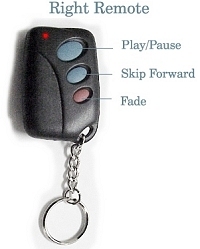
- Right Remote
- Button #1 -Play/Pause
- Same as button #1 on the Left Remote. Repeated
here for convenience since it will
be the
most used button. This way, if you
have one
remote in each (right & left) pocket
you can activate "Play / Pause"
with either hand, in case the other
hand
is occupied.
- Button #2 - Skip Forward One Track
- Pressing this button will cause the player
to skip to the next track each time
it is
pressed.
-
Button #3 - Fade Out/In
- Pressing this button while a track is playing
will cause the player to fade out the song
to zero volume over 5 seconds.
- Pressing this button while the unit is paused
will cause the current track to fade in over
5 seconds from zero volume to current full
volume.
- This button is set up with a 3 second activation.
You must hold the button for 3 seconds to
activate this feature. This is so that this
feature will not be accidentally activated
at the wrong moment.
Note: There is a built relay activation time
of about one and a half seconds for each
button to insure 100% accuracy. This means
that after pressing a button you must wait
about one and a half seconds before you can
press the same (or another) button on the
same remote.
Additional remotes (set of two, programmed
to a specific system) for back-up use are
available for $50.00 at time of system purchase,
or $75.00 + S & H after initial system
purchase. Cue-Master Pro unit will need to
be returned for programming of aditional
(back-up) remote units after initial purchase.
Go Back
