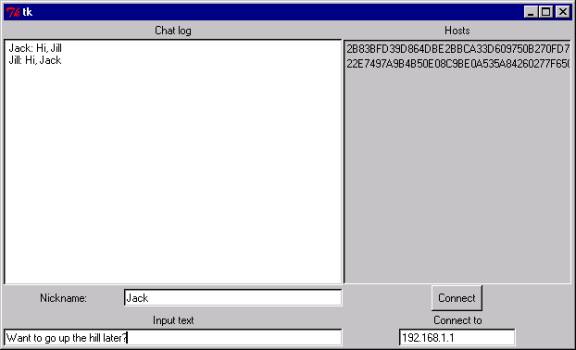

The upper right shows the host keys of all the computers in the chat. These can be compared with host keys which have been shared ahead of time to confirm that the other members of the chat are the people expected. If you save host keys from other people you know in a file called "dchosts.txt", then those host keys will be shown in red when they are participating in the chat. This will help you to know that you are chatting with real people and not a bunch of hosts controlled by one guy.
The lower right is where you put in the host to connect to. This is the first step, done before the chat begins.
In addition, users should exchange their host keys before hand, and save them in a "dchosts.txt" file so they are displayed in red in the host key panel. This provides some assurance of meaningful anonymity in that the other participants are known. It also protects against the cryptographic "man in the middle" attack. See below for more details on cryptographic attacks.
Once the chat begins, no one is allowed to enter. This restriction may be removed in a future version. People can leave at any time, but keep in mind that this may break anonymity in subtle ways. If you have a distinctive style or nickname and you leave, people may realize that when your host left, a particular participant left at the same time. Then they could figure out which computer you were on.
To begin the chat, the user who will be the root node should click on the button which says "Be the one and only root". Other users should enter the node they will connect to in the Connect box. This will cause the button to change to read "Connect". They should then connect to that node.
As people connect into the network, the host key box will display the host keys of all the other computers in the network.
At this point the system is in "connect" mode and not yet in "chat" mode. You should not switch to chat mode until you are sure that everyone is connected who wants to.
To switch to chat mode, just try sending a message. You can first optionally enter a nickname in the nickname box which will be put at the front of all your messages. But remember, this is an anonymous system. Nothing prevents anyone from changing nicks or copying one from someone else. Don't take nicknames too seriously.
Once you everyone has switched to chat mode by sending an initial message, the chat will proceed. At this point no more connections into the network will be allowed.
The chat will end when the last user leaves. It may be best to have an agreed-upon time for the chat to end.
Remember, this is an experimental system so it will be useful to record your experiences. Tell how many people are in the chat and how well the performance seemed. This data can be entered in the User Comments section on this site.
It is because of this that DCchat won't allow people to enter and leave the chat at random times. Everyone should agree ahead of time on when the chat will occur. Once people switch to chat mode, no more connections are allowed, and once someone exits, the chat quits. Otherwise the fact that a particular participant had disappeared when his node went away would reveal who was on that node.
One of the dangers in a P2P system like this is what is called the "man in the middle" (MITM) attack. In this case, you connect into the DCchat network via a particular node, which we will call your parent node. All of your information about what is going on in the rest of the network comes through this node. If this node were run by a malicious user, he could provide bogus data to you about the other nodes' keys and messages. This would allow him to break the anonymity and find out which messages you are sending.
This is why you are encouraged to pre-share host keys. These keys are used to cryptographically authenticate the initial messages which set up shared secrets between every pair of nodes in the network. If you get the host keys via a source not controlled by the MITM, and you see those same host keys in the DCchat window, you can be sure that you have a secure and private connection at least with regard to those other hosts. The only way the MITM attack could work then would be if the MITM controlled or colluded with the owners of all those host keys.
DCchat will display host keys in red if they match the entries in a file called "dchosts.txt". Collect host keys from other sources and put them in a file with this name to use this feature.
RC4 is used as a stream cipher to hide the sources of every message. Each pair of nodes in the chat shares a secret RC4 key. RC4 is widely considered a strong cipher except for some weaknesses on startup. The first 256 bytes of the RC4 stream output are discarded to avoid this weakness.
The shared RC4 keys are generated using an authenticated Diffie-Hellman exchange with random DH keys. All the DH keys share a common 1024 bit prime which comes from the IPSEC protocol and is specially chosen to avoid weaknesses. The authentication is done via a DSS signature by the host keys. The host keys also all share a common 1024 bit prime (different from the DH one) which was pulled out of the PGP source code and was also chosen for security. Using shared primes makes the keys smaller and makes the DH exchanges much simpler.
The authenticated DH exchange is done by each node broadcasting a single message which has a randomly chosen DH key, its host key, and a signature over all this by the host key. As each node broadcasts this data, each pair of nodes sets up a unique shared RC4 key by using their corresponding broadcast DH values.
Keys are selected by using RC4 as a random number generator, seeded by mouse movements. The seed file is stored on disk and each time DCchat is run, the contents of the file get hashed with the current time of day, and the seed file updated.