Special Feature
Part I - OverView : The Flash Runner

What is The Flash Runner?
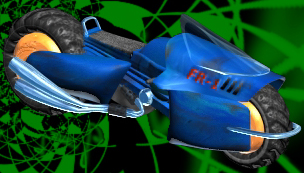
Well, it's the brainchild of Varian Qua. Basically it's a futuristic non-pivoting
motorcycle based on my imagination. It's a extremely high speed bike with
elements of today's motorcycle designs (probably not practical for such
sci-fi bikes but it gives some character to the motorcycle). Theorectically
(though more or less fictional), when the bike nears the speed of light
it virtually turns into pure energy (so here I get a chance to apply some
of 3D Studio's special effects). Well, the storyline is coming along but
it's not done yet. So let's get on with the project.
 MAX or R4?
I chose to do this project on 3D Studio Max. The processes shown here
will come from 3DS MAX. However, 3D Studio R4 users can also follow the
procedures and come up with an equally good version of the Flash Runner
because the creation processes etc. are about the same. At the end of each
step a note will be included for 3DS R4 users on how to achieve the same
effect. I chose 3DS MAX because of the arrangement of the various parts.
The "shade selected" option in 3DS MAX made the task easier as
I could see the exact location of the objects and which object overlaps
which. In 3DS R4 moving the wireframes about (especially complex and messy
wireframes) would not be so easy as it would be difficult to tell if an
object overlap another without spending time rendering the scene. I also
made use of the "patch" modelling feature in 3DS MAX for a couple
of objects. However, the same objects can easily be replacated by a loft
process.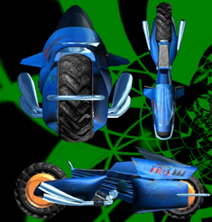
Who should follow this Special Feature?
This Special Feature will prove useful to beginners and professionals
alike. The steps that will be presented are designed more to the beginner-intermediate
level so everyone can understand them. However, I'm sure professionals can
skim through and get something out of it as well.
This Special Feature marks the beginning of "Real World" applications
of 3D Studio and a closer look at my personal work and how it is done. I
hope to open the eyes of users and help them learn by example as it is more
fun and interesting than reading the text of the lessons as it includes
practical tips and a real "Hands-on" experience.
The coming parts should be ready soon. Check back in a week or so and
we will begin with the basic mesh creation.
Back to Learning 3D Studio menu.
If you have any comments or questions please write to CrydoVax
(Varian Qua)
All graphics, html and text on this page is copyright of Varian Qua 1997
This page hosted by  Get your own Free
Home Page
Get your own Free
Home Page