

Ok, heres the deal, you can only use this information if you own the original of the game you want to back up. But I am probably right in assuming that this information will be used illegally. Anyway, the purpose of this site is to assist newcommers to the Playstation Backup scene in correctly applying a ppf patch to their PSX image. I take no responsibility for the misuse of the following information, or for any coasters that you may burn. If you are a lucky bastard and your CD reader and recorder are compatible with a program called Clone CD (CD copy program), then see you later, cause you don't need to apply a patch if you can copy with this program.
REQUIRED PROGRAMS:
WINZIP
CDRWIN (Preferably 3.7F or later) - Golden Hawk technology (screenshots are from 3.7F)
PPF-O-MATIC V2.0 or APPLYPPF.exe - Paradox
Note: Patches are designed to be used on CDRWIN '.bin' (image) files. Cdrwin is the only program that makes '.bin' files. Nero cannot be used as it makes a '.nrg' image file. There is a new program called Fireburner which may also make bin files but i have not used this program, and as long as cdrwin does the job, I dont plan on changing.

STEP 1: CHECK TO SEE IF THE GAME IS PROTECTED
a) Check the PSX protected games section at the Australian Playstation Forum. this section is frequently updated.
b) Read the boards. Chances are if a new game is protected someone is already upset about it and has already written a message on one of the boards. Be careful not to believe everything you read.
c) Check which company produced the game. Sony and Infograms normally are the protection companies. EA/, Edios, Activision, 989 Studios don't protect any of their games (may change but for the moment it is true).
d) When all else turns up blank use the forum to ask if anyone else has problems (remember don't just come out and say "it's protected" if many people are having problems, because yeah it most likely is protected.
STEP 2: DOWNLOAD THE PATCH FROM THE INTERNET
Find the correct patch for the game you want to backup. It is important to not that Australian PAL patches are the same as UK PAL patches. It is safe to assume that a UK PAL patch will work on Australian PAL games (eg Tarzan & Dino Crisis).
STEP 3: UNZIP THE PATCH
Unzip the patch into the directory in which you want to save the image of the game.
Eg c:\psxgame
STEP 4: RUN CDRWIN 3.7F
Firsly you must create an image (.bin) file on your hard drive. Follow these steps to create a successful image. Note PPF patches are designed to be used in conjunction with cdrwin. you cannot use Nero or any other program to create the required '.bin' image.
a) Insert original PSX disk into CD Reader (use your CD Recorder as your Reader)
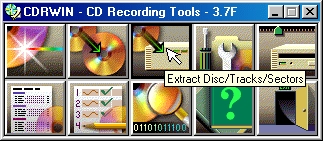
b) Select Extract Disc/Tracks/Sectors
(If an error occurs this means that there is no PSX CD in the CD Recorder, or that the CD Recorder is not selected as the reading drive. Click 'OK' to continue and change the drive)
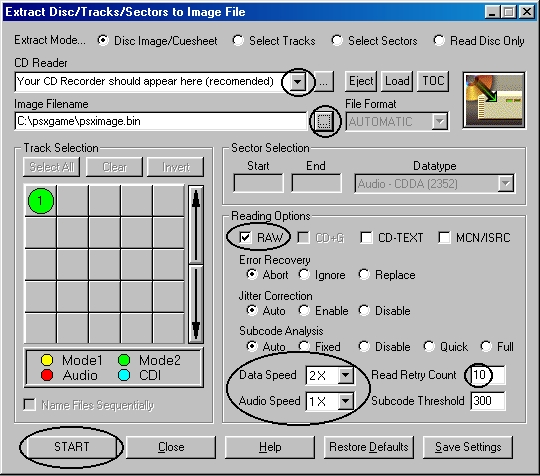
In the screenshot below the items which need to be checked are highlighted.
a) At the top of the screen, Disc Image/Cuesheet should be selected (this is the default setting)
b) Select the CD Reader drive if this is not already selected (Use your CD Burner as the Reader - recommended)
c) Type in the image file name you want to create and save it in the same directory as the patsh file.
d) Under Reading Options
- select RAW (Very Important)
- change the Data & Audio read speeds to 2x and 1x respectively.
(For the benefit of making the best possible backup of your game it is recommended that reading and writing be done at slow speeds)
- change Read Retry count to 10
Warning!!!
Do not change Error Recovery, Jitter Correction or Subcode Analysis.
(leave these on their default settings - see below)
STEP 5: APPLYING THE PPF PATCH
This section is divided into two parts (A & B). Part A explains how to apply a ppf patch using PPF-O-MATIC v2.0 and Part B explains how to apply a patch using applyppf.exe
