This is copied from
http://www.howstuffworks.com/serial-port.htm
How Serial Ports Work
Considered to be one of the most basic
external connections to a computer, the serial port has been an integral
part of most computers for more than 20 years. Although many of the newer
systems have done away with the serial port completely in favor of USB connections, most modems still use the serial
port, as do some printers, PDAs
and digital cameras.
Few computers have more than two serial ports.
|
|

Essentially, serial ports provide a standard
connector and protocol to let you attach devices, such as modems, to your
computer. In this edition of How
Stuff Works, you will learn about the difference between a parallel
port and a serial port, what each pin does and what flow control is.
UART
Needed
All computer operating
systems in use today support serial ports, because serial ports have been
around for decades. Parallel
ports are a more recent invention and are much faster than serial ports. USB ports are only a few years
old, and will likely replace both serial and parallel ports completely over the
next several years.
The name "serial" comes from the
fact that a serial port "serializes" data. That is, it takes a byte of data and transmits
the 8 bits in the byte one at a time. The advantage is that a serial port needs
only one wire to transmit the 8 bits (while a parallel port needs 8). The
disadvantage is that it takes 8 times longer to transmit the data than it would
if there were 8 wires. Serial ports lower cable costs and make cables smaller.
Before each byte of data, a serial port
sends a start bit, which is a single bit with a value of 0. After each byte of
data, it sends a stop bit to signal that the byte is complete. It may also send
a parity bit.
Serial ports, also called communication
(COM) ports, are bi-directional. Bi-directional communication allows
each device to receive data as well as transmit it. Serial devices use
different pins to receive and transmit data -- using the same pins would limit
communication to half-duplex, meaning that information could only travel
in one direction at a time. Using different pins allows for full-duplex
communication, in which information can travel in both directions at once.
|
|
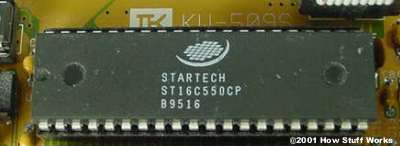
Serial ports rely on a special controller
chip, the Universal Asynchronous Receiver/Transmitter (UART), to
function properly. The UART chip takes the parallel output of the computer's
system bus and transforms it into serial form for transmission through the
serial port. In order to function faster, most UART chips have a built-in buffer of anywhere
from 16 to 64 kilobytes. This buffer allows the chip to cache data coming in from the
system bus while it is processing data going out to the serial port. While most
standard serial ports have a maximum transfer rate of 115 Kbps (kilobits per
second), high speed serial ports, such as Enhanced Serial Port (ESP) and
Super Enhanced Serial Port (Super ESP), can reach data transfer rates of
460 Kbps.
The
Serial Connection
The external connector for a serial port can be either 9 pins or 25 pins.
Originally, the primary use of a serial port was to connect a modem to your
computer. The pin assignments reflect that. Let's take a closer look at what happens
at each pin when a modem is connected.
|
|
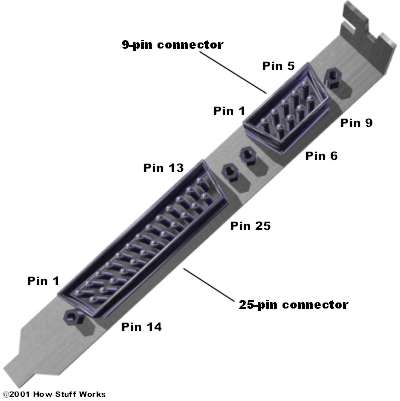
9-pin connector:
- Carrier Detect -
Determines if the modem is connected to a working phone line.
- Receive Data - Computer
receives information sent from the modem.
- Transmit Data - Computer
sends information to the modem.
- Data Terminal Ready -
Computer tells the modem that it is ready to talk.
- Signal Ground - Pin is
grounded.
- Data Set Ready - Modem
tells the computer that it is ready to talk.
- Request To Send -
Computer asks the modem if it can send information.
- Clear To Send - Modem
tells the computer that it can send information.
- Ring Indicator - Once a
call has been placed, computer acknowledges signal (sent from modem) that
a ring is detected.
25-pin
connector:
- Not Used
- Transmit Data - Computer
sends information to the modem.
- Receive Data - Computer
receives information sent from the modem.
- Request To Send -
Computer asks the modem if it can send information.
- Clear To Send - Modem
tells the computer that it can send information.
- Data Set Ready - Modem
tells the computer that it is ready to talk.
- Signal Ground - Pin is
grounded.
- Received Line Signal Detector - Determines if the modem is connected to a working phone line.
- Not Used: Transmit Current Loop Return (+)
- Not Used
- Not Used: Transmit Current Loop Data (-)
- Not Used
- Not Used
- Not Used
- Not Used
- Not Used
- Not Used
- Not Used: Receive Current Loop Data (+)
- Not Used
- Data Terminal Ready -
Computer tells the modem that it is ready to talk.
- Not Used
- Ring Indicator - Once a
call has been placed, computer acknowledges signal (sent from modem) that
a ring is detected.
- Not Used
- Not Used
- Not Used: Receive Current Loop Return (-)
Voltage
sent over the pins can be in one of two states, On or Off. On
(binary value "1") means that the pin is transmitting a signal between
-3 and -25 volts, while Off (binary value "0") means that it is
transmitting a signal between +3 and +25 volts...
Going
With The Flow
An important aspect of serial communications is the concept of flow control.
This is the ability of one device to tell another device to stop sending data
for a while. The commands Request to Send (RTS), Clear To Send (CTS), Data
Terminal Ready (DTR) and Data Set Ready (DSR) are used to enable flow control.
|
|
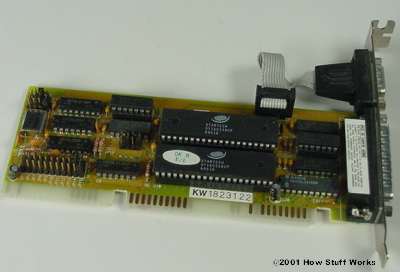
Let's look at an example of how flow control
works: You have a modem that communicates at 56 Kbps. The serial connection
between your computer and your modem transmits at 115 Kbps, which is over twice
as fast. This means that the modem is getting more data coming from the
computer than it can transmit over the phone line. Even if the modem has a 128K
buffer to store data in, it will still quickly run out of buffer space and be
unable to function properly with all that data streaming in.
With flow control, the modem can stop the
flow of data from the computer before it overruns the modem's buffer. The
computer is constantly sending a signal on the Request to Send pin, and
checking for a signal on the Clear to Send pin. If there is no Clear to Send
response, the computer stops sending data, waiting for the Clear to Send before
it resumes. This allows the modem to keep the flow of data running smoothly.