Copied from
http://www.howstuffworks.com/parallel-port.htm
How Parallel Ports Work
If you have a printer connected to your
computer, there is a very good chance that it uses the parallel port.
While USB is becoming
increasingly popular, the parallel port is still the most used interface for
printers.
|
|
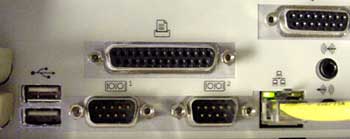
Parallel ports are used to connect a host of
popular computer peripherals:
- Printers
- Scanners
- CD-writers
- External hard
drives
- Iomega Zip removable drives
- Network
adapters
- Tape backup drives
Parallel
Port Basics
|
|
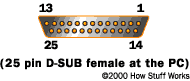
Parallel ports were originally developed by IBM,
as a way to connect a printer to your PC. When IBM was in the process of
designing the PC, the company wanted the computer to work with printers offered
by Centronics, a top printer manufacturer at the time. IBM decided not
to use the same port interface on the computer that Centronics used on the
printer. Instead, IBM engineers coupled a 25-pin connector, DB-25, with
a 36-pin Centronics connector to create a special cable to connect the printer
to the computer. Other printer manufacturers ended up adopting the Centronics
interface, making this strange hybrid cable an unlikely de facto standard.
When a PC sends data to a printer or other
device using a parallel port, it sends eight bits of data (one byte) at a
time. These eight bits are transmitted parallel to (beside) each other,
as opposed to the same eight bits being transmitted serially (all in a
single row) through a serial port. The standard parallel port is capable of
sending 50 to 100 kilobytes of data per second.
|
|
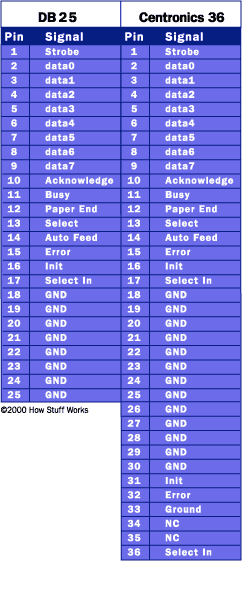
Let's take a closer look at what each pin
does when used with a printer:
- Pin 1 carries the strobe signal. It maintains a level of
between 2.8 and 5 volts,
but drops below .5 volts whenever the computer sends a byte of data. This
drop in voltage tells the printer that data is being sent.
- Pins 2 through 9 are used to carry data. To indicate that a bit has
a value of 1, a charge of 5 volts is sent through the correct pin. No
charge on a pin indicates a value of 0. This is a simple but highly
effective way to transmit digital information over an analog cable in real
time.
- Pin 10 sends the acknowledge signal from the printer to the
computer. Like Pin 1, it maintains a charge and drops the voltage below .5
volts to let the computer know that the data was received.
- If the printer is busy, it will charge Pin 11. Then, it will
drop the voltage below .5 volts to let the computer know it is ready to
receive more data.
- The printer lets the computer know if it is out of paper by sending
a charge on Pin 12.
- As long as the computer is receiving a charge on Pin 13, it knows
that the device is online.
|
|
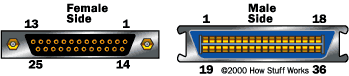
- The computer sends an auto feed signal to the printer
through Pin 14 using a 5 volt charge.
- If the printer has any problems, it drops the voltage to less than
.5 volts on Pin 15 to let the computer know that there is an error.
- Whenever a new print job is ready, the computer will drop the
charge on Pin 16 to initialize the printer.
- Pin 17 is used by the computer to remotely take the printer offline.
This is accomplished by sending a charge to the printer and maintaining it
as long as you want the printer offline.
- Pins 18-25 are grounds and are used as a reference signal
for the low (below .5 volts) charge.
Notice
how the first 25 pins on the Centronics end match up with the pins of the first
connector. With each byte the parallel port sends out, a handshaking signal is
also sent so the printer can latch the byte.
SPP/EPP/ECP
The original specification for parallel ports was unidirectional, meaning that
data only traveled in one direction for each pin. With the introduction of the
PS/2 in 1987, IBM offered a new bidirectional parallel port design. This
mode is commonly known as Standard Parallel Port (SPP) and has
completely replaced the original design. Bidirectional communication allows
each device to receive data as well as transmit it. Many devices use the eight
pins (2-9) originally designated for data. Using the same eight pins limits
communication to half-duplex, meaning that information can only travel
in one direction at a time. But pins 18-25, originally just used as grounds,
can be used as data pins also. This allows for full-duplex (both
directions at the same time) communication.
|
|
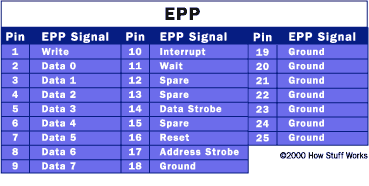
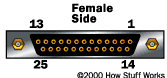
Enhanced Parallel Port (EPP) was created by Intel,
Xircom
and Zenith
in 1991. EPP allows for much more data, 500K to 2 MB, to be transferred each
second. It was targeted specifically towards non-printer devices that would
attach to the parallel port, particularly storage devices that needed the
highest possible transfer rate.
|
|
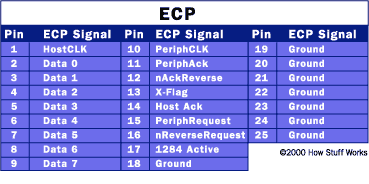
Close on the heels of the introduction of
EPP, Microsoft
and Hewlett
Packard jointly announced a specification called Extended Capabilities
Port (ECP) in 1992. While EPP was geared towards other devices, ECP was
designed to provide improved speed and functionality for printers.
|
|
In 1994, the IEEE 1284 standard was
released. It included the two specifications for parallel port devices, EPP and
ECP. In order for them to work, both the operating system and
the device must support the required specification. This is seldom a problem
today since most computers sold support SPP, ECP and EPP and will detect which
mode needs to be used, depending on the attached device. If you need to
manually select a mode, you can do so through the BIOS on most computers.