This is copied from
Asynchronous Serial
Transmission
These brief notes have been extracted from the draft of Principles of Computer
Hardware (third edition). We describe the asynchronous serial link, the modem,
and the RS232 interface between the computer and modem. These notes provide
only the essentials of these topics.
Figure 1 shows the waveform corresponding to a single seven-bit character.
In an asynchronous serial transmission system the clocks at the transmitter and
receiver responsible for dividing the data stream into bits are not
synchronized. The output from the transmitter sits at a mark state whenever
data is not being transmitted and the line is idle. The term mark
belongs to the early days of data transmission and is represented by a -12V in
many systems operating over short distances.
Figure 1 Asynchronous serial transmission

In what follows, a bit period is the shortest time for which the line may be
in a logical 1 (mark) or a logical 0 (space) state. When the transmitter wishes
to transmit a word, it places the line in a 0 state for one bit period. A space
is represented by +12V. When the receiver sees this logical 0, called a start
bit, it knows that a character is about to follow. The incoming data stream
can then be divided into seven bit periods and the data sampled at the center
of each bit. The receiver's clock is not synchronized with the transmitter's
clock and the bits are not sampled exactly in the center.
After seven data bits have been sent, a parity bit is transmitted to
give a measure of error protection. If the receiver finds that the received
parity does not match the calculated parity, an error is flagged and the
current character rejected. The parity bit is optional and need not be
transmitted.
One or two stop bits at a logical 1 level follow the parity bit. The
stop bit carries no information and serves only as a spacer between consecutive
characters. After the stop bit has been transmitted, a new character may be
sent at any time. Asynchronous serial data links are used largely to transmit
data in character form.
If the duration of a single bit is T seconds, the length of a
character is given by start bit plus seven data bits plus the parity bit plus
the stop bit = 10T. Asynchronous transmission is clearly inefficient,
since it requires ten data bits to transmit seven bits of useful information.
Several formats for asynchronous data transmission are in common use; for
example, eight data bits, no parity, one stop bit.
Bit-rate and Baud-rate
The speed at which a serial data link operates is expressed in bits per
second and is typically in the range 110 to over 56,600 bps.
Two units of speed are employed in data transmission. Once is bits/per
second (bps) and the other Baud (after Baudot, a pioneer in the days
of the telegraph). Bit rate defines the rate at which information flows across
a data link. Baud rate defines the switching speed of a signal (i.e., the Baud
rate indicates how often a signal changes state).
For a binary two-level signal, a data rate of one bit per second is
equivalent to one Baud; for example, a modem transmitting binary data at 1,200
bps is said to operate at 1,200 Baud. Suppose a data transmission system uses
signals with 16 possible discrete levels. Each signal element can have one of
16 = 24 different values; that is a signal element encodes 4 bits.
If the 16-level signals are transmitted at 1,200 Baud, the data rate is 4 x
1,200 = 4,800 bps.
Modulation and Data
Transmission
We are now going to look at a topic called modulation, the means of
modifying signals to make them suitable for transmission over a particular
channel. A bandpass channel like a telephone channel can transmit sine waves
within its bandwidth but can't transmit digital pulses. If a sequence of binary
signals were presented to one end of a telephone network, the digital signals
would be so severely distorted that they would be unrecognizable at the
receiving end of the circuit.
Because the telephone network can transmit voice-band signals in the range 300
to 3,300 Hz, various ways of converting digital information into speech-like
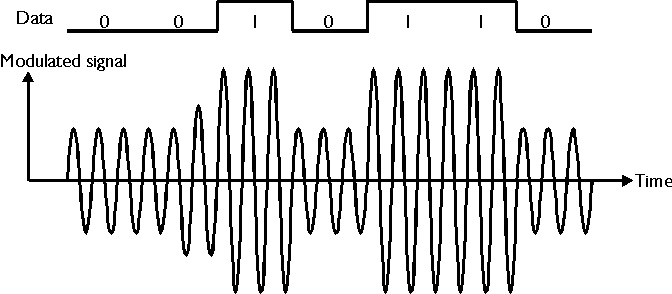
signals have been investigated. Figure 2 shows how the digital data can be used
to change, or modulate, the amplitude of a sine wave in sympathy with a
digital signal. This technique is known as amplitude modulation or AM.
The equipment needed to generate such a signal is called a modulator and that
needed to extract the digital data from the resulting signal is called a
demodulator. The interface between a computer and a telephone system is called
a MODEM (modulator-demodulator). Because AM is more sensitive to
noise (i.e., interference) than other modulation techniques, it is not widely
used in data transmission.
Figure 2 Amplitude modulation
Instead of modulating a sine wave by changing its amplitude, it's possible
to change its frequency in sympathy with the digital data. In a binary system,
one frequency represents one binary value and a different frequency represents
the other. Figure 3 shows a frequency modulated (FM) signal. FM is widely used
because it has a better tolerance to noise than AM (i.e., it is less affected
by various forms of interference).
Figure 3 Frequency modulation
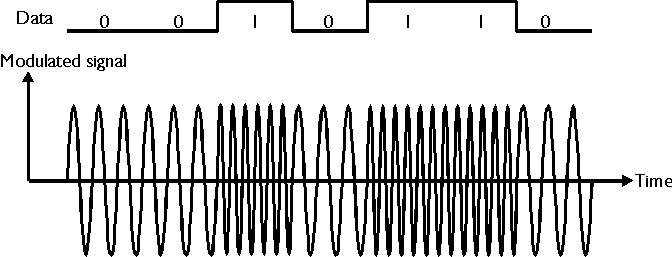
Figure 4 illustrates another form of modulation called phase modulation
(PM). In this case, the phase of the sine wave is changed in sympathy
with the digital signal. PM is widely used and has fairly similar
characteristics to FM. If the phase change corresponding to a logical 1 is 180°
, and 0° (no change) corresponds to a logical 0, one bit of information
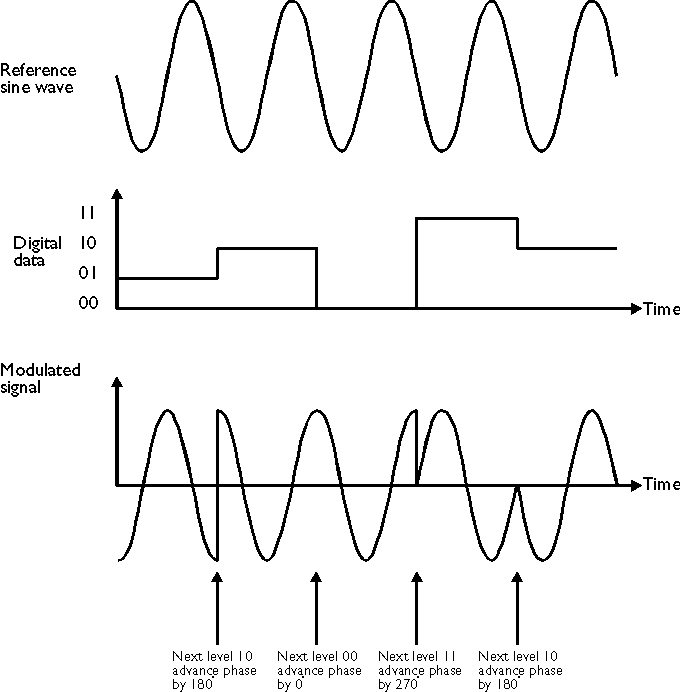
can be transmitted in each time slot (Figure 4). If, however, the phase is
shifted by multiples of 90° , two bits at a time can be transmitted
(Figure 5).
Figure 4 Phase modulation
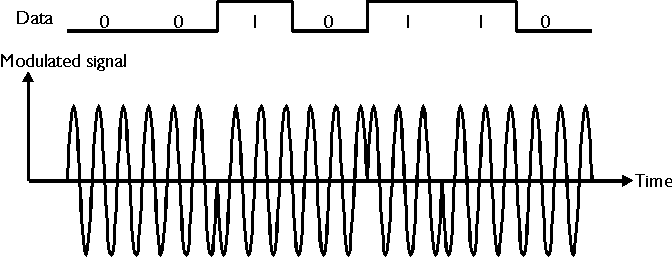
Figure 5 Differential phase modulation
High-speed Modems
Modems operate over a wide range of bit rates. Until the mid 1990s most modems
operated between 300 bps to 9,600 bps. Low bit rates were associated with the
switched telephone network where some lines were very poor and signal
impairments reduced the data rate to 2,400 bps or below. The higher rates of
4,800 bps and 9,600 bps were generally found on privately leased lines where
the telephone company offered a higher grade of service.
The growth of the Internet provided a mass market for high-speed modems.
Improved modulation techniques and better signal-processing technology has a
massive impact on modem design. By the mid 90s, low cost modems operated at
14.4K baud or 28.8K baud. By 1998, modems capable of operating at 56K baud over
conventional telephone lines were available for the price of a 1200 bps modem
only a decade earlier.
High-speed modems operate by simultaneously changing the amplitude and phase
of a signal. This modulation technique is called quadrature amplitude
modulation (QAM). A QAM signal can be represented mathematically by the
expression S x sin(wt) + C x cos(wt), where S and C are two
constants. The term "quadrature" is used because a sine wave
and a cosine wave of the same frequency and amplitude are almost identical. The
only difference is that a sine wave and a cosine wave are 90° out
of phase (90° represents ¼ of 360° —hence quadrature). Figure
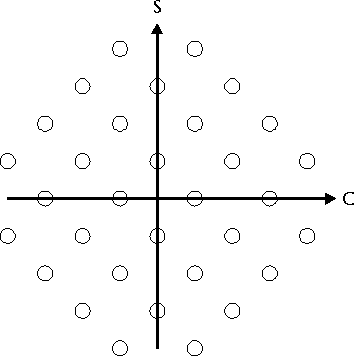
6 demonstrates a 32-point QAM constellation in which each point represents one
of 32 discrete signals. A signal element encodes a 5-bit value which means a
modem with a signaling speed of 2400 baud can transmit at 12,000 bps.
Figure 6 The 32-point QAM constellation
High-speed Transmission over the PSTN
The backbone of the POTS (plain old telephone system) is anything but
plain. Data can be transmitted across the world via satellite, terrestrial
microwave links, and fiber optic links at very high rates. The factor that
limits the rate at which data can be transmitted is known as "the last
mile"; that is, the connection between your phone and the global
network at your local switching center.
ISDN
A technology called ISDN (integrated services digital network) was
developed in the 1980s to help overcome the bandwidth limitations imposed by
the last mile. ISDN was developed largely for professional and business
applications and is now available to anyone with a personal computer. There are
two variants of ISDN—basic rate services and primary rate services. The basic
rate service is intended for small businesses and provides three fully duplex
channels. Two of these so-called B channels can carry voice or data and
the third D channel is used to carry control information. B
channels operate at 64K bps and the D channel at 16K bps.
ISDN's popularity is due to its relatively low cost and the high quality of
service it offers over the telephone line. You can combine the two B
channels to achieve a data rate of 128K bps. You can even use the D
control channel (simultaneously) to provides an auxiliary channel at 9.6K bps.
Note that ISDN can handle both voice and data transmission simultaneously.
Several protocols have been designed to control ISDN systems. V.110 and
V.120 are used to connect an ISDN communications devices to high-speed ISDN
lines. ISDN took long time from its first implementation to its adoption by
many businesses. However, newer technologies have been devised to overcome the last
mile problem and ISDN will probably never become as commonplace as some had
anticipated.
ADSL
If there's one thing you can guarantee in the computing world, it's that
yesterday's state-of-the-art technology becomes the current standard, a new
state-of-the-art technology is emerging. Just as ISDN was becoming popular in
the late 1990s, as system called ADSL (asymmetric digital subscriber line)
was being developed as a new high-speed "last mile" system.
As we've said, telephone lines have a bandwidth of 3000 Hz that limits the
maximum rate at which data can be transmitted. In fact, the twisted wire pair
between your home and the telephone company has a much higher bandwidth. The
bandwidth of a typical twisted pair less than about 3 miles is over 1 MHz.
Asymmetric Digital Subscriber Line technology exploits the available
bandwidth of the local connection. The bandwidth of the telephone link is
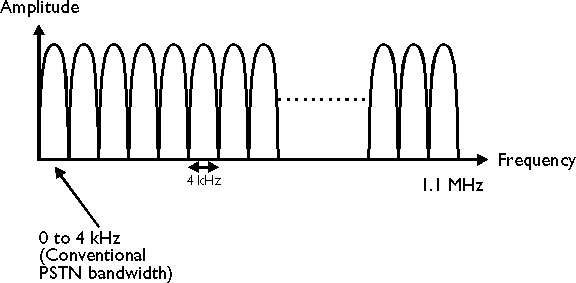
divided into a number of 4 KHz slices as figure 7 demonstrates. The first slice
from 0 to 4 KHz represents the conventional telephone bandwidth. Frequencies
between 4 kHz and 24 KHz aren't used in order to provide a guard band to stop
the higher frequencies interfering with conventional telephone equipment.
The spectrum between 24 kHz and 1.1 MHz is divided into 249 separate 4 KHz
channels in the same way as the FM band is divided into slots for the various
broadcasting stations. A data signal can be assigned one of these slices and
its spectrum tailored to fit its allocated 4 KHz slot. At the other end of the
link, the signal in that 4 KHz slot is converted back into the data signal.
Until recently it was very difficult to perform these operations. The advent of
low-cost digital signal processing has made it much easier to process signals
(i.e., to shift their range of frequencies from one band to another).
The characteristics of these slots vary with frequency; for example, there
is much more attenuation of signals in slots close to 1.1 MHz. The terminal
equipment is able to use the better channels to carry high data rates and to
allocate the higher frequency channels to slower bit rates.
Figure 7 Dividing a 1.1 MHz bandwidth into 4 kHz slots
The RS232C Interface
The first really universal standard for the physical connection between
computer and modem was published in 1969 by the Electronic Industry Association
(EIA) in the USA and is known as RS232C (Recommended Standard 232 version C).
Since then the standard has been revised (e.g., RS232D and RS232E).
RS232 specifies the plug and socket at the modem and the digital equipment
(i.e., their mechanics), the nature of the transmission path and the signals
required to control the operation of the modem (i.e., the functionality of the
data link).
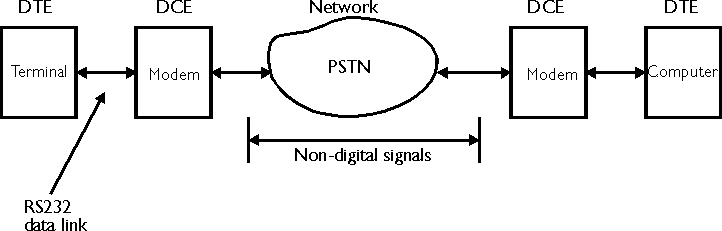
From the point of view of the standard, the modem is known as data
communications equipment (DCE) and the digital equipment to be connected to
the modem is known as data terminal equipment (DTE). Figure 8
illustrates the role played by the RS232 standard in linking DCE to DTE.
Figure 8 Linking DTE to DCE with the RS232 data link
Because RS232 was intended for DTE to DCE links, its functions are very
largely those needed to control a modem.
RS232C Control Lines
The RS232 standard describes the functions carried out by several control
signals between the DTE and the DCE. The following control signals implement
most of the important functions of an R232 DTE to DCE link.
Request to send (RTS) This is a signal from the DTE to the DCE. When
asserted, RTS indicates to the DCE that the DTE wishes to transmit data to it.
Clear to send (CTS) This is a signal from the DCE to the DTE and,
when asserted, indicates that the DCE is ready to receive data from the DTE.
Data set ready (DSR) This is a signal from the DCE to the DTE which
indicates the readiness of the DCE. When this signal is asserted, the DCE is
able to receive from the DTE. DSR indicates that the DCE (usually a modem) is
switched on and is in its normal functioning mode (as opposed to its self-test
mode).
Data terminal ready (DTR) This is a signal from the DTE to the DCE.
When asserted, DTR indicates that the DTE is ready to accept data from the DCE.
In systems with a modem, it maintains the connection and keeps the channel
open. If DTR is negated, the communication path is broken. In everyday terms,
negating DTR is the same as hanging up a phone.
Example
How long does it take a computer to transmit a certain picture to a remote
site over the telephone system, given the following data?
1. The image measures 4
inches by 2 inches.
2. The image has been scanned
at a resolution of 200 pixels/inch.
3. Each pixel represents a
32-level grey-scale value (i.e., 32 steps from white to black).
4. The data is transmitted
asynchronously with one start bit, eight data bits, no parity bit, and one stop
bit.
5. The signalling speed of
the modem is 2,400 baud.
6. The modem uses 256-point
QAM to modulate the signal.
Note: A pixel is a picture
element and corresponds to a "dot". A pixel can have attributes such
as colour.
Solution
a. The total number of pixels is:
horizontal pixels x vertical pixels
= (4 x 200) x (2 x 200) = 800 x 400 = 320,000 pixels
b. Each pixel represents one of 32
levels of grey. Therefore, a pixel is encoded as 5 bits (25 = 32).
c. The total number of bits to be
transmitted is:
pixels x bits/pixel = 320,000 x 5 =
1,600,000 bits/image.
d. The switching (signalling) speed
is 2400 baud and each signal is 1 of 256 different values. That is, each signal
carries 8 bits (because 28 = 256).
e. The transmitted bit-rate is
given by baud rate x bits/signal = 2,400 x 8 = 19,200 bits/s
f. Each unit of data transmitted
(i.e., each character) consists of 8 data bits in a frame consisting of 1 start
bit + 8 data bits + 0 parity bit + 1 stop bit. It takes 10 bits in a frame to
transmit 8 data bits. The effective data transmission rate is therefore reduced
by 8/10. Consequently, the modem transmits at
19,200 x 8/10 = 15,360 bits/s.
g. The time taken to transmit the
image is (total bits)/(transmitted bit rate) = 1,600,000/15,360 = 104 s.
h. In practice, the value would be
higher to account for any time between successive characters and the overhead
needed to set up the call and to deal with its progress.
i. Note that many real data
transmission systems first compress the data rather than sending the full
1,600,000 bits. Since much of most images has a constant intensity (e.g., most
of a printed page is white), data can be run length encoded. That is, you
transmit the number of pixels in a run of constant intensity.