This copied from
http://www.howstuffworks.com/modem.htm
How Modems Work
If you are reading this
article on your computer at home, chances are that it arrived via a modem.
This edition of How Stuff
Works will show you how a modem works by starting with the original 300
baud modems and progressing all the way through to the latest ADSL
configurations!
[Note: If you are unfamiliar with bits,
bytes and the ASCII character codes, the HSW article entitled How Bits and Bytes Work will
help make this article much clearer.]
The Origin of
Modems
The word modem is a contraction
of the words modulator-demodulator. A modem is typically used to send
digital data over a phone line. The sending modem modulates the data
into a signal that is compatible with the phone line, and the receiving modem demodulates
the signal back into digital data. Wireless modems are also frequently seen
converting data into radio signals and back.
Modems came into existence in the 1960s as a
way to allow terminals to connect to computers over the phone lines. A typical
arrangement is shown below:
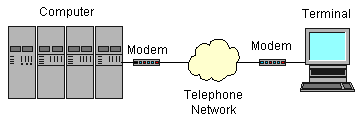
In a configuration like this, a dumb
terminal at an off-site office or store could "dial in" to a
large, central computer. The 1960s were the age of time-shared
computers, so a business would often buy computer time from a time-share
facility and connect to it via a 300 bit-per-second (BPS) modem.
A dumb terminal is simply a keyboard and a
screen. A very common dumb terminal at the time was called the DEC VT-100, and
it became a standard of the day (now memorialized in terminal emulators
worldwide). The VT-100 could display 25 lines of 80 characters each. When the
user typed a character on the terminal, the modem sent the ASCII code for the character
to the computer. The computer would then send the character back to the
computer so it would appear on the screen.
When personal computers started appearing in
the late 1970s, bulletin board systems became the rage. A person would
set up a computer with a modem or two and some BBS software, and other people
would dial in to connect to the bulletin board. The users would run terminal
emulators on their computers to emulate a dumb terminal.
People got along at 300 BPS for quite
awhile. The reason this speed was tolerable was because 300 BPS represents
about 30 characters per second, and that is much faster than a person can type
characters or read. Once people started transferring large programs and images
to and from bulletin board systems, however, 300 BPS became intolerable. Modem
speeds went through a series of steps at two year or so intervals:
- 300 bit per second - 1960s through 1983 or so
- 1200 bit per second - gained popularity in 1984 and 1985
- 2400 bit per second
- 9600 bit per second - first appeared in late 1990 and early 1991
- 19.2K bit per second
- 28.8K bit per second
- 33.6K bit per second
- 56K bit per second - became the standard in 1998
- ADSL, at something approaching 10M BPS - just appearing in any real
numbers in 1999.
Understanding 300
BPS Modems
300 BPS modems are extremely easy to
understand, so let's use them as a starting point. A 300 BPS modem is a device
that uses Frequency Shift Keying (FSK) to transmit digital information
over a telephone line. In frequency shift keying, a different tone (frequency)
is used for the different bits (see How Guitars Work for a
discussion of tones and frequencies).
When a terminal's modem dials a computer's
modem, the terminal's modem is called the originate modem. It transmits
a 1,070 hertz tone for a zero and a 1,270 hertz tone for a 1. The computer's
modem is called the answer modem, and it transmits a 2,025 hertz tone
for a 0 and a 2,225 hertz tone for a 1. Because the originate and answer modems
transmit different tones, they can both use the line simultaneously. This is
known as full-duplex operation. Modems that can transmit in only one
direction at a time are known as half-duplex modems, and they are rare.
Let's say that two 300 BPS modems are
connected, and the user at the terminal types the letter "a". The
ASCII code for this letter is 97 decimal or 01100001 binary (see the HSW
article entitled How Bits and
Bytes Work for details). A device inside the terminal called a UART
(Universal Asynchronous Receiver/Transmitter) would convert the byte into its
bits and send them out one at a time through the terminal's RS-232 port
(also know as a serial port). The terminal's modem is connected to the
RS-232 port, so it receives the bits one at a time and its job is to send them
over the phone line.
Faster Modems
In order to create faster modems, modems
designers must use techniques far more sophisticated than Frequency Shift
Keying. First they moved to Phase Shift Keying (PSK), and then Quadrature
Amplitude Modulation (QAM). These techniques allow an incredible amount of
information to be crammed into the 3,000 hertz of bandwidth available on a
normal voice-grade phone line. 56K-bit modems, which actually connect at
something like 48K-bits on anything but absolutely perfect lines, are about the
limit of these techniques. See the links section for details if you are
interested.
All of these high-speed modems incorporate a
concept of gradual degradation, meaning they can test the phone line and fall
back to slower speeds if the line cannot handle the modem's fastest speed.
The latest step in the evolution of the
modem is Asymmetric Digital Subscriber Line, or ADSL, modems. The word Asymmetric
is used because these modems send data faster in one direction than they do in
another. An ADSL modem takes advantage of the fact that any normal home,
apartment or office has a dedicated copper wire running between it and phone
company's nearest mux or central office. This dedicated copper wire can carry
far more data than the 3,000 hertz signal needed for your phone's voice
channel. If both the phone company's mux or central office is equipped with an
ADSL modem on your line and so is your house, then the section of copper wire
between your house and the phone company can act as a purely digital high-speed
transmission channel. The capacity is something like one million bits per
second between the home and the phone company (upstream) and eight
million bits per second between the phone company and the home (downstream)
under ideal conditions. The same line can transmit both a phone conversation and
the digital data.
The approach an ADSL modem takes is very
simple in principle. The phone line's bandwidth between 24,000 hertz and
1,100,000 hertz is divided into 4,000 hertz bands, and a virtual modem
is assigned to each band. Each of these 249 virtual modems tests its band and
does the best it can with the slice of bandwidth it is allocated. The aggregate
of the 249 virtual modems is the total speed of the pipe.
Point-to-Point
Protocol
Today no one uses dumb terminals or
terminal emulators to connect to an individual computer. Instead we all use our
modems to connect to an Internet Service Provider (ISP), and the ISP
connects us into the Internet. The Internet lets us connect to any machine in
the world (see the HSW article entitled How Web Servers and the
Internet Work for details). Because of the relationship between your
computer, the ISP and the Internet, it is no longer appropriate to send individual
characters. Instead, your modem is routing TCP/IP packets between you and your
ISP.
The standard technique for routing these
packets through your modem is called PPP or the Point-to-Point
Protocol. The basic idea is simple - your computer's TCP/IP stack forms its
TCP/IP datagrams normally, but then the datagrams are handed to the modem for
transmission. The ISP receives each datagram and routes it appropriately onto
the Internet. The same thing happens to get data from the ISP to your computer.
See this
page and this
page for additional information.
Links
If you want to know more about modems,
and especially if you wish to delve into things like PSK and QAM in more
detail, the following links are extremely helpful.
- Asynchronous
Serial Transmission - good intro
- A
Brief Introduction to Modem Technology
- Modems
- Practical
Guide to Modems
- 32
V.34 Modems Answer The Call
- Summary
of ITU-T Recommendation V.32 bis
- 56Kbps
Data Transmission Across the PSTN
- An extremely detailed book on QAM is Modern
Quadrature Amplitude Modulation : Principles and Applications for Fixed
and Wireless Communications by William Webb, Lajos Hanzo.
- Point-to-Point
Protocol
- RFC1661:
The Point-to-Point Protocol (PPP)
- ADSL
FAQ
- ADSL
FAQ (technical)
- ADSL
tech info
- Serial
Port FAQ
- The
Packet Radio Users Notebook
- DATA-LINC
SRM6200E Ethernet Radio Modem