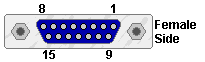
Types of joystick and actual connection to the port
Analog joystick
 The
original joystick on the PC was an analog joystick, wich is composed of two
fire buttons and two potentiometers for each axis (X and Y). The
potentiometers used on this type of joystick are linear type with a value of
100 k ohms, and are wired as in figure 1. The
original joystick on the PC was an analog joystick, wich is composed of two
fire buttons and two potentiometers for each axis (X and Y). The
potentiometers used on this type of joystick are linear type with a value of
100 k ohms, and are wired as in figure 1.
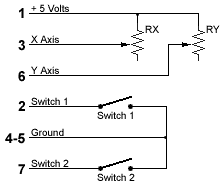
Figure 1: ANALOG JOYSTICK
Digital joystick
A
second joystick type started in the early 80's, it was based on a digital
circuit, it replaced the potentiometers with regular digital (on/off)
switches, it was also known as an atari style joystick. And when Nintendo
came out with the know well known joypad many companies like Gravis came out
with PC joypads. These types of joysticks pretty much work all the same and
are typically wired as in figure 2.

Figure 2: DIGITAL JOYSTICK
The
optional part of the above figure should only be connected when a four button
joystick is required. If a second joystick is to be connected to the same
port, a two button joystick should be used, because the 3rd and 4th buttons
are connected to the 1st and 2nd button of the second joystick. If the
joystick used has a 3rd or even a fourth button, you could also add a rapid
fire repeater to it. An common way to add this feature, if you have the room
for it, is to use a simple circuit like in figure 3, it uses a 555 timer to
witch is enabled when you press the button, and sends pulses at about 400Hz
to the computer input, you could even make an inline box adapter that would
add auto repeat fire to the existing buttons of your joystick by simply
feeding the signal from the joystick to the 555 timer and sending the output
of it to the computer.
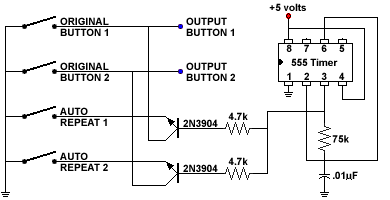
Figure 3: AUTO REPEAT FIRE
When
a second joystick is to be used on a single port, you must first have a port
that allows two joysticks to be connected to it and secondly you need a
special Y adapter cable witch can be purchased at most computer resellers.
For those of you who would like to build there own cable the connections to
make one are explained in figure 4.
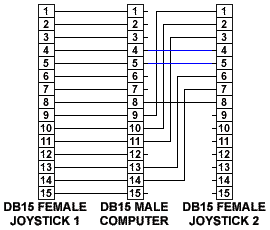
Figure 4: Y CABLE JOYSTICK ADAPTER
This
is one way to configure a second joystick and is probably the best way to do
it, some people or manufacturers will replace the two blue wires connected to
pins 4 & 5 of the Joystick 2 connector and will connect them to pin 12
from the computer and the red wire connected to pin 8 of the joystick 2
connector and will connect it to pin 15 from the computer. This is ok, but if
you have a midi enabled connector (mostly found on soundcards), the second
way might not work, it could disable the soundcard all together, because
these pins (12 & 15) are used for midi input and output. So to be on the
safe side, the wiring diagram in figure 4 is probably the safest way to go.
If you have already bought a cable and it doesn't seem to work wright, it
might be that the cable is wired to pins 12 & 15. One way to overcome
this problem is to build a special adapter wired like in figure 5, this
adapter reroutes the two pins to from pin 5 & 9 and thus isolates the two
midi pins.
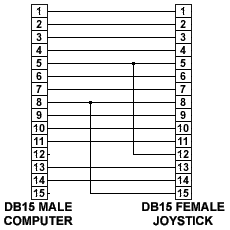
Figure 5: MIDI PIN ISOLATOR ADAPTER
If
you ever build any of these cables or joystick adapters you would probably
want to test your circuits before using them. Here is a small program called JOYTEST.EXE, I wrote to test all of
these projects, it is DOS based and works on all 286 PC computers and higher.
|