







|
|
|
Last Updated - 18Feb01 It's easy to understand the booming business that digital camera manufacturers are doing these days. The host of easy-to-use personal and business publishing applications, the dramatic expansion of the Web and its insatiable appetite for visual images, and the proliferation of inexpensive printers capable of photo-realistic output make a digital camera an enticing add-on. Those factors, combined with improving image quality and falling prices, put the digital camera on the cusp of becoming a standard peripheral for a home or business PC.
Although the principle may be the same as a film camera, the inner workings of a digital camera are quite different, the imaging being performed either by a charge coupled device (CCD) or CMOS (complementary metal-oxide semiconductor) sensors. Each sensor element converts light into a voltage proportional to the brightness which is passed into an analogue-to-digital converter (ADC) which translates the fluctuations of the CCD into discrete binary code. The digital output of the ADC is sent to a digital signal processor (DSP) which adjusts contrast and detail, and compresses the image before sending it to the storage medium. The brighter the light, the higher the voltage and the brighter the resulting computer pixel. The more elements, the higher the resolution, and the greater the detail that can be captured. This entire process is very environment-friendly. The CCD or CMOS sensors are fixed in place and it can go on taking photos for the lifetime of the camera. There’s no need to wind film between two spools either, which helps minimise the number of moving parts. The CCD is the technology at the heart of most digital cameras, and replaces both the shutter and film found in conventional cameras. It's origins lie in 1960s, when the hunt was on for inexpensive, mass-producible memory solutions. It's eventual application as an image-capture device hadn't even occurred to the scientists working with the technology initially.At Bell Labs in 1969, Willard Boyle and George Smith came up with the CCD as a way to store data. The first imaging CCD, with a format of 100x100 pixels, was created in 1974 by Fairchild Electronics. By the following year the device was being used in TV cameras for commercial broadcasts and soon became commonplace in telescopes and medical imaging systems. It was some time later before the CCD became part of the high-street technology that is now the digital camera. It works like an electronic version of a human eye. Each CCD consists of millions of cells known as photosites or photodiodes. These are essentially light-collecting wells that convert optical information into an electric charge. When light particles known as photons enter the silicon body of the photosite, they provide enough energy for negatively-charged electrons to be released. The more light that enters the photosite, the more free electrons are available. Each photosite has an electrical contact attached to it, and when a voltage is applied to this the silicon below each photosite becomes receptive to the freed electrons and acts as a container for them. Thus, each photosite has a particular charge associated with it - the greater the charge, the brighter the intensity of the associated pixel.
The photosites on a CCD actually respond only to light - not to colour. Colour is added to the image by means of red, green and blue filters placed over each pixel. As the CCD mimics the human eye, the ration of green filters to that of red and blue is two to one. This is because the human eye is most sensitive to yellow-green light. As a pixel can only represent one colour, the true colour is made by averaging the light intensity of the pixels around it - a process known as colour interpolation. Recognising a glass ceiling in the conventional charge-coupled device
(CCD) design, Fujifilm have developed a new, radically different CCD with
larger, octagonal-shaped photosites situated on 45-degree angles in place
of the standard square shape. This new arrangement is aimed at avoiding the signal noise that
has previously placed limits on the densities of photosites on a CCD,
providing improved colour reproduction, a wider dynamic range and
increased sensitivity, all attributes that result in sharper, more
colourful digital images. For these and other reasons, many industry analysts believe that eventually, almost all entry-level digital cameras will be CMOS-based and that only midrange and high-end units will use CCDs. Problems remain to be solved - such as noisy images and an inability to capture motion correctly - and at the start of the new millennium CMOS technology clearly had a way to go before reaching parity with CCD technology. However, it's prospects were given a major boost in late 2000 when Silicon Valley-based Foveon Inc. announced the manufacture of a 16.8 million pixel (4096 x 4096) CMOS image sensor - about 3 times the resolution of any previously announced photographic CMOS image sensor and more than 50 times the resolution of the most commonly manufactured CMOS image sensors low-end consumer digital cameras of the time. Hitherto, CMOS image sensors had been manufactured using 0.35 or 0.50 micron process technology, and it had been generally accepted that 0.25 represented the next round of product offerings. Foveon's 16 megapixel sensor is the first image sensor of any size to be manufactured with 0.18 micron process technology - a proprietary analogue CMOS fabrication process developed in collaboration with National Semiconductor Corporation - and represents a two generation leap ahead of the CMOS imager industry. The use of 0.18 micron processing enables more pixels to be packed into a given physical area, resulting in a higher resolution sensor. Transistors made with the 0.18 micron process are smaller and therefore do not take up as much of the sensor space, which can be used instead for light detection. This space efficiency enables sensor designs that have smarter pixels which can provide new capabilities during the exposure without sacrificing light sensitivity. Comprising nearly 70 million transistors, the 4096 x 4096 sensor
measures 22mm x 22mm and has an estimated ISO speed of 100 with a dynamic
range of 10 stops. In the 18 months following its release the sensor is
expected to be seen in products for the high-quality professional markets
- including professional cameras, film scanners, medical imaging, document
scanning and museum archiving. In the longer term, it is anticipated that
the sensor's underlying technology will migrate down to the larger,
consumer markets. In 1997 the typical native resolution of consumer digital cameras was 640 x 480 pixels. A year later as manufacturing techniques improved and technology progressed the emergence of 'megapixel' cameras meant that the same money could buy a 1024 x 768 or even a 1280 x 960 model. By early 1999, resolutions were as high as 1536 x 1024 and before the middle of that year the two megapixel barrier had been breached, with the arrival of 2.3 million-CCDs supporting resolutions of 1800 x 1200. A year later the unrelenting march of the megapixels saw the three megapixel barrier breached, with the advent of 3.34 megapixel CCDs capable of delivering a maximum image size of 2048 x 1536 pixels. At this level, raw resolution is arguably little more than a numbers game and secondary to a digital camera's other quality factors. One of these - and almost as important to the quality of the final image as the amount of information the CCD is capable of capturing in the first place - is how cleanly the information is passed to the ADC. The quality of a CCD's colour management process is another important factor and one of the prime reasons for differences in the output of cameras with the same pixel count CCD. The process should not be confused with the interpolation method used by some manufacturers to achieve bitmap files with a resolution greater than their true optical resolution (the resolution of their CCD array). This method - more accurately referred to as resampling - adds pixels using information already present, and although it increases the effective resolution, it does so at the cost of a reduction in sharpness and contrast. It works by quantifying pixels and qualifying them according to the common traits they possess. In place of the standard interpolation, in which pixels are copied and pasted to create larger images, Some cameras employ a software enlargement technique which it is claimed produces results better than can be achieved by conventional interpolation. This copies and pastes pixels - according to where the enlargement software thinks they are needed to make lines, shapes, patterns and contours - to create larger images. Another limiting factor is the image compression routines used by many digital cameras to enable more images to be stored in a given amount of memory. Some digital camera store images in a proprietary format, requiring the manufacturer’s supplied software for access, but most digital cameras compress and save their images in the industry-standard JPEG or FlashPIX formats, readable on almost every graphics package. Both use slightly lossy compression leading to some loss of image quality. However, many cameras have several different compression settings, allowing the user a trade-off between resolution quality and image capacity, including the option to store images in with no compression at all ('CCD raw mode') for the very best quality. Features
In a step designed to try to address this problem, some LCDs are provided with a power-saving skylight intended to allow it to be used without the backlight. In practice, however, this is rarely practical. If there is sufficient light to allow the skylight to work, the chances are that it will also render the LCD unusable. Digital cameras are often described as having lenses with equivalent focal lengths to popular 35mm-camera lenses. In fact, most digital cameras feature auto focus lenses with focal lengths around 8mm; these provide equivalent coverage to a standard film camera because the imaging CCDs are so much smaller than a frame of 35mm film. Aperture and shutter speed control are also fully automated with some cameras also allowing manual adjustment. Although optical resolution is not an aspect that features greatly in the way digital cameras are marketed, it can have a very important role in image quality. Digital camera lenses typically have an effective range of up to 20', an ISO equivalency of between 100 and 160 and support shutter speeds in the 1/4 of a second to 1/500th of a second range.
For close-up work, a macro function is often provided, allowing photos to be taken at a distance as close as 3cm but more typically supporting a focal range of around 10 - 50cm. Some digital cameras even have swivelling lens units, capable of rotating through 270 degrees and allowing a view of the LCD viewfinder panel regardless of the angle of the lens itself.
Some cameras provide a manual exposure mode, allowing the photographer a significant degree of artistic licence. Typically, four parameters can be set in this mode: colour balance, exposure compensation, flash power and flash sync. Colour balance can be set for the appropriate lighting condition - daylight, tungsten or fluorescent. Exposure compensation alters the overall exposure of the shot relative to the metered 'ideal' exposure. This feature is similar to that a SLR cameras, allowing a shot to be intentionally under- or over-exposed to achieve a particular effect. A flash power setting allows the strength of the flash to be incrementally altered and a flash sync setting allows use of the flash to be forced, regardless of the camera's other settings. Features allowing a number of different image effects are becoming increasingly common. This allows the selection of monochrome, negative and sepia modes. Apart from their use for artistic effect, the monochrome mode is useful for capturing images of documents for subsequent optical character recognition (OCR). Some digital cameras also provide a 'sports' mode - which adds sharpness to the captured images of moving objects - and a 'night shooting' mode which allows for long exposures. Panoramic modes differ in their degree of complexity. At the simpler end of the spectrum is the option for a letterbox aspect image that simply trims off the top and the bottom edges of a standard image - taking up less storage space in the process. More esoteric is the ability to produce pseudo-panoramic shots by capturing a series of images and then combining them into a single panoramic landscape using special-purpose software. A self-timer is a common feature, typically providing a 10-second delay between the time the shutter is activated and when the picture is taken and all modern day digital cameras have a built-in automatic flash, with a manual override option. The best have a working range of up to 12' and provide a number of different modes, such as auto lowlight and backlight flash, fill flash for bright lighting shadow reduction, force-off for indoor and mood photography and red-eye reduction. Red-eye is caused by light reflected back from the retina, which is covered in blood vessels. One system works by shining an amber light at the subject for a second before the main burst of light, causing the pupil to shrink so that the amount of red light reflected back is reduced. Another feature commonly available with film cameras that is now available on their digital counterparts is the ability to watermark a picture with a date and time, or indeed some other chosen text. And that's not all. The recent innovation of built-in microphones provides for sound annotation, in standard WAV format. After recording, this sound can be sent to an external device for playback, or played back on headphones using an ear socket. A couple of other features which demonstrate the digital camera's close coupling with other aspects of PC technology are a function that allows thumbnail images to be emailed directly by camera-resident software and the ability to capture short video clips that can be stored in MPEG-1 format. Higher-end models also provide support for two memory cards and features more commonly associated with SLR-format cameras - such as detachable lenses and the ability to drive a flash unit from either the integrated hotshoe or an external mount. By early 2000 a number of major manufacturers, including Nikon and Kodak, were preparing to follow rival Minolta's lead in pushing digital cameras into the mainstream professional market by offering single lens reflex technology at "affordable prices". While the differential between professional and consumer models remains significant, it has decreased dramatically in the late 1990s - as has the gap between digital cameras in general and their analogue counterparts. Operation Most digital cameras also require recovery time between shots for postcapture processing (converting the data from analogue to digital, mapping, sharpening and compressing the image, and saving the image as a file). This interval can take from a few seconds to half a minute, depending on the camera and the condition of the batteries. Most digital cameras use rechargeable nickel cadmium or nickel hydride batteries as well as regular alkaline batteries (generally 4 AA batteries). Battery lifetimes vary greatly from camera to camera. As a general rule, however, the rechargeables are typically good for between 45 minutes to 2 hours of shooting, depending on how much the LCD and flash are used, while a set of four alkaline AA cells have a typical lifetime of 1 hour. Memory
storage Modern digital cameras use removable storage. This offer two main advantages: first, once a memory card is full it can simply be removed and replaced by another; second, given the necessary PC hardware, memory cards can be inserted directly into a PC and the photos read as if from a hard disk. By early 1999 two rival formats were battling for domination of the digital camera arena:
Devices are available for both types of media to allow access via either a standard floppy disk drive or a PC's parallel port. The highest performance option is a SCSI device which allows PC Card slots to be added to a desktop PC. CompactFlash has a far sturdier construction than its rival, encapsulating the memory circuitry in a hard-wearing case. SmartMedia has its gold-coloured contact exposed, and prolonged use can cause scoring on its surface. Its memory circuitry is set into resin and sandwiched between the card and the contact. CompactFlash can operate between temperatures of 25oC to 75oC and claims a 100-year usage life; SmartMedia can be used between 0oC to 50oC and claims that it can be written to at least 250,000 times. With the 24-bit colour, 1800 x 1200 resolution images being produced by consumer models by mid-1999 occupying a massive 6.2MB - storage capacity is becoming an increasingly important aspect of digital camera technology. It is not clear which format will emerge as winner in the standards battle. SmartMedia has got off to a good start, but CompactFlash is used in PDAs as well, and this extra versatility might prove an important advantage in the long run. By the end of 1999 a third memory technology had emerged, in the shape of Sony's Memory Stick. Smaller than a stick of chewing gum, the 32MB Memory Stick is designed for use in small AV electronics products such as digital cameras and camcorders. It's proprietary 10-pin connector ensures foolproof insertion, easy removal, and reliable connection and its unique Erasure Prevention Switch helps protect stored data from accidental erasure. Disk
storage With the resolution of still digital cameras increasing apace and the emergence of digital video cameras, the need for flexible, high-capacity image storage solutions has never been greater. In 1999 Iomega launched an innovative removable storage device intended for use in digital cameras as well as notebook and handheld devices. The battery-powered Clik! drive supports the PC Card interface and provides a capacity of 40MB on its 10g, 50 x 50mm media. It comes complete with an adapter, allowing the transfer of images from CompactFlash and SmartMedia cards to its significantly cheaper 40MB magnetic disk media. The following year Agfa's ePhoto CL30 Clik! became the first digital camera to use Clik! disks as its primary mode of storage. Mid-1999 also saw IBM enter the fray with the launch of the world's smallest hard disk drive, its revolutionary Microdrive. The Microdrive uses a single one-inch diameter platter that weighs just 16g and spins at 4,500rpm and . Using the Type II CompactFlash interface, the new device - initially available in 170MB and 340MB capacities - takes CompactFlash storage into a new dimension. By the end of 1998 the largest available CompactFlash memory card held just 64MB and in mid-2000 digital cameras rarely came with more than an 8MB card. Furthermore, since the data density of the 340MB version is a mere 5.04Gbits per square inch - and IBM already manufactures conventional disk drives with a density of twice that - microdives of two or three times this capacity should be available in the not too distant future. One of the major advantages of a digital camera is that it is non-mechanical. Since everything is digital, there are no moving parts - and subsequently a lot less that can go wrong. However, this didn't deter Sony from the taking a step which can be viewed as being imaginative and retrograde at the same time - including an integrated 3.5in floppy disk drive in some of its Mavica range of digital cameras. This exclusive Sony technology allowed for double the speed when recording or playing back images. The high-speed spindle motor combined with new DSP also allows for quicker JPEG compression. Each disc is capable of storing up to 40 still images per disc - or 60 seconds of MPEG audio and video. Since a floppy disk's capacity is somewhat limited, integrated-drive Mavicas aren't suitable for high-resolution work. However, provided the device proves reliable, Sony could be on to a winner in the consumer marketplace. Whilst their claim that the floppy disk remains the storage media of choice may be becoming increasing less true, the fact that floppy disk media is universally compatible, cheap and readily available is undeniable. Its also easy to use - no hassles with connecting wires or interfaces. While the integrated drive obviously adds both weight and bulk to a device that's usually designed to be as compact as possible - some users actually prefer designs that lend themselves to a double-handed grip. Its potential unreliability is addressed to some extent by the provision of a 'Whole Disk' copy facility that allows users to easily make copies of disks. This copies images from the original disk to the camera's internal memory and thence to a second disk. In the second half of 2000 Sony updated its innovative approach to the issue digital camera storage limitations when it introduced a Mavica model which stored images on a special 3in/156MB CD-R disc. This provided sufficient capacity to store around 300 640x480 resolution images using JPEG compression. Connectivity Some digital cameras provide a video-out socket and S-Video cable to allow images to be displayed directly to a projector, TV or VCR. Extending the 'slide show' capability further, some allow images to be uploaded to the camera, enabling it to be used as a mobile presentation tool. An increasing number of digital cameras have the ability to cut out the computer and output images directly to a printer. But without established interface standards, each camera requires a dedicated printer from its own manufacturer. As well as the more established printer technologies, there are two distinct technologies used in this field: thermo autochrome and dye sublimation. Business users have more to gain from digital photography than home users. The technology lets the user put a photo onto the computer monitor within minutes of shooting, translating into a huge productivity enhancement and a valuable competitive edge. Digitally captured photos are going into presentations, business letters, newsletters, personnel ID badges, and Web- and print-based product catalogues. Moreover, niche business segments that have relied heavily on traditional photography - such as real-estate agents (for photos of properties) and insurance adjusters (for documentation of claims in the field) - now embrace digital cameras wholeheartedly. If the requirement is to get images in electronic form in the fastest possible time, then a digital camera is the only choice. In fact, they are ideal for any on-screen publishing or presentation use, where people are typically running their PCs at resolutions between 640 x 480 and 1024 x 768 pixels. A digital camera, working at between 640 x 480 and 1024 x 768 pixels, can quickly capture and output an image in a computer-friendly, bitmapped file format ready for incorporation into a presentation, DTP layout, publishing on the WWW and so on. Digital vs
film The first step is to consider resolution. Whilst its easy to state the resolution of a digital camera's CCD, expressing the resolution of traditional film in absolute terms is more difficult. Assuming a capture resolution of 1280 x 960 pixels, a typical 1999 model digital camera is capable of producing a frame size of just over 1.2 million pixels. A modern top-of-the-range camera lens is capable of resolving at least 200 pixels per mm. Since a standard 100ASA 35mm negative is 24 x 36mm, this gives an effective resolution of 24 x 200 x 36 x 200 = 34,560,000. This resolution is rarely achieved in practice and, indeed, rarely required. However, on the basis of resolution, it is clear that digital cameras still have some way to go before they reach the level of performance as their conventional film camera counterparts. However, this is only part of the answer. The next factor to consider is colour - and here digital cameras have an advantage. Typically, the CCDs in digital cameras capture colour information in 24 bits per pixel. This equates to 16.7 million colours and is generally considered as being the maximum number the human eye can perceive. On its own this doesn't constitute a major advantage over film. However, unlike the silver halide crystals in a film, a CCD captures each of the three component colours (red, green and blue) with no bias. Photographic film tends to have a specific colour bias - dependent on the type of film and, to a certain extent, the manufacturer - and this can have an adverse effect on an image, according to its colour balance. However, its also its silver halide crystals that give photographic film its key advantage. While the cells on a CCD are laid out in rows and columns, the crystals on a film are, to all intent and purposes, randomly arranged with no discernible pattern. As the human eye is very sensitive to patterns, it tends to perceive the regimented arrangement of the pixels captured by a CCD very easily, particularly when adjacent pixels have markedly different tonal values. Magnify photographic film, and though the dots will be discernible, there will be no apparent regularity. Its for this reason that modern inkjet printers use a technique known as 'stochastic dithering', which adds a random element to the pattern of the ink dots in order to smooth the transition from one tone to the next. Photographic film does this naturally, so the eye perceives the results as less blocky when compared to digital stills. There are two possible ways around this problem for digital cameras. Manufacturers can either develop and build models that can capture a higher resolution than the eye can perceive, or they can build in dithering algorithms that alter an image after it has been captured by the CCD. Both of these options have downsides however, such as increased file sizes and longer processing times. Digital
video
|


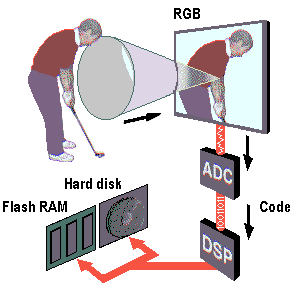 In principal, a
 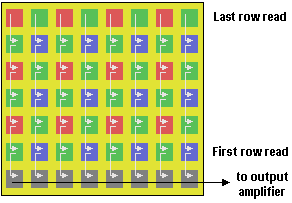 The next stage in the
process passes this current to what's known as a read-out register. As the
charges enter and then exit the read-out register they're deleted and,
since the charge in each row is 'coupled' to the next, this has the effect
of dragging the next in behind it. The signals are then passed - as free
of signal noise as possible - to an amplifier and thence on to the
ADC.
The next stage in the
process passes this current to what's known as a read-out register. As the
charges enter and then exit the read-out register they're deleted and,
since the charge in each row is 'coupled' to the next, this has the effect
of dragging the next in behind it. The signals are then passed - as free
of signal noise as possible - to an amplifier and thence on to the
ADC.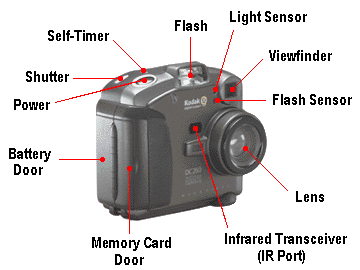 Few digital cameras come with a true single-lens reflex (SLR)
viewfinder, where what the user sees through the viewfinder is exactly
what the camera's CCD 'sees'; most have the typical compact camera
separate viewfinder which sees the picture being taken from a slightly
different angle and suffer the consequent problems of parallax. Most
digital cameras allow the LCD to be used for composition instead of the
optical viewfinder, thereby eliminating this problem. On some models this
is hidden on the rear of a hinged flap that has to be folded out, rotated
and then folded back into place. On the face of it this is a little
cumbersome - but it has a couple of advantages over a fixed screen. First,
the screen is protected when not in use and, second, it can be flexibly
positioned so as to allow the photographer to take a self-portrait or to
hold the camera above their head whilst still retaining control over the
framing of the shot. It also helps with one of the common problems in
using an LCD viewfinder - viewing difficulty in direct sunlight. The other
downside, of course, is that prolonged use causes batteries to drain
quickly.
Few digital cameras come with a true single-lens reflex (SLR)
viewfinder, where what the user sees through the viewfinder is exactly
what the camera's CCD 'sees'; most have the typical compact camera
separate viewfinder which sees the picture being taken from a slightly
different angle and suffer the consequent problems of parallax. Most
digital cameras allow the LCD to be used for composition instead of the
optical viewfinder, thereby eliminating this problem. On some models this
is hidden on the rear of a hinged flap that has to be folded out, rotated
and then folded back into place. On the face of it this is a little
cumbersome - but it has a couple of advantages over a fixed screen. First,
the screen is protected when not in use and, second, it can be flexibly
positioned so as to allow the photographer to take a self-portrait or to
hold the camera above their head whilst still retaining control over the
framing of the shot. It also helps with one of the common problems in
using an LCD viewfinder - viewing difficulty in direct sunlight. The other
downside, of course, is that prolonged use causes batteries to drain
quickly.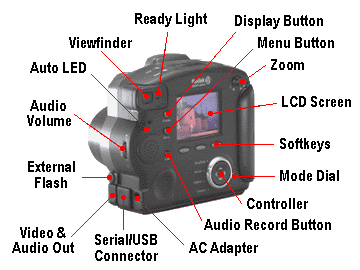 Zoom capability - motorised zoom lenses with a focal length
range equivalent to anything between a 36mm (moderate wide angle) and
114mm (moderate telephoto) lens on a 35mm format camera - is becoming an
ever-more popular feature. Some cameras have a gradual zoom action across
the total focal range, others provide two or three predefined settings.
Digital zoom doesn't increase the image quality, but merely takes a
portion of an image and uses the camera's software to automatically resize
it to a full-screen image by interpolation. Some digital cameras provide a
digital zoom feature as an alternative to an true optical zoom, others
provide it as an additional feature, effectively doubling the range of the
camera's zoom capability.
Zoom capability - motorised zoom lenses with a focal length
range equivalent to anything between a 36mm (moderate wide angle) and
114mm (moderate telephoto) lens on a 35mm format camera - is becoming an
ever-more popular feature. Some cameras have a gradual zoom action across
the total focal range, others provide two or three predefined settings.
Digital zoom doesn't increase the image quality, but merely takes a
portion of an image and uses the camera's software to automatically resize
it to a full-screen image by interpolation. Some digital cameras provide a
digital zoom feature as an alternative to an true optical zoom, others
provide it as an additional feature, effectively doubling the range of the
camera's zoom capability.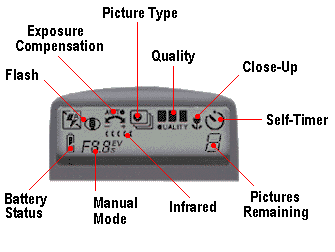 Some cameras offer a number of image exposure options. One of
the most popular is a burst mode that allows a number of exposures to be
taken with a single press of the shutter - as many as 15 shots in a burst
at rates of between 1 and 3 shots per second. Also common is time-lapse,
which delays multi-picture capture over preselected interval. Other
examples are the ability for four consecutive shots to each use only a
quarter of the available CCD array, resulting in a single frame with four
separate images stored on it and to take multiple exposures at a preset
delay interval, tiling the resulting images in a single frame.
Some cameras offer a number of image exposure options. One of
the most popular is a burst mode that allows a number of exposures to be
taken with a single press of the shutter - as many as 15 shots in a burst
at rates of between 1 and 3 shots per second. Also common is time-lapse,
which delays multi-picture capture over preselected interval. Other
examples are the ability for four consecutive shots to each use only a
quarter of the available CCD array, resulting in a single frame with four
separate images stored on it and to take multiple exposures at a preset
delay interval, tiling the resulting images in a single frame. 
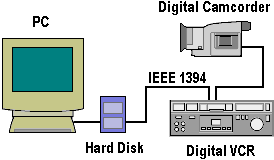 Of course, with a
DV camera a traditional video capture card isn't needed because the output
from the camera is already in a compressed digital format. DV files are
still large, however, and the trend towards digital video includes digital
video cameras being equipped with an
Of course, with a
DV camera a traditional video capture card isn't needed because the output
from the camera is already in a compressed digital format. DV files are
still large, however, and the trend towards digital video includes digital
video cameras being equipped with an 