Copied from site
http://www.howstuffworks.com/analog-digital.htm
How Analog and Digital Recording Works
When CDs were first introduced in the
early 1980s, their single purpose in life was to hold music in a digital
format. In order to understand how a CD works, you need to first understand how
digital recording and playback works and the difference between analog and
digital technologies.
In this edition of How Stuff Works we
will look at how analog-digital recording works so that you have a complete
understanding of the difference between the two techniques!
Understanding
Analog and Digital Recording
Thomas Edison is credited
with creating the first device for recording and playing back sounds in 1877.
His approach used a very simple mechanism to store an analog wave mechanically.
In Edison's original phonograph, a diaphragm directly controlled a needle, and
the needle scratched an analog signal onto a tin foil cylinder:
You spoke into Edison's device while
rotating the cylinder, and the needle "recorded" what you said onto
the tin. That is, as the diaphragm vibrated so did the needle, and those
vibrations impressed themselves onto the tin. To play the sound back, the
needle moved over the groove scratched during recording. During playback, the
vibrations pressed into the tin caused the needle to vibrate, causing the
diaphragm to vibrate and play the sound. This system was improved by Emil
Berliner in 1887 to produce the gramophone, which is also a purely mechanical
device using a needle and diaphragm. The gramophone's major improvement was the
use of flat records with a spiral groove, making mass production of the records
easy. The modern phonograph works the same way, but the signals read by the
needle are amplified electronically rather than directly vibrating a mechanical
diaphragm.
Analog Wave
What is it that the needle in Edison's
phonograph is scratching onto the tin cylinder? It is an analog wave
representing the vibrations your voice creates. For example, here is a graph
showing the analog wave created by saying the word "Hello":
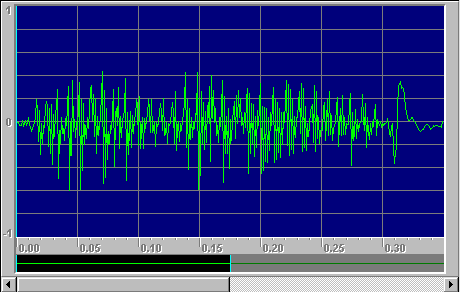
This waveform was recorded electronically
rather than on tin foil, but the principle is the same. What this graph is
showing is, essentially, the position of the microphone's diaphragm (Y axis)
over time (X axis). The vibrations are very quick - the diaphragm is vibrating
on the order of 1,000 oscillations back and forth per second. This is the sort
of wave scratched onto the tin foil in Edison's device. Notice that the
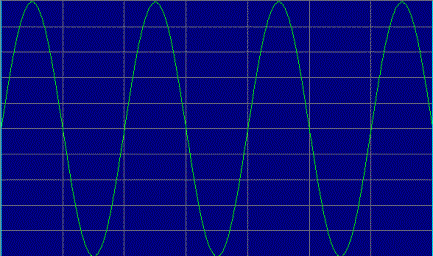
waveform for the word "hello" is fairly complex. A pure tone is
simply a sine wave vibrating at a certain frequency, like this 500 hertz wave
(500 hertz = 500 oscillations per second):
You can see that the storage and playback of
an analog wave can be very simple - scratching onto tin is certainly a direct
and straightforward approach. The problem with the simple approach is that the
fidelity is not very good. For example, when you use Edison's phonograph there
is a lot of scratchy noise stored with the intended signal, and the signal is
distorted in several different ways. You can also see that if you play a
phonograph repeatedly, eventually it will wear out. When the needle passes over
the groove it changes it slightly (and eventually erases it).
How Do I Hear
Digital Data?
In a CD (and any other digital recording
technology) the goal is to create a recording with very high fidelity (very
high similarity between the original signal and the reproduced signal) and
perfect reproduction (the recording sounds the same every single time you play
it no matter how many times you play it). To accomplish these two goals,
digital recording converts the analog wave into a stream of numbers and records
the numbers instead of the wave. The conversion is done by a device called an analog-to-digital
converter. Then to play back the music, the stream of numbers is converted
back to an analog wave by a digital-to-analog converter (DAC). The
analog wave produced by the DAC is amplified and fed to the speakers to produce
the sound.
The analog wave produced by the DAC will be
the same every time, as long as the numbers are not corrupted. The analog wave
produced by the DAC will also be very similar to the original analog wave if
the analog-to-digital converter sampled at a high rate and produced accurate
numbers.
You can understand why CDs have such high
fidelity if you understand the analog-to-digital conversion process better.
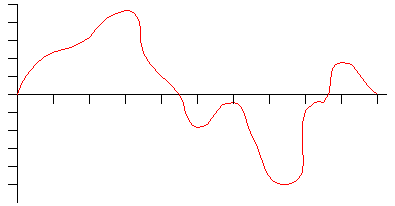
Let's say you have a sound wave, and you wish to sample it with an A-to-D
converter. Here is a typical wave (assume here that the ticks on the horizontal
axis represent 1/1000ths of a second):
When you sample the wave with an
analog-to-digital converter you have control over 2 variables. The first is the
sampling rate. The rate controls how many samples are taken per second.
The second is the sampling precision. The precision controls how many
different gradations (quantization levels) are possible when taking the sample.
In the following figure, let's assume that the sampling rate is 1,000 per
second and the precision is 10:
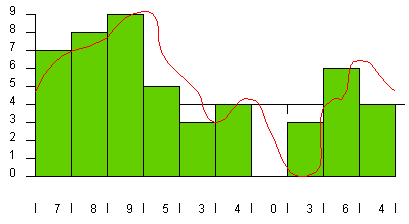
The green rectangles represent samples.
Every 1/1000th of a second the A-to-D converter looks at the wave and picks the
closest number between 0 and 9. The number chosen is shown along the bottom of
the figure. These numbers are a digital representation of the original wave.
When the DAC recreates the wave from these numbers, you get the blue line shown
in the following figure:
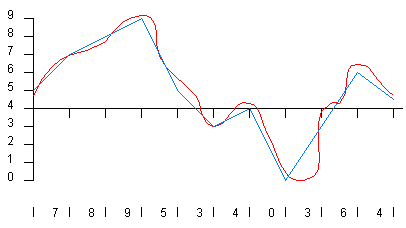
You can see that the blue line lost quite a
bit of the detail originally found in the red line, and that means the fidelity
of the reproduced wave is not very good. This is the sampling error. You reduce
sampling error by increasing both the sampling rate and the precision. In the
following figure, both the rate and the precision have been improved by a
factor of 2 (20 gradations at a rate of 2000 samples per second):
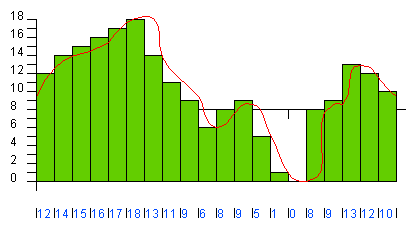
In the following figure the rate and the
precision have been doubled again (40 gradations at 4,000 samples per second):
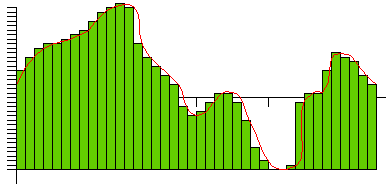
You can see that as the rate and precision
improve, the fidelity (the similarity between the original wave and the DAC's
output) improves. In the case of CD sound, fidelity is an important goal so the
sampling rate is 44,100 samples per second and the number of gradations is
65,536. At this level the output of the DAC so closely matches the original
wave form that the sound is essentially "perfect" to most human ears.
How Many Hundreds
of Megabytes Fit On a CD?
One thing about the CD's sampling rate and
precision is that it produces a lot of data. On a CD the digital numbers
produced by the analog-to-digital converter are stored as bytes, and it takes two bytes to represent 65,536
gradations. There are two sound streams being recorded (one for each of the
speakers on a stereo system). A CD can store up to 74 minutes of music, so the
total amount of digital data that must be stored on a CD is:
44,100
samples/channel/second * 2 bytes/sample * 2 channels * 74 minutes * 60
seconds/minute = 783,216,000 bytes
That is a lot of bytes! To
store that many bytes onto a cheap piece of plastic tough enough to survive the
abuse most people put a CD through was no small task, especially when you
consider that the first CDs came out in 1980. Read How CDs Work for the complete
story!
Links
If you would like to build a replica of
Edison's phonograph, click
here for instructions.
Places to buy music CDs:
- CD
Universe

 800.com
 - EveryCD
- interesting pricing
- DVD
Express
- DVD music and movies
CDs
are incredibly interesting devices. Here are some links that provide more
detailed information:
- How Digital
Versatile Discs (DVDs) Work
- How Compact Discs
(CDs) Work
- Audio
Compact Discs - An Introduction - One of the best descriptions ever of
the laser lens system and the tracking methods used in CD drives.
- CD-R
Frequently Asked Questions
- MPEG
Information - Details on MPEG compression used in DVD
If you want to produce 1 or
10 CDs yourself, you can use CD-R and make them on your computer. If you want
to produce thousands of audio CDs or CD-ROMs for distribution, then you turn to
a CD manufacturer. There are hundreds of companies will help you manufacture
your CD and its sleeve/jewel box. Here are two manufacturers with informative
web sites: