





|
|
|
Last Updated - 18Feb01 Digital imaging has come of age. Equipment that was once reserved for the wealthiest bureaux is now commonplace on the desktop. The powerful PCs required to manipulate digital images are now considered entry level, so it comes as no surprise to learn that scanners, the devices used to get images into a PC, are one of the fastest growing markets today. At its most basic level, a scanner is just another input device, much like a keyboard or mouse, except that it takes its input in graphical form. These images could be photographs for retouching, correction or use in DTP. They could be hand-drawn logos required for document letterheads. They could even be pages of text which suitable software could read and save as an editable text file. The list of scanner applications is almost endless, and has resulted in products evolving to meet specialist requirements:
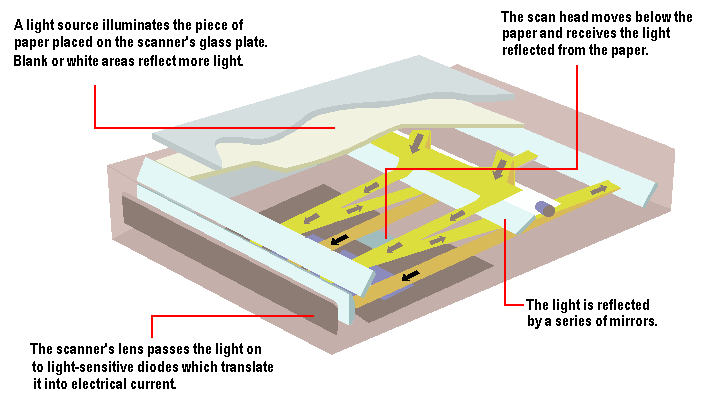
However, flatbed scanners are the most versatile and popular format. These are capable of capturing colour pictures, documents, pages from books and magazines, and, with the right attachments, even scan transparent photographic film. On the simplest level, a scanner is a device which converts light (which we see when we look at something) into 0s and 1s (a computer-readable format). In other word, scanners convert analogue data into digital data. All scanners work on the same principle of reflectance or transmission. The image is placed before the carriage, consisting of a light source and sensor; in the case of a digital camera, the light source could be the sun or artificial lights. When desktop scanners were first introduced, many manufacturers used fluorescent bulbs as light sources. While good enough for many purposes, fluorescent bulbs have two distinct weaknesses: they rarely emit consistent white light for long, and while they're on they emit heat which can distort the other optical components. For these reasons, most manufacturers have moved to 'cold-cathode' bulbs. These differ from standard fluorescent bulbs in that they have no filament. They therefore operate at much lower temperatures and, as a consequence, are more reliable. Standard fluorescent bulbs are now found primarily on low-cost units and older models. By late 2000, Xenon bulbs had emerged as an alternative light source. Xenon produces a very stable, full-spectrum light source that's both long lasting and quick to initiate. However, xenon light sources do consume power at a higher rate than cold cathode tubes.
To direct light from the bulb to the sensors that read light values, CCD scanners use prisms, lenses, and other optical components. Like eyeglasses and magnifying glasses, these items can vary quite a bit in quality. A high-quality scanner will use high-quality glass optics that are colour-corrected and coated for minimum diffusion. Lower-end models will typically skimp in this area, using plastic components to reduce costs. The amount of light reflected by or transmitted through the image and picked up by the sensor, is then converted to a voltage proportional to the light intensity - the brighter the part of the image, the more light is reflected or transmitted, resulting in a higher voltage. This analogue-to-digital conversion (ADC) is a sensitive process, and one that is susceptible to electrical interference and noise in the system. In order to protect against image degradation, the best scanners on the market today use an electrically isolated analogue-to-digital converter that processes data away from the main circuitry of the scanner. However, this introduces additional costs to the manufacturing process, so many low-end models include integrated analogue-to-digital converters that are built into the scanner's primary circuit board. The sensor component itself is implemented using one of three different types of technology:
PMT With PMT, the light detected by the sensor is split into three beams which are passed through red, green and blue filters and thence into the photomultiplier tubes - where the light energy is converted into an electrical signal. PMTs have a much higher sensitivity to light and lower noise levels than CCD scanners. Consequently, drum scanners are capable of excellent tonal resolution, being less susceptible to errors due to refraction or focus than their flatbed counterparts However, drum scanners are slow compared to CCD scanners and are expensive. These days they're are generally used only for specialised high-end applications. CCD CIS The technology employed by its sensor mechanism is not, however, the only factor that governs a scanner level of performance. The following are equally important aspects of a given unit's specification:
Resolution relates to the fineness of detail that a scanner can achieve, and is usually measures in dots per inch (dpi). The more dots per inch a scanner can resolve, the more detail the resulting image will have. The typical resolution of an inexpensive desktop scanner in the late 1990s was 300 x 300. A typical flatbed scanner has a CCD element for each pixel, so for a desktop scanner claiming a horizontal optical resolution of 600dpi (dots per inch) - alternatively referred to as 600ppi (pixels per inch) - and a maximum document width of 8.5in there’ll be an array of 5,100 CCD elements in what’s known as the scan head. The scan head is mounted on a transport which is moved across the target object. Although the process may appear to be a continuous movement, the head moves a fraction of an inch at a time, taking a reading between each movement. In the case of a flatbed scanner, the head is driven by a stepper motor, a device which turns a predefined amount and no more, each time an electrical pulse is fed. The number of physical elements in a CCD array determines the x-direction sampling rate, and the number of stops per inch determines the y-direction sampling rate. Although these are conveniently referred to as a scanner’s ‘resolution’, the term is not strictly accurate. The resolution is the scanner’s ability to determine detail in an object and is defined by the quality of electronics, optics, filters and motor control, as well as the sampling rate. The actual scan head, though capable of reading a raster line 8.5in wide, will be much smaller than that, typically around 4in wide. The reflected light is presented to the scan head through a lens, and the quality of the optics can have a greater effect on the resolution of the scan than the sampling rate. High resolution optics in a 400dpi scanner is likely to produce better results than a 600dpi device with poor optics. By late 1998 the physical limit as to how many CCD elements could be placed side by side in one inch stood at 600. It is, however, possible for the apparent resolution to be increased using a technique known as interpolation, which under software or hardware control guesses intermediate values and inserts them between the real ones. Some scanners do this much more effectively than others. Scanners typically offer resolutions of 2,400dpi, 4,800dpi and 9,600dpi. Its important to realise that scanners simply aren’t capable of picking up this level of detail. The actual optical resolution of the CCDs in most modern scanners is 600 x 1,200dpi at best and all higher figures are based on interpolation. Note that the specification of a non-uniform resolution - for example, 600 x 1200dpi - necessarily implies hardware interpolation, since the acquisition of data at 600dpi in one axis and 1200dpi in the other clearly cannot result in a 'square' of data. At 600 x 600dpi such a scanner will interpolate the 1200dpi dimension down to 600dpi (usually done by merely running the stepper motor that moves the light bar at twice its minimum rate), or at 1200 x 1200dpi they interpolate up the x dimension. Basically, an integrated circuit chip in the scanner generates new data by taking the dots the scanner actually sees, and calculating where the dots in-between would most likely fall, using an algorithm to 'guess' the colour of the new dots by averaging the colour of adjacent dots. Software interpolation can increase the resolution even more than hardware interpolation. It is performed by the PC's processor under the control of the scanner's TWAIN driver software. The problem is that best guesses can never be truly accurate. Interpolated images will always seem too smooth and slightly out of focus. This doesn’t matter so much with line-art where interpolation has the effect of smoothing out jagged edges. But for continuous-tone images like photographs its often better to stick with a scanner’s actual optical resolution. Colour
scanners Single-pass scanners have problems with the stability of light levels when they’re being turned on and off rapidly. Older three-pass scanners used to suffer from registration problems along with being slow. More modern three-pass units are much improved and able to match some single-passers for speed. However, by the late 1990s most colour scanners were single-pass devices. These scanners use one of two methods for reading light values: beam splitter or coated CCDs. When a beam splitter is used, light passes through a prism and separates into the three primary scanning colours, which are each read by a different CCD. This is generally considered the best way to process reflected light, but to bring down costs many manufacturers use three CCDs, each of which is coated with a film so that it reads only one of the primary scanning colours from an unsplit beam. While technically not as accurate, this second method usually produces results that are difficult to distinguish from those of a scanner with a beam splitter. Bit-depth The simplest kind of scanner only records black and white, and is sometimes known as a 1-bit scanner because each bit can only express two values, on and off. In order to see the many tones in between black and white, a scanner needs to be at least 4-bit (for up to 16 tones) or 8-bit (for up to 256 tones). The higher the scanner's bit-depth, the more accurately it can describe what it sees when it looks at a given pixel. This, in turn, makes for a higher quality scan. Most modern colour scanners are at least 24-bit, meaning that they collect 8 bits of information about each of the primary scanning colours: red, blue, and green. A 24-bit unit can theoretically capture over 16 million different colours, though in practice the number is usually quite smaller. This is near-photographic quality, and is therefore commonly referred to as 'true colour' scanning. Recently, an increasing number of manufacturers are offering 30-bit and 36-bit scanners, which can theoretically capture billions of colours. The only problem is that very few graphics software packages can handle anything larger than a 24-bit scan, because of limitations in the design of personal computers. Still, those extra bits are worth having. When a software program opens a 30-bit or 36-bit image, it can use the extra data to correct for noise in the scanning process and other problems that hurt the quality of the scan. As a result, scanners with higher bit-depths tend to produce better colour images. Dynamic
range Dynamic range is measured on scale from 0.0 (perfect white) to 4.0 (perfect black), and the single number given for a particular scanner tells how much of that range the unit can distinguish. Most colour flatbeds have difficulty perceiving the subtle differences between the dark and light colours at either end of the range, and tend to have a dynamic range of about 2.4. That's fairly limited, but it's usually sufficient for projects where perfect colour isn't a concern. For greater dynamic range, the next step up is a top-quality colour flatbed scanner with extra bit-depth and improved optics. These high-end units are usually capable of a dynamic range between 2.8 and 3.2, and are well-suited to more demanding tasks like standard colour prepress. For the ultimate in dynamic range, the only alternative is a drum scanner. These units frequently have a dynamic range of 3.0 to 3.8, and deliver all the colour quality one could ask of a desktop scanner. Although they are overkill for most projects, drum scanners do offer high quality in exchange for their high price. In theory, a 24-bit scanner offers an 8-bit range (256 levels) for each primary colour - the difference between 256 levels is commonly accepted to be indiscernible to the human eye. Unfortunately, a few of the least significant bits are lost in noise, while any post-scanning tonal corrections reduce the range still further. That’s why it’s best to make any brightness and colour corrections in one go from the scanner driver before making the final scan itself. More expensive scanners with 30- or 36-bit depths have a much wider range to start with, offering better detail in the shadow and highlight areas, allowing you to make tonal corrections and still end up with a decent 24-bits at the end. A 30-bit scanner collects 10-bits of data each for the red, green and blue colour components while 36-bit scanners collect 12-bits for each. The scanner driver allows the operator to control which 24 of those 30 or 36 bits are kept and which ones are discarded - this adjustment being made by changing the Gamma Curve, accessed through the TWAIN driver's Tonal Adjustment control. 'Scanners' Next
|