This
information comes from site http://www.plcs.net/chapters/data30.htm
RS-232 Communications (hardware)
RS-232 communications is the most
popular method of plc to external device communications. Let's tackle it piece
by piece to see how simple it can be when we understand it.
RS-232 is an asynchronous
(a marching band must be "in sync" with each other so that when one
steps they all step. They are asynchronous in that they follow the band leader
to keep their timing) communications method. We use a binary system (1's and
0's) to transmit our data in the ASCII format. (American Standard Code for
Information Interchange- pronounced ASS-KEY) This code translates human
readable code (letters/numbers) into "computer readable" code (1's
and 0's). Our plcs serial port is used for transmission/reception of the data.
It works by sending/receiving a voltage. A
positive voltage is called a MARK and a negative voltage is called a SPACE.
Typically, the plc works with +/- 15volts. The voltage between +/- 3 volts is
generally not used and is considered noise.
There are 2
types of RS-232 devices.
The first is called a DTE device. This means Data Terminal Equipment and a
common example is a computer. The other type is called a DCE device. DCE means
Data Communications Equipment and a common example is a modem. Your plc may be
either a DTE or DCE device. Check your documentation.
The plc serial port works
by turning some pins on while turning other off. These pins each are dedicated
to a specific purpose. The serial port comes in 2 flavors-- a 25-pin type and a
9-pin type. The pins and their purposes are shown below. (This chart assumes
your plc is a DTE device)
|
9-PIN |
25-PIN |
PURPOSE |
|
1 |
1 |
frame ground |
|
2 |
3 |
receive data (RD) |
|
3 |
2 |
transmit data (TD) |
|
4 |
20 |
data terminal ready (DTR) |
|
5 |
7 |
signal ground |
|
6 |
6 |
data set ready (DSR) |
|
7 |
4 |
request to send (RTS) |
|
8 |
5 |
clear to send (CTS) |
|
9 |
22 |
ring indicator (RI) *only
for modems* |
Each pins purpose in
detail:
- frame ground- This pin should be internally
connected to the chassis of the device.
- receive data- This pin is where the data
from the external device enters the plc serial port.
- transmit data- This pin is where the data
from the plc serial port leaves the plc enroute to the external device.
- data terminal ready- This pin is a master control
for the external device. When this pin is 1 the external device will not
transmit or receive data.
- signal ground- Since data is sent as + or -
voltage, this pin is the ground that is referenced.
- data set ready- Usually external devices have
this pin as a permanent 0 and the plc basically uses it to determine that
the external device is powered up and ready.
- request to send- This is part of hardware
handshaking. When the plc wants to send data to the external device it
sets this pin to a 0. In other words, it sets the pin to a 0 and basically
says "I want to send you data. Is it ok?" The external device
says it's OK to send data by setting its clear to send pin to 0. The plc
then sends the data.
- clear to send- This is the other half of
hardware handshaking. As noted above, the external device sets this pin to
0 when it is ready to receive data from the plc.
- ring indicator- only used when the plc is
connected to a modem.
What happens when your plc and external device
are both DTE (or both DCE) devices? They can't talk to each other, that's what happens. The
picture below shows why 2 same type devices can't communicate with each other.
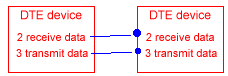
Notice that in the picture above, the receive data line
(pin2) of the first device is connected to the receive data line of the second
device. And the transmit data line (pin3) of the first device is connected to
the transmit data of the second device. It's like talking through a phone with
the wires reversed. (i.e. your mouth piece is connected directly to the other
parties mouthpiece and your ear piece is connected directly to the other
parties earpiece.) Obviously, this won't work well!
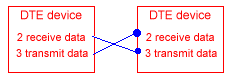
The solution is to use a null-modem connection
as shown below. This is
typically done by using a reverse (null-modem) cable to connect the devices.
To summarize everything, here's a typical
communications session. Both
devices are powered up. The plc is DTE and the external device is DCE.
The external device turns on DSR which tells the plc that's
it's powered up and "there". The PLC turns on RTS which is like
asking the external device "are you ready to receive some data?" The
external device responds by turning on it's CTS which says it's ok to for the
plc to send data. The plc sends the data on its TD terminal and the external
device receives it on its RD terminal. Some data is sent and received. After a
while, the external device can't process the data quick enough. So, it turns
off its CTS terminal and the plc pauses sending data. The external device
catches up and then turns its CTS terminal back on. The plc again starts
sending data on its TD terminal and the external device receives it on its RD
terminal. The plc runs out of data to send and turns off its RTS terminal. The
external device sits and waits for more data.
RS-232 Communications (software)
Now that we understand the hardware
part of the picture, let's dive right into the software part. We'll take a look
at each part of the puzzle by defining a few of the common terms. Ever
wondered what phrases like 9600-8-N-1 meant?
Do you use software-handshaking or hardware-handshaking at formal parties for a
greeting? If you're not sure, read on!
- ASCII is a human-readable to computer-readable translation
code. (i.e. each letter/number is translated to 1's and 0's) It's a 7-bit
(a bit is a 1 or a 0) code, so we can translate 128 characters. (2^7 is
128) Character sets that use the 8th bit do exist but they are not true
ASCII. Below is an ASCII chart showing its "human-readable"
representation. We typically refer to the characters by using hexadecimal
terminology. "0" is 30h, "5" is 35h, "E" is
45h, etc. (the "h" simple means hexadecimal)
|
|
most significant
bits |
||||||||
|
least |
|
0 |
1 |
2 |
3 |
4 |
5 |
6 |
7 |
|
0 |
|
|
space |
0 |
@ |
P |
` |
p |
|
|
1 |
|
XON |
! |
1 |
A |
Q |
a |
q |
|
|
2 |
STX |
|
" |
2 |
B |
R |
b |
r |
|
|
3 |
ETX |
XOFF |
# |
3 |
C |
S |
c |
s |
|
|
4 |
|
|
$ |
4 |
D |
T |
d |
t |
|
|
5 |
|
NAK |
% |
5 |
E |
U |
e |
u |
|
|
6 |
ACK |
|
& |
6 |
F |
V |
f |
v |
|
|
7 |
|
|
' |
7 |
G |
W |
g |
w |
|
|
8 |
|
|
( |
8 |
H |
X |
h |
x |
|
|
9 |
|
|
) |
9 |
I |
Y |
i |
y |
|
|
A |
LF |
|
* |
: |
J |
Z |
j |
z |
|
|
B |
|
|
+ |
; |
K |
[ |
k |
{ |
|
|
C |
|
|
, |
< |
L |
\ |
l |
| |
|
|
D |
CR |
|
- |
= |
M |
] |
m |
} |
|
|
E |
|
|
. |
> |
N |
^ |
n |
~ |
|
|
F |
|
|
/ |
? |
O |
_ |
o |
|
|
- start bit- In RS-232 the first thing we send is called a start
bit. This start bit ("invented" during WW1 by Kleinschmidt) is a
synchronizing bit added just before each character we are sending. This is
considered a SPACE or negative voltage or a 0.
- stop bit- The last thing we send is called a stop bit. This
stop bit tells us that the last character was just sent. Think of it as an
end-of -character bit. This is considered a MARK or positive voltage or a
1. The start and stop bits are commonly called framing
bits because they surround the character we are sending.
- parity bit- Since most plcs/external equipment are
byte-oriented (8 bits=1byte) it seems natural to handle data as a byte.
Although ASCII is a 7-bit code it is rarely transmitted that way.
Typically, the 8th bit is used as a parity bit for error checking. This
method of error checking gets its name from the math idea of parity. (remember
the odd-even property of integers? I didn't think so.) In simple terms, parity means that all characters
will either have an odd number of 1's or an even number of 1's.
Common forms of parity are None, Even, and Odd. (Mark and Space aren't very common so I won't discuss them). Consider these examples:
send "E" (45h or 1000101b(inary))
In parity of None, the parity bit is always 0 so we send 10001010.
In parity of Even we must have an Even number of 1's in our total character so the original character currently has 3 1's (1000101) therefore our parity bit we will add must be a 1. (10001011) Now we have an even number of 1's.
In Odd parity we need an odd number of 1's. Since our original character already has an odd number of 1's (3 is an odd number, right?) our parity bit will be a 0. (10001010)
During transmission, the sender calculates the parity bit and sends it. The receiver calculates parity for the 7-bit character and compares the result to the parity bit received. If the calculated and real parity bits don't match, an error occurred an we act appropriately.
It's strange that this parity method is so popular. The reason is because it's only effective half the time. That is, parity checking can only find errors that effect an odd number of bits. If the error affected 2 or 4 or 6 bits the method is useless. Typically, errors are caused by noise which comes in bursts and rarely effects 1 bit. Block redundancy checks are used in other communication methods to prevent this. - Baud rate- I'll perpetuate the
incorrect meaning since it's most commonly used incorrectly. Think of baud
rate as referring to the number of bits per second that are being
transmitted. So 1200 means 1200 bits per second are being sent and 9600
means 9600 bits are being transmitted every second. Common values (speeds)
are 1200, 2400, 4800, 9600, 19200, and 38400.
- RS232 data format- (baud rate-data
bits-parity-stop bits) This is the way the data format is typically
specified. For example, 9600-8-N-1 means a baud rate of 9600, 8 data bits,
parity of None, and 1 stop bit.
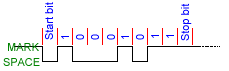
The picture below shows how data leaves the serial port for
the character "E" (45h 100 0101b) and Even parity.
Another important thing that is sometimes used
is called software handshaking (flow control). Like the hardware handshaking we saw in the
previous chapter, software handshaking is used to make sure both devices are
ready to send/receive data. The most popular "character flow control"
is called XON/XOFF. It's very simple to understand. Simply put, the receiver
sends the XOFF character when it wants the transmitter to pause sending data.
When it's ready to receive data again, it sends the transmitter the XON character.
XOFF is sometimes referred to as the holdoff character and XON as the release
character.
The last thing we should know about is delimiters. A delimiter is simply added to the end of a message to tell
the receiver to process the data it has received. The most common is the
CR or the CR and LF pair. The CR (carriage return) is like the old typewriters.
(remember them??) When you reached the end of a line while typing, a bell would
sound. You would then grab the handle and move the carriage back to the start.
In other words, you returned the carriage to the beginning. (This is the same
as what a CR delimiter will do if you view it on a computer screen.) The
plc/external device receives this and knows to take the data from its buffer.
(where the data is stored temporarily before being processed) An LF (line feed)
is also sometimes sent with the CR character. If viewed on a computer screen
this would look like what happens on the typewriter when the carriage is returned
and the page moves down a line so you don't type over what you just typed.
Sometimes an STX and ETX pair is used for
transmission/reception as well. STX is "start of text" and ETX is
"end of text". The STX is sent before the data and tells the external
device that data is coming. After all the data has been sent, an ETX character
is sent.
Finally, we might also come across an ACK/NAK pair. This is
rarely used but it should be noted as well. Essentially, the transmitter sends
its data. If the receiver gets it without error, it sends back an ACK
character. If there was an error, the receiver sends back a NAK character and
the transmitter resends the data.
RS-232 has a lot of information to absorb, so
feel free to reread it. It's not so difficult if you take your time and think about each step.
Other communication methods get easier!