Programmable Logic
Controllers (PLCs) have replaced many of the relay systems that were used
before computer systems became viable.
The Sydney Water Board has
electrical motors connected to pumps.
There are pumps
for water.
These need to be turned on
when the reservoir is below a set level.
These need to be turned off
when the reservoir has reached the top level.
Top water level and bottom
water level have switches inside the reservoir that send their status to the
motor controller.
This is ON and OFF
operation.
There are also
pumps for sewage.
There are reservoirs called
WET WELLS that need to be emptied into the main sewers.
The electrical motors often
are not just ON and OFF but are variable in speed.
If there is a lot of rain
the pumps need to match the flow and speed up.
The motors need to get more
information than just ON and OFF.
In the 1970’s PLCs were
being installed into sewerage and water systems to control motors and treatment
processes.
This picture is from the web
site http://www.plcs.net/chapters/level12.htm
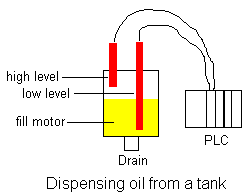
The website PLCS.NET contains tutorials
to learn the PLC language.
This is an outline taken
from the site http://www.plcs.net/chapters/parts3.htm
The Guts Inside
The PLC mainly consists of a CPU,
memory areas, and appropriate circuits to receive input/output data. We can
actually consider the PLC to be a box full of hundreds or thousands of separate
relays, counters, timers and data storage locations. Do these counters, timers,
etc. really exist? No, they don't "physically" exist but rather they
are simulated and can be considered software counters, timers, etc. These
internal relays are simulated through bit locations in registers. (more on that
later)
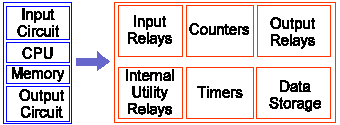
What does each part
do?
- INPUT RELAYS-(contacts)These are connected
to the outside world. They physically exist and receive signals from
switches, sensors, etc. Typically they are not relays but rather they are
transistors.
- INTERNAL UTILITY RELAYS-(contacts) These do not
receive signals from the outside world nor do they physically exist. They
are simulated relays and are what enables a PLC to eliminate external
relays. There are also some special relays that are dedicated to
performing only one task. Some are always on while some are always off.
Some are on only once during power-on and are typically used for
initializing data that was stored.
- COUNTERS-These again do not physically exist. They are
simulated counters and they can be programmed to count pulses. Typically
these counters can count up, down or both up and down. Since they are
simulated they are limited in their counting speed. Some manufacturers also
include high-speed counters that are hardware based. We can think of these
as physically existing. Most times these counters can count up, down or up
and down.
- TIMERS-These also do not physically exist. They come
in many varieties and increments. The most common type is an on-delay
type. Others include off-delay and both retentive and non-retentive types.
Increments vary from 1ms through 1s.
- OUTPUT RELAYS-(coils)These are connected to
the outside world. They physically exist and send on/off signals to
solenoids, lights, etc. They can be transistors, relays, or triacs
depending upon the model chosen.
- DATA STORAGE-Typically there are registers
assigned to simply store data. They are usually used as temporary storage
for math or data manipulation. They can also typically be used to store
data when power is removed from the PLC. Upon power-up they will still
have the same contents as before power was removed. Very convenient and
necessary!!
PLC Operation
A PLC works by continually scanning a program. We
can think of this scan cycle as consisting of 3 important steps. There are
typically more than 3 but we can focus on the important parts and not worry
about the others. Typically the others are checking the system and updating the
current internal counter and timer values.
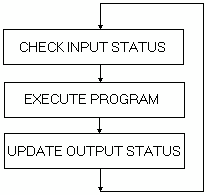
Step 1-CHECK INPUT STATUS-First the PLC takes a look
at each input to determine if it is on or off. In other words, is the sensor
connected to the first input on? How about the second input? How about the
third... It records this data into its memory to be used during the next step.
Step 2-EXECUTE PROGRAM-Next the PLC executes your
program one instruction at a time. Maybe your program said that if the first
input was on then it should turn on the first output. Since it already knows
which inputs are on/off from the previous step it will be able to decide
whether the first output should be turned on based on the state of the first
input. It will store the execution results for use later during the next step.
Step 3-UPDATE OUTPUT STATUS-Finally the PLC updates
the status of the outputs. It updates the outputs based on which inputs were on
during the first step and the results of executing your program during the
second step. Based on the example in step 2 it would now turn on the first
output because the first input was on and your program said to turn on the
first output when this condition is true.
After the third step the
PLC goes back to step one and repeats the steps continuously. One scan time is defined as the time it takes to execute
the 3 steps listed above.