Model Railroading uses
Digital Command Control to run the trains.
The web site ALL
ABOUT DCC gives an over view of its operation.
Packets of digital data are used.
The ones and zeros are voltages +14V to –14V.
The packets are structured
so that there is error checking and instructions given.
Computers do not “know” what
they are connected to. They “see” a stream of digits and have to differentiate
between a robotic arm, train controller or a JPEG picture file. The data is
usually read in the context of software eg you would not try to run the train
from a graphics program.
Data streams consist of
header, data and trailer.
JPEG picture header
information is copied here.
ALL ABOUT DCC is copied here
just in case you are not connected to the internet
|
ALL ABOUT DCC |
|
|
|
Whose
do I buy? |
|
|
|
|
|
EXAMPLE
DCC DECODER INSTALLATIONS |
||
|
|
|
|
|
DIGITRAX
CHIEF PROGRAMMING GUIDES |
||
|
PART 1 WHAT
IS DCC?
· How fast to go · Which direction to go · Which lights are on · Momentum, acceleration, etc. Pause a moment...take a deep breath and contemplate all this: you can now have a half-dozen (or 2...or 20...or 200) locos chasing each other around the layout -- with no rear-end collisions -- because we are individually controlling their speeds! Ain't computers wonderful?! And, thanks to the leadership of a Working Group of the NMRA, a Brand "D" Command Station/Booster readily communicates with Brand "L" Decoders -- and vice-versa. By this time, it has occured to you that every loco you want to operate must have a Decoder in its belly. If this sounds like a financial show-stopper, relax; thanks to increasing volumes ever-improving technology, and vigorous competition, the street price of many decoders is well below $20...and falling. We'll deal with the financial issues further on, but I can tell you with absolute conviction that once you take the plunge, you'll wonder how you ever got along without it! You'll soon discover than for the first time, you're "running your trains, not your layout."
1. Address Byte -- tells the Decoders which of them this data is meant for. 2. Instruction Byte -- typically tells the addressed decoder the speed and direction of its locomotive. 3. Error Detect Byte -- since DCC is just like a computer network operating in a very noisy environment, it is necessary to be able to detect errors in the data should they occur.
· The waveshape is different o sinusoidal for AC o square wave for DCC · The voltage is different o ±165 volts peak (115 volts RMS) for AC (USA) o ±14-16 volts peak (14-16 volts RMS) for DCC · The frequency is different o 60Hz for AC (USA) o Approx. 8000Hz (8KHz) for DCC So...don't confuse the DCC signal with any AC signal. The bipolar DCC signal is a hefty, high-current signal which allows the on-board Decoder to (1) extract the data packets from the Command Station and (2) rectify and filter the bipolar signal to provide clean Direct Current (DC) for application to the locomotive motor (actually, the Decoder provides a Pulse-Width Modulated [PWM] DC signal to the motor, but we'll cover that later).
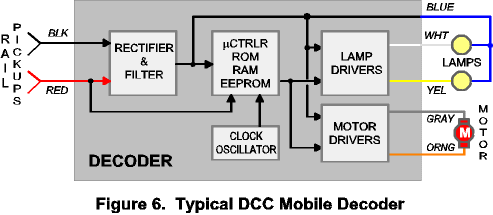
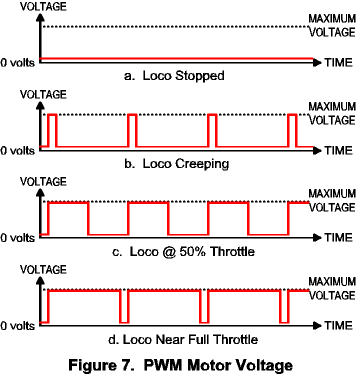
A block diagram of a typical mobile (ie, locomotive-mounted) Decoder is shown in Figure 6, above. The hefty DCC signal is passed from the rails directly to a full-wave bridge rectifier and then filtered to smooth the pulses into a useful DC voltage to power both the Decoder itself and the host loco's lights and motor. The embedded microcontroller examines all packets on the rails, checking the "Address Byte" to see if a packet is directed to its attention. The address for each loco is programmed into the Decoder via the Cab; to accomplish this, the loco is placed on a dedicated "Programming Track" which is connected to the Command Station. The Command Station "writes" the selected address into the non-volatile memory (EEPROM) on-board the Decoder; henceforth, the Decoder will respond only to the selected address. This address is usually two digits (01 thru 99 -- 00 is reserved), and is often the last two digits of the loco's road number (eg, loco #4627 would have address "27"). When the Decoder detects its address in a packet, it temporarily stores the direction, speed and function data while checking the "Error Detect Byte" to ensure the validity of the data; if the data is good, any requested changes will be made immediately (eg, speed up, slow down, stop, change direction, turn on the headlight). While we were programming the address into the Decoder, we probably also programmed any number of other "Configuration Variables" (CVs in "DCC-speak"), such as: · Which direction is "forward" for the loco; · Motor start voltage; · Maximum motor voltage; · Acceleration/deceleration rates (momentum); · If the loco is part of a consist; · How the lights should behave; · Number of speed steps (14, 28 or 128). Unlike DC throttles, the motor is driven with a programmable waveform known as Pulse-Width Modulation (PWM), in which the maximum voltage is applied to the motor for some percentage of the time (versus DC, in which a percentage of the max voltage is applied all the time). For example, if we want the loco stopped, we apply max voltage 0% of the time (in DC, it's simply zero volts); if we want the loco to creep, DCC applies max voltage 10% of the time (in DC, we apply 10% of max voltage); if we want the loco to move at approx. half of top speed, DCC applies max voltage 50% of the time (in DC, it's 50% of max voltage all the time); for top speed, DCC applies max voltage all the time (so does DC). Confused? Figure 7 shows the DCC motor control waveforms graphically (the red line is the voltage actually applied to the loco's motor).
Still confused? Don't worry about it -- it'll come to you. Just remember that using PWM means you can't use "coreless" motors without a special Decoder; without the iron to dissipate the heat created by the PWM scheme, a coreless motor will fry! Happily, locos from Athern, Atlas, Kato, Life-Like and most others don't use coreless motors; if in doubt, check with an expert. We've almost beaten the Decoder subject to death; but before moving on, let me mention the other type of Decoder -- the "Stationary Decoder," a/k/a "Accessory Decoder." As the name implies, it's not mounted in a loco; it's...well, stationary. "What good is that?" you're wondering. DCC is about more than just operating locos; it's about operating your whole LAYOUT! A Stationary Decoder (SD) is used to operate turnouts (both twin-coil and stall-motor types), animation motors, accessory lighting...and almost anything else that runs on electricity. Most DCC vendors offer SDs, though features vary from vendor to vendor. I don't recommend you dabble in SDs until you've gotten the DCC basics and locomotive operation down well -- they can be tricky beasts, but offer another dimension in automation that's really fun! That's it for the "How Does It Work?" part. If you were skipping this section, you can start reading again HERE. It's not necessary to memorize this; you don't need to understand all the inner workings to enjoy DCC -- but you'll find it very useful to know what the pieces are and what function they perform. There are some excellent reference materials both in print and on the web; in the "How Can I Learn More?" section at the end of all this I list my personal recommendations. Meanwhile, please read on...
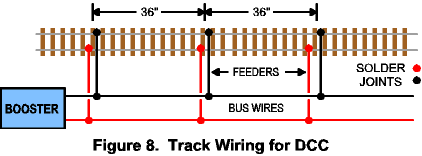
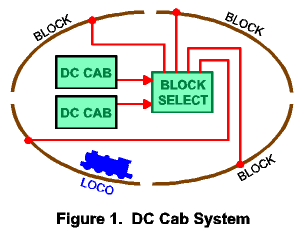
PHYSICAL SIZE If you'd like to discuss this issue one-on-one, feel free to Email Me; I'd be happy to help in any way I can. OPERATION Operating alone or in a group really isn't the key criteria; it's more the "what" that you do, rather than the "who" does it. Four operators can control one train each with a DC cab about as easily as with a DCC cab (as long as they don't mind throwing the block toggles). Which leads to the last operational issue -- if you've grown to despise block toggles and cab selectors as much as I did, then DCC is an easy decision! YOUR BUDGET TRACKWORK One of the most commonly asked questions is, "Will I need to rewire my layout?" IF you have #14 bus wires running from your throttle, AND you have track feeders to both rails at least every 36 inches, THEN you shouldn't need to do any major rewiring (unless you want to eliminate those pesky old block toggles -- and that shouldn't be major). If your wiring doesn't meet the above "specs," you will need to do at least some rewiring.
If you're wiring a DCC layout from scratch, I recommend a trip to your local Home Depot (or equivalent) to procure some #14 solid conductor wire such as that used for residential wiring; I like to use red and black for this purpose. If your layout is quite large, use #12 wire instead of #14. These are the "bus wires" that connect to the Booster's track terminals and run all around the layout. Use #20 solid copper wire (such as from Radio Shack) to implement a pair of "track feeders" every 36 inches; solder one end to the bus wire and the other end to the proper rail. More detail is available in several of my recommended references.
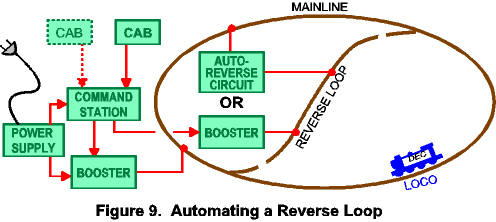
· Command Station · Booster · Cab (Throttle) · 14-18 volt, 4-6 amp transformer (or something equivalent) · One or more locomotives with Decoder installed · Misc. electrical tidbits: wire, fuses/breakers, AC cord, etc. Hooking it all up is really pretty simple; each manufacturer will provide the needed operations manuals and hookup instructions. Some retailers who specialize in DCC will also provide you with their own printed guides and other advice (eg: Loy's Toys, Tony's Train Exchange). I strongly suggest that you purchase what's usually referred to as a "Starter Set," rather than trying to acquire the separate pieces. Most vendors feature Starter Sets, and they have everything except the transformer and locomotive. Most retailers either have or can point you to the right transformer; ask when you order. If you're not comfortable wiring transformers and fuses and connecting to the AC mains, consider something like Loy's "Model Train Fuel Tank;" all you have to do is follow instructions. Optionally, you can take power from that DC Throttle you're no longer going to need; they won't supply a lot of current (amps), but it'll be fine to get you going. As as rule-of-thumb, you can operate one less loco thusly than you can in a straight DC system. REVERSE LOOPS, WYES & TURNTABLES -- In the DC cab world, we typically handled reverse loops (and other things that reverse the train's direction) with a DPDT toggle switch (or relay) to reverse track polarity before the train exited the loop. In the DCC world, you can do the same thing, probably using the same switch/relay. However, reverse loops are the exception to the "all one block" norm of DCC; they must be isolated at each end and in both rails -- just like DC. They must be a separate block. AND...DCC offers yet easier ways to control reverse loops. Several vendors offer automatic reversing circuits for use with loops; you simply connect them between the mainline and the loop (a little soldering). As the lead loco enters or leaves the loop, the circuit "flips" the phase of the loop's power so that it matches the mainline. [Note: "Phase" in AC circuits is analogous to "polarity" in DC circuits.] By now you're thinking, "Wait...won't flipping the loop power cause the loco to reverse?" Good thought -- but the answer is "No." In the DCC world, the phase or polarity of the rails doesn't matter (so long as it matches across gaps); forward and reverse are defined by you, and controlled by the Decoder...not the track. Keep this in mind; it'll be useful later.
If money isn't a limiting factor, you can even use a separate Booster to power your reverse loop(s); many Boosters have "auto-reversing" capability; that is, whenever they detect a short across the rails (such as would occur when a loco bridges a rail gap between out-of-phase blocks), they automatically reverse phase and check to see if this cleared the short. You don't have to touch anything. Neat, huh? An extra Booster will set you back roughly $125-175. Model Rectifier Corp (MRC), maker of the Command 2000 DCC starter set, offers several Athearn HO-Scale locos with Decoders installed. Numerous retailers offer Decoder installation service. Kato offers several magnificent N-Scale diesel locos which are "Decoder-Ready" -- that is, all you have to do is swap the stock light board for the appropriate "Plug-n-Play" Decoder from Digitrax (and soon other vendors). Atlas now has four N-Scale diesel types that come with Decoders factory installed. Many of the newer HO locos have the NMRA-standard plug on the light board; you can simply "plug in" the Decoder and you're off and running. In short, it's getting easier and easier to get started! |
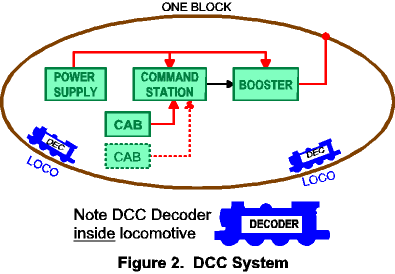
 Normally
just a transformer which supplies low-voltage AC to the Command Station and
Booster, although some folks use hefty DC Supplies they just happened to have
laying around. As long as you supply 3-5 amps at 14-18 volts AC or DC,
everything will work just fine.
Normally
just a transformer which supplies low-voltage AC to the Command Station and
Booster, although some folks use hefty DC Supplies they just happened to have
laying around. As long as you supply 3-5 amps at 14-18 volts AC or DC,
everything will work just fine.  The
Command Station is the real intelligence of the DCC system, but it is rarely
a separate box; it's usually packaged with either the Booster or the Cab (occasionally
both). It contains a microcontroller plus some form of non-volatile
memory,
The
Command Station is the real intelligence of the DCC system, but it is rarely
a separate box; it's usually packaged with either the Booster or the Cab (occasionally
both). It contains a microcontroller plus some form of non-volatile
memory, 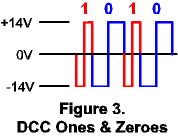 and
is responsible for all communication between the Cab and all Decoders. The
Command Station communicates with Decoders by transmitting packets of
data to them through the rails. Each packet is a stream of binary
digits (ones & zeros -- see Fig. 3) transmitted at the rate of
approximately 8000 bits per second. A typical packet is shown in Figure 4; it
consists of a Preamble of ten or more consecutive "ones,"
followed by three 8-bit data bytes, each separated by a "zero" start
bit, and terminated by an end bit (logic 1); the data bytes are:
and
is responsible for all communication between the Cab and all Decoders. The
Command Station communicates with Decoders by transmitting packets of
data to them through the rails. Each packet is a stream of binary
digits (ones & zeros -- see Fig. 3) transmitted at the rate of
approximately 8000 bits per second. A typical packet is shown in Figure 4; it
consists of a Preamble of ten or more consecutive "ones,"
followed by three 8-bit data bytes, each separated by a "zero" start
bit, and terminated by an end bit (logic 1); the data bytes are: 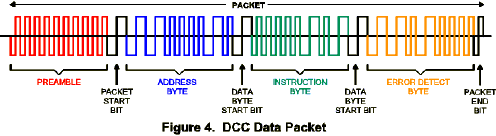
 Sometimes
referred to as a "Power Station," this is the Pack Mule of the
group, containing no intelligence. The Booster's job is to take the data packets
generated by the Command Station and boost them to a higher-voltage bipolar
signal which is applied to the track via a high-current driver. That's all --
just brute force stuff with little finesse; a bipolar signal that swings plus
and minus 14-16 volts about ground. This bipolar waveform is similar
to the common Alternating-Current (AC) waveform found at the duplex outlets
in your home, or to the AC waveform used to operate AC locomotives; similar,
but definitely NOT the same thing:
Sometimes
referred to as a "Power Station," this is the Pack Mule of the
group, containing no intelligence. The Booster's job is to take the data packets
generated by the Command Station and boost them to a higher-voltage bipolar
signal which is applied to the track via a high-current driver. That's all --
just brute force stuff with little finesse; a bipolar signal that swings plus
and minus 14-16 volts about ground. This bipolar waveform is similar
to the common Alternating-Current (AC) waveform found at the duplex outlets
in your home, or to the AC waveform used to operate AC locomotives; similar,
but definitely NOT the same thing:  A
hand-held unit very similar to DC walkaround cabs but with many more controls
and (usually) an alpha-numeric display. The Cab has the normal speed knob and
direction control plus Decoder programming controls, and "function"
(eg, lights, sound) controls. The display typically shows the address of the
loco under control of that cab, its speed and its direction; or, if in the
"programming mode," it shows the function being programmed and the
data to be programmed. Some DCC Cabs allow control of only one locomotive at
a time while others allow control of two locos simultaneously. This choice
could be governed by whether you typically operate alone or with a group. You
can have as many Cabs plugged into your DCC system as you have humans to
operate them, and some vendors now offer wireless Cabs which are
linked to the sytems by Infra-Red light waves (IR -- much like the remote on
your TV) or Radio waves (RF -- the same way your cell phone operates).
However...most of these products use what's called "simplex"
communication -- they can only talk one way; you have full control over your
loco(s), but to change locos, program a Decoder, or anything requiring
two-way communication, you have to temporarily plug into the DCC wiring
(usually using a short pigtail hanging from the Cab). Duplex Cabs (allowing
2-way communications) will be along soon, but will cost more than their
Simplex brethren; meanwhile, the Simplex versions offer great flexibility and
ease of movement on medium- to large-sized layouts.
A
hand-held unit very similar to DC walkaround cabs but with many more controls
and (usually) an alpha-numeric display. The Cab has the normal speed knob and
direction control plus Decoder programming controls, and "function"
(eg, lights, sound) controls. The display typically shows the address of the
loco under control of that cab, its speed and its direction; or, if in the
"programming mode," it shows the function being programmed and the
data to be programmed. Some DCC Cabs allow control of only one locomotive at
a time while others allow control of two locos simultaneously. This choice
could be governed by whether you typically operate alone or with a group. You
can have as many Cabs plugged into your DCC system as you have humans to
operate them, and some vendors now offer wireless Cabs which are
linked to the sytems by Infra-Red light waves (IR -- much like the remote on
your TV) or Radio waves (RF -- the same way your cell phone operates).
However...most of these products use what's called "simplex"
communication -- they can only talk one way; you have full control over your
loco(s), but to change locos, program a Decoder, or anything requiring
two-way communication, you have to temporarily plug into the DCC wiring
(usually using a short pigtail hanging from the Cab). Duplex Cabs (allowing
2-way communications) will be along soon, but will cost more than their
Simplex brethren; meanwhile, the Simplex versions offer great flexibility and
ease of movement on medium- to large-sized layouts.  Currently-available
Decoders are good examples of the packaging density which is possible with
today's microelectronic components, and rival the Command Station in both
power and sophistication. Some Decoders are designed to directly replace the
light board in a loco; these are referred to as "Plug-n-Play"
Decoders.
Currently-available
Decoders are good examples of the packaging density which is possible with
today's microelectronic components, and rival the Command Station in both
power and sophistication. Some Decoders are designed to directly replace the
light board in a loco; these are referred to as "Plug-n-Play"
Decoders. 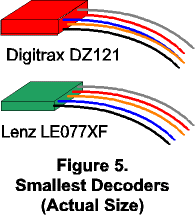 Most
other Decoders have pigtail leads and may require soldering, although HO and
larger scale Decoders increasingly have an NMRA-standard 8-pin plug which
mates with a socket within the loco's innards. Decoders designed for use in
N- and Z- scale locos have been compacted to the smallest-possible package as
there's usually no spare room under small-scale hoods; in these cases, the
frames are frequently machined to provide a mounting location for the
Decoder. The smallest Decoder available is the Lenz LE077XF (0.53 x 0.37 x
0.10"); also attractively-small is the Digitrax DZ121 (0.68 x 0.38 x
0.18"), both shown actual size in Figure 5 (above). While primarilly
intended for Z-scale, both of these units are commonly used in N-scale locos
(and even some HO). Early in 2001, Lenz will release the LE010XF, smaller yet
than the '077XF. NOTE that O- and G-scale locos are not compatible with such
mini-decoders due to the higher current requirements of their motors; it's
important to select a Decoder which IS compatible with the target locomotive
(and thankfully, many are available).
Most
other Decoders have pigtail leads and may require soldering, although HO and
larger scale Decoders increasingly have an NMRA-standard 8-pin plug which
mates with a socket within the loco's innards. Decoders designed for use in
N- and Z- scale locos have been compacted to the smallest-possible package as
there's usually no spare room under small-scale hoods; in these cases, the
frames are frequently machined to provide a mounting location for the
Decoder. The smallest Decoder available is the Lenz LE077XF (0.53 x 0.37 x
0.10"); also attractively-small is the Digitrax DZ121 (0.68 x 0.38 x
0.18"), both shown actual size in Figure 5 (above). While primarilly
intended for Z-scale, both of these units are commonly used in N-scale locos
(and even some HO). Early in 2001, Lenz will release the LE010XF, smaller yet
than the '077XF. NOTE that O- and G-scale locos are not compatible with such
mini-decoders due to the higher current requirements of their motors; it's
important to select a Decoder which IS compatible with the target locomotive
(and thankfully, many are available).