


Developing Software Solutions
Functions
Example 4.1
This program has three functions that
are called from the main program.
PROGRAM
Solve;
VAR
A,P,B:real;
Answer:char;
FUNCTION
Apples(Pears,Bananas:real):real;
BEGIN
Apples:=Pears*Bananas
END;
FUNCTION
Pears(Apples,Bananas:real):real;
BEGIN
Pears:=Apples/Bananas
END;
FUNCTION
Bananas(Apples,Pears:real):real;
BEGIN
Bananas:=Apples/Pears
END;
BEGIN
{main program}
Clrscr;
Writeln('This program will solve for
A,P or B for the equation A=PxB');
Writeln;
Write('Do you wish to solve for A, P
or B? Enter one of these letters.');
Readln(Answer);
Writeln;
CASE
Answer OF
'A','a': BEGIN
Write('Enter
value of P');
Readln(P);
Write('Enter
value of B');
Readln(B);
Writeln;
Writeln('A=
',Apples(P,B):5:2);
END;
'P','p': BEGIN
Write('Enter
value of A');
Readln(A);
Write('Enter
value of B');
Readln(B);
Writeln;
Writeln('P=
',Pears(A,B):5:2);
END;
'B','b': BEGIN
Write('Enter
value of A');
Readln(A);
Write('Enter
value of P');
Readln(P);
Writeln;
Writeln('A=
',Apples(P,B):5:2);
END;
END
END.
PROCEDURE
Example 5.1
Here is an example of a procedure. It
draws boxes on the screen using a GotoXY statement. The screen has XY
co-ordinates numbered 1,1 in the top left hand corner and 80,23 in the bottom
right hand corner.
PROGRAM
Box;
VAR
I:integer;
PROCEDURE
DrawBox(X1,Y1,X2,Y2:integer);
VAR I:integer;
BEGIN
GotoXY(X1,Y1);
FOR I:=X1 to X2 DO Write
('-');
FOR I:=Y1+1 to Y2 DO
BEGIN
GotoXY(X1,I);
Write('!');
GotoXY(X2,,I);
Write('!');
END;
GotoXY(X1,Y2);
FOR I:=X1 to X2 DO
Write('-');
END; { of procedure }
BEGIN
Clrscr;
FOR I:=1 to 5 DO
DrawBox(I*4,I*2,10*I,4*I);
DrawBox(1,1,80,23);
END.
So
that you can work out what is going on here, remove the line
FOR I:= 1 to 5 DO
DrawBox(I*4,I*2,10*I,4*I);
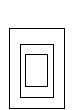 and run
the program again.
and run
the program again.
DrawBox(4,2,10,4);
DrawBox(8,4,20,8);
DrawBox(16,8,40,16);
DrawBox(20,10,50,20)
Exercise 5.2
Use
the Procedure to draw three concentric boxes in the centre of the screen
One Dimensional Array
This
program uses PROCEDURES to GET and GIVE information. A FUNCTION is used to
calculate and return a value to the main program. The main program is very
short.
Example 6.1
PROGRAM
Test_Average;
CONST
Max=25;
TYPE
Scores=ARRAY[1..Max] OF real;
VAR
Score:Scores;
Number:integer;
Avg:real;
{**********************************************************
This
procedure will get the test scores.
***********************************************************}
PROCEDURE
Get_Scores (VAR Score:Scores);
VAR
I:integer;
BEGIN
Write('How many scores do you want
to average? Number=');
Readln(Number);
Writeln;
Writeln;
Writeln('Enter each score, and press
ENTER after each entry.');
Writeln;
Writeln;
FOR I:=1 TO Number DO
Readln (trm. Score[I])
END;
{***********************************************************
This
function will calculate the average of the test scores.
***********************************************************}
FUNCTION
Average (Score:Scores) : real;
VAR
J:integer;
Total:real;
BEGIN
Total:=0;
FOR J:=1 TO Number DO
Total:=Total+Score[J];
Average:=Total/Number
END;
{******************************************************************
This
procedure will display the results.
******************************************************************}
PROCEDURE
Display_Results(Score:Scores);
VAR
K:integer;
BEGIN
Clrscr;
Writeln ('Test Scores');
Writeln;
FOR K:=1 TO Number DO
Writeln(Score[K]:5:2);
Writeln;
Writeln('Average');
Writeln(Avg:5:2)
END;
BEGIN
Clrscr;
Writeln('This program will average
any number of test scores.');
Writeln;
Get_Scores(Score);
Avg:=Average(Score);
Display_Results(Score)
END.
3x3 ARRAYS
This
program fills a 3x3 array with integers entered by the user. It then displays
the 3x3 square by M[Row,Col] and number.
Enter
the program and run it. Enter the number 1...9 in order so that the display
looks like
123
456
789
Example 7.1
PROGRAM Fill_Square;
TYPE
Magic_Square=ARRAY[1..3,1..3] OF
integer;
VAR
Mnum: Magic_Square;
PROCEDURE
Fill (VAR M : Magic_Square);
VAR
Row, Col:integer;
BEGIN
FOR Col:=1 TO 3 DO
BEGIN
Writeln;
Write('Enter
the Magic Square numbers');
Writeln('
for column',Col,':');
FOR Row:=1
TO 3 DO
BEGIN
Write(' and
row',Row,':');
Readln(trm,M[Row,Col]);
END
END;
Writeln;
Writeln;
Writeln(' M[1,1] M[1,2] M[1,3] ',M[1,1],M[1,2],M[1,3]);
Writeln(' M[2,1] M[2,2] M[2,3] ',M[2,1],M[2,2],M[2,3]);
Writeln(' M[3,1] M[3,2] M[3,3] ',M[3,1],M[3,2],M[3,3]);
END;
BEGIN
{main program]
Fill (Mnum);
END.
Exercise 7.2
Modify
this program so that the array is 5x2 and the display looks like
01234
56789
GotoXY Statement
DISPLAY MAGIC SQUARE
This
program fills a 3x3 array using a PROCEDURE
Fill. A 3x3 box is drawn up on the screen using PROCEDURE DrawBox (a
modifoed version of the previous program). Numbers are drawn on the screen
using X's with PROCEDURES DrawZero, DrawOne and DrawTwo.
The
main program uses a CASE statement to call each procedure and put the number in
the correct spot on the screen.
Example 8.1
PROGRAM
Magic_Square;
TYPE
Magic_Square=ARRAY[1..3,1..3] OF
integer;
VAR
I,Row,Col,X,Y:integer;
M:Magic_Square;
PROCEDURE
Fill(VAR M:Magic_Square);
BEGIN
M[1,1]:=0;
M[1,2]:=1;
M[1,3]:=2;
M[2,1]:=0;
M[2,2]:=12;
M[2,3]:=2;
M[3,1]:=0;
M[3,2]:=1;
M[3,3]:=2;
END;
PROCEDURE
DrawZero(X1,Y1:integer);
BEGIN
GotoXY(X1,Y1);
Write('XXXXX');
GotoXY(X1,Y1+1);
Write('X X');
GotoXY(X1,Y1+2);
Write('X X');
GotoXY(X1,Y1+3);
Write('X X');
GotoXY(X1,Y1+4);
Write('XXXXX');
END;
PROCEDURE DrawOne(X1,Y1:integer);
VAR I:integer;
BEGIN
FOR I:=0 TO 4 DO
BEGIN
GotoXY(X1+4,Y1+I);
Write('X');
END;
END;
PROCEDURE
DrawTwo(X1,Y1:integer);
BEGIN
GotoXY(X1,Y1);
Write('XXXXX');
GotoXY(X1,Y1+1);
Write(' X');
GotoXY(X1,Y1+2);
Write('XXXXX');
GotoXY(X1,Y1+3);
Write('X ');
GotoXY(X1,Y1+4);
Write('XXXXX');
END;
PROCEDURE
DrawBox(X1,Y1,X2,Y2:integer);
VAR I:integer;
BEGIN
GotoXY(X1,Y1);
FOR I:=X1 TO X2 DO
Write('-');
FOR I:=Y1+1 TO Y2 DO
BEGIN
GotoXY(X1,I);
Write(':');
GotoXY(X2,I);Write(':');
END;
GotoXY(X1,Y2);
FOR I:=X1 TO X2 DO
Write('-');
END;
BEGIN {main program}
Fill(M);
Clrscr;
DrawBox(1,1,79,22);
DrawBox(27,1,53,22);
DrawBox(1,8,79,15);
FOR Col:=1 TO 3 DO
BEGIN
FOR
Row:=1 TO 3 DO
BEGIN
X:=26*Row-6;
Y:=7*Col-4;
CASE
M[Row,Col] OF
0
: DrawZero(X,Y);
1
: DrawOne(X,Y);
2
: DrawTwo(X,Y);
12:
BEGIN
DrawOne(X-7,Y);
DrawTwo(X,Y);
END; {compound CASE 12}
END;{CASE}
END;{row}
END;{column}
GotoXY(1,23);
END.{main program}
Exercise 8.2
Write
PROCEDURE statements for DrawThree, DrawFour, DrawFive, DrawSix, DrawSeven,
DrawEight and DrawNine. Include these PROCEDURE statements in this program.
Change
the values in the array M[Row,Col] to any single integer values and demonstrate
that your program can display the square.
Arithmetic with Array Variables
This
program has filled a 3x3 square with numbers. It then checks to see if this
square is magic.
|
|
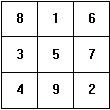
There
are 8 additions 8+1+6=15 3+5+7=15 4+9+2=15 8+5+2=15 |
8+3+4=15 1+5+9=15 6+7+2=15 6+5+4=15 |
Example 9.1
PROGRAM
Check_Magic;
TYPE
Magic_Square=ARRAY[1..3,1..3] OF
Integer;
VAR
M: Magic_Square;
PROCEDURE
Check (VAR M:Magic_Square);
VAR
A1,A2,A3,A4,A5,A6,A7,A8:Integer;
BEGIN
A1:=M[1,1]+M[1,2]+M[1,3];
A2:=M[2,1]+M[2,2]+M[2,3];
A3:=M[3,1]+M[3,2]+M[3,3];
A4:=M[1,1]+M[2,1]+M[3,1];
A5:=M[1,2]+M[2,2]+M[3,2];
A6:=M[1,3]+M[2,3]+M[3,3];
A7:=M[1,1]+M[2,2]]+M[3,3];
A8:=M[1,3]+M[2,2]+M[3,1];
IF A1=A2 THEN
IF A1=A3 THEN
IF A1=A4
THEN
IF
A1=A6 THEN
IF
A1=A7 THEN
IF
A1=A8 THEN
Writeln
('This is a magic square')
ELSE
Writeln
('Bombed')
ELSE
Writeln
('Bombed')
ELSE
Writeln
('Bombed')
ELSE
Writeln
('Bombed')
ELSE
Writeln
('Bombed')
ELSE
Writeln
('Bombed')
ELSE
Writeln ('Bombed')
END;
BEGIN
{main program}
M[1,1]:=8;
M[1,2]:=1;
M[1,3]:=6;
M[2,1]:=3;
M[2,2]:=5;
M[2,3]:=7;
M[3,1]:=4;
M[3,2]:=9;
M[3,3]:=2;
Check(M);
END.
Exercise 9.2
There is a pattern that
will always give us a magic square:-
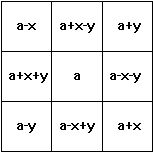
ie
M[1,1]:=a-x
M[1,2]:=a+x-y etc
Check
that this pattern works by writing a PROCEDURE to fill the array after the main
program asks the operator for integer values a,x and y.
The
magic square should be displayed on the screen after the CHECK procedure.