If you lost the icon of Addictive Typing Lessons (or Numpad Typing Drills).
If you lose your  or or 
On the Tools menu, click Add-ons. Click Addictive Typing Lessons (or Numpad Typing Drills). Click Options. In the options, move it to different toolbars or positions. 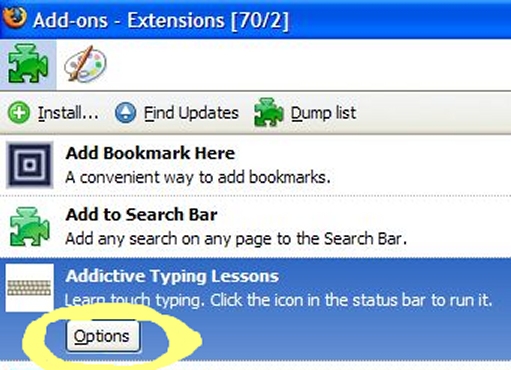
|
If that doesn't work, use about:config 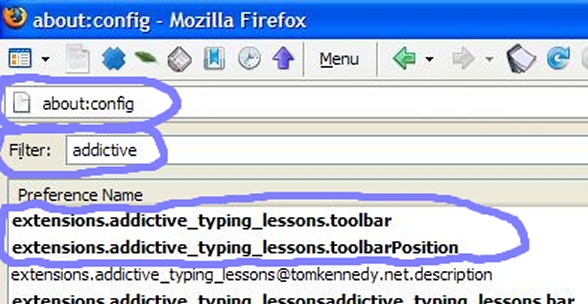
In the address box of Firefox, type about:config then hit Enter. How to use about:config When the page appears, type addictive (or numpad) in the Filter box. It will show 3 to 6 options for Addictive Typing Lessons. Options 4, 5, and 6 are from the old version, they have no effect. You can right-click on an option, and click Reset, to set it to the default value. Or, double-click an option to type in a value. extensions.addictive_typing_lessons.toolbar Set it to one of these: status-bar main-menubar toolbar-menubar extensions.addictive_typing_lessons.toolbarPosition Reset it to its default value of -1, or type in a number. You have to restart Firefox to see any changes. |