
Removing programs from the computer:
1. Remember you
must have a CD/disk or license for each computer on which you load particular
software. That is, if you have Print Shop loaded on three computers, you must
have three CDs or a site license.
2. Software loaded on the network (Cornerstone, STAR, AR, etc) licenses will
be on file in the CRS office.
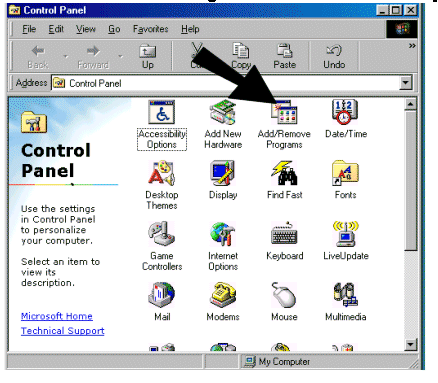
3. If you need to remove software from a computer, please first look to see
if it can be removed from the Add/Remove Programs menu on the Control
Panel. [Go to Start, choose Settings, and then Control
Panel]
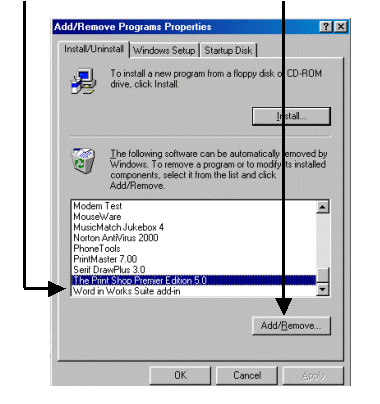
4. Choose the program to delete and click the Remove button.
5. If the program is not listed in the Add/Remove Programs menu, then
you will need to go to Explorer to remove the program.
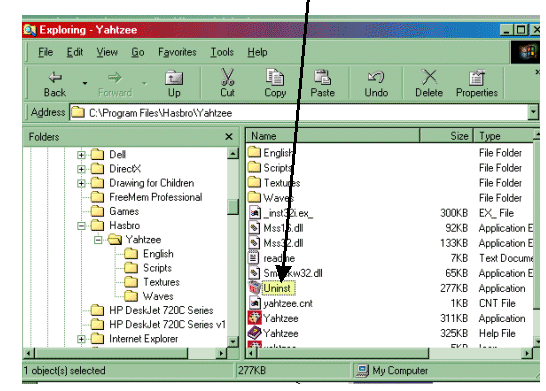
6. Check to see if the program has an uninstall file within the program:
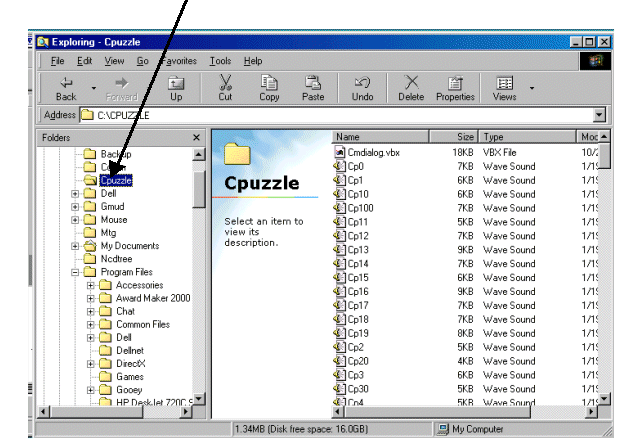
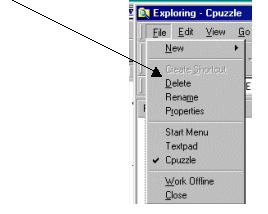
7. If there is
not an Uninstall file, you will have to delete the program from the folders
list:
8. Keep a copy of the software inventory form and the CDs (disks) near the computer to make the inventory easier when someone comes from Technology in May to check the computers.