 |
 |
 |
 |
 |
| DEAD AIM |
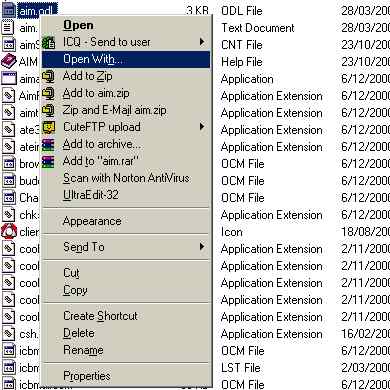
| Make sure AIM is not running - this means totally shutdown not just offline. To do this check for the icon in the system tray, if it's there, right click it and choose EXIT Next you need to open the file called "aim.odl" in Notepad (or any other text editor of your choice). You'll find this file in your AIM directory - Default location is C:Program FilesAIM95aim.odl. The following steps show how to open it through Explorer. Go to your AIM folder - Default location is C:Program FilesAIM95. Right mouse click on the file called aim.odl. From the popup menu select "Open With..". |
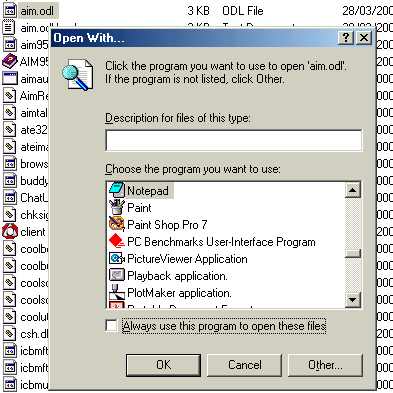
| When the "Open With.." box appears scroll down until you find Notepad. Select this making sure the "Always use this program to open these files" is deselected and click "OK" |
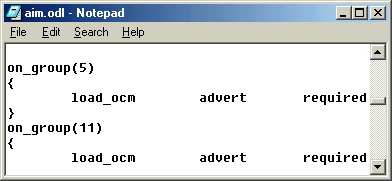
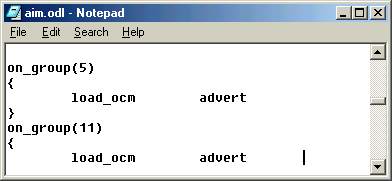
| With the file open in notepad scroll down until you find the following lines of code - see picture bellow. |
| Now you need to remove the "required" notations - it should now look like the picture bellow. |
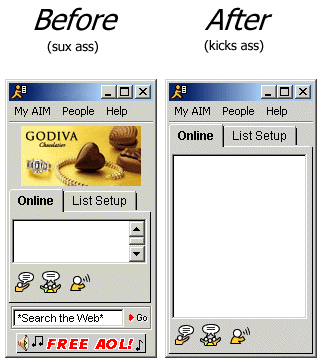
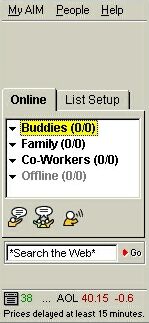
| Click on the File menu and select Save. Close Notepad. Next find the file "advert.ocm" in your AIM directory, and rename it to advert.OLD. This is done by Right (mouse) Clicking on the file in Explorer and selecting Rename from the popup menu. The file can be actually deleted but I prefer to use this rename approach just incase you may need this file back in the future. In which case you can simple rename it from advert.OLD back to advert.ocm That's it! now when you load AIM it should look something like the picture bellow. |
| HAV FUN |
 |
 |
| CLICK ON THE PICTURE BELOW FOR PASSWORD CRACKER AND IM FADER |
|
|
 |