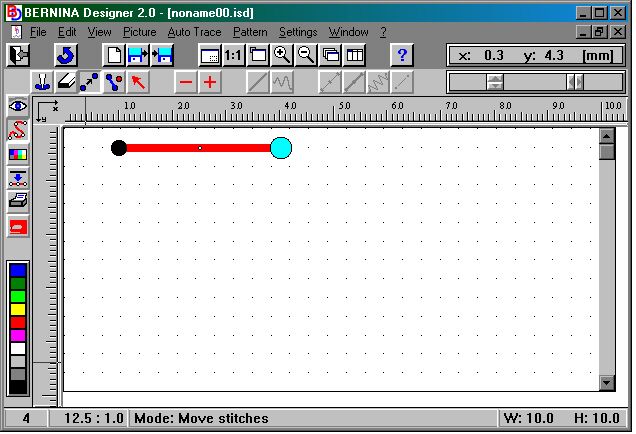
Because the screen on which you design is sooo big and the design/stitch can be sooo small, it is often difficult to figure out how close the stitches (points here after) should be together in order to form "satin stitch" effect - like on my monograms. The zoom function can make this even worse... the more you zoom in the further apart the stitches should be... otherwise you end up making loverly knotted beads!The same question from the stitch length angle says how long will it be when it is stitched out?.... hmmm... use this "test"... set the stitch length on the toolbar to 2mm and put down 2 points, now go to the move stitch function and move the second point until a small dot appears along the line you've done... now move it back until it just dissappears... the result is a 2 mm stitch! See the second and third picture below. The picture directly below should give you instant perspective on size.
Copyright © 2000 by Bernina of America, Inc.
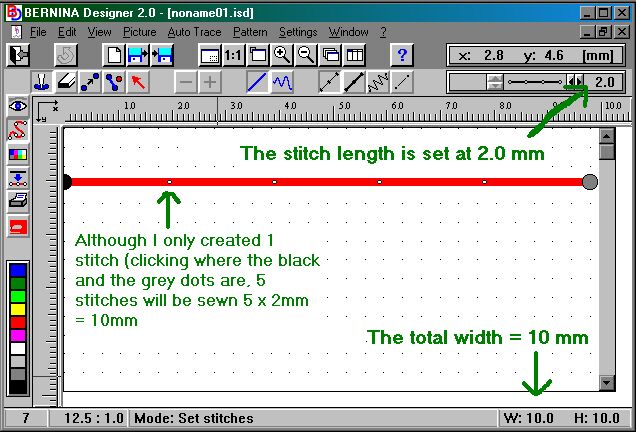
In the picture above, look at the two most critical settings for an indication of how big
the design is: The stitch length setting and the overall size of the design (stated as a
measurement of width (W) and height (H) - both in millimeters) To put this in another
way - that entire long red line (representing the stitch) is merely the width of your
maximum setting for stitch width on the 1630!
Copyright © 2000 by Bernina of America, Inc.
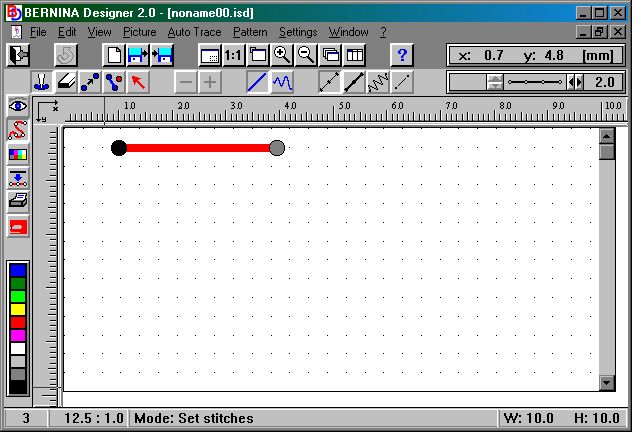
Above and below are the two pictures demonstrating the "test". Above the stitch just less than 2mm and below the stitch just over 2mm.
Copyright © 2000 by Bernina of America, Inc.
abstract designs (redwork and cross-stitch, which incidentally I do by pencil on graph paper first... FAT HINT...there's freeware available from a good French Doctor that print out graph paper according to your own specs.. the folk using the Stitch Designer should really go get a copy of it RIGHT NOW! This freeware program will print out graph paper with blocks according to your own specifications. It really helps to play around on until you have a good idea what you want your design to look like and then doing it on the Bernina Designer software is a cinch!