


Basic steps to copying with CDRWin :-
1. Open the CDRWin Software and select `Extract Disc/Tracks/Sectors`.
2. Insert a Playstation game into your CD-R.
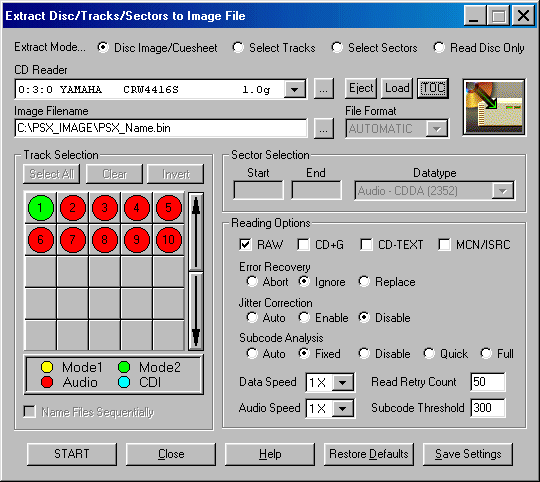
3. Make sure that your CD-R is selected in the `CD reader` drop down menu.
4. Choose an Image Filename. Try this one :- C:/Windows/Desktop/Images/***.bin (*** is the name of the actual file. i.e. If you`re reading Tekken then name it Tekken.bin). In order for this path to work you will need to create a new folder on your desktop and name it `Images`.
5. Next you need to change some settings. Make sure `RAW` is selected in the reading options. Set `Error recovery` to `Ignore`. Leave `Jitter Correction` and `Subcode Analysis` set to `Auto`. Change the `Read retry count` to `9` and change `Data` and `Audio` speeds to `MAX`.
6. Click `Save Settings`. (You only need to do this the first time. Everything will remain the same every other time).
7. Now click `Start`.
8. After it has finished reading, click `Close`.
9. Then select `Record Disc`.
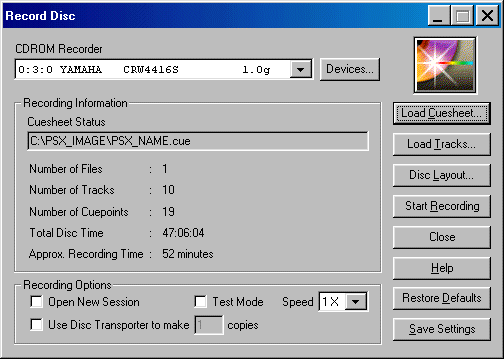
10. Click on the `Load Cuesheet` button.
11. Browse until you find the `Images` folder.
12. Then select the `.cue` file for the game you want to burn, i.e. Tekken would be Tekken.Cue
13. Insert a blank CD into your CD-R.
14. Set `Recording Speed` to `MAX`.
15. Click on `Start`.
THAT`S IT !!!