The Cool Tool

Open Minipattern MPTree

Home
OpenMiniPatterns


Short Description:

A pattern that makes it easy to create functions that show your data in a treeview.

Dependent from Libraries:

  • MPTool
  • CLASS450/PATTERNLIBS/Active
  • CLASS450/PATTERNLIBS/Storage
  • CLASS450/PATTERNLIBS/UIStyle
  • History of changes:

    21.Nov.2002

  • Added the option "TreeChildNodesSorted". With this option set for a TreeFetch or TreeFolder function, the subnodes of the nodes cretated with this functions will be sorted in the TreeView. If not set, the nodes will be in the order they are created by the function..
  • 09.Nov.2002

  • If the check for a nodetype type will be done in the TreeFetchWithCheck, there will be no more check for this nodetype in the TreeBase function.
  • 08.Nov.2002

  • Added the possibility to make check for existing childs on the serverside. To get it activated inherit with your TreeFetch function from Abstract.TreeFetchWithCheck instead of abstract.TreeFetch
  • 17.Jun.2002

  • Some bugfixes: TreeFetch didn't read more than 64 records under all circumstances.
  • It's now possible to refresh the whole tree or only the subnodes of the selected node.
  • The example model is a little bit more extended.
  • Possible Enhancements:

  • A NodeFunction that builds nodes for the values of a status field.
  • A NodeFunction that builds nodes for each attribute of an record. Attributes can be i.e. selected in a variable.
  • Status:

    Groupmodel online (Plex 4.5a)
    Model includes help topics (partly, but really not perfect)
    Example model online (Plex 4.5a)

    Downloads:

    Groupmodel MPTree.zip
    Example Groupmodel MPTreeEx.zip
    Example Model Resources MPTreeExRes.zip

    Description:

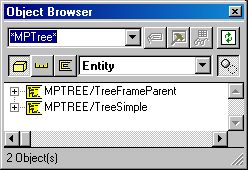
    There are two entities to inherit from.

  • TreeSimple for building a treeview function.

  • TreeFrameParent for building a treeview function in combination with FrameParent/FrameChild.
  • Implementation:

    Steps to create a treview function (as done in the example model):

    1. Let a new entity inherit from TreeSimple

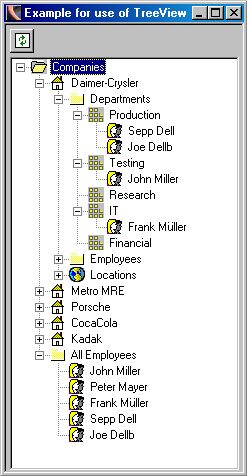
    2. Create a function for each node type your treeview shall include. There are two types supported in the pattern. They are called TreeFetch (for data retrieving) and TreeFolder for folder nodes, that structure the data in the treeview (like the nodes Companies, Departments in the example tree).

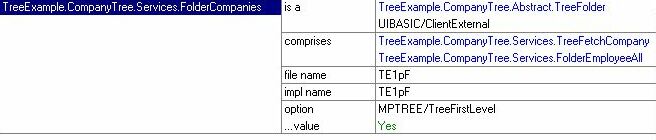
    3. In the example model is a folder node on the highest level. To do this create a new function "FolderCompanies" in the services folder and let it inherit from the abstract TreeFolder function. Also let it inherit from ClientExternal. Add a option triple "TreeFirstLevel" to all TreeNode or TreeFetch functions that shall be on the first level of the tree structure. In this example there is only one node type (companies folder) on the first level of the structure. Ignore the comprises triple at this point, they will be explained in a later step.

    4. Each TreeFolder or TreeFetch function that will be used in your treeview function must be comprised under the TreeBase.TreeComprises function. So add this triple.

    5. A message will be used to set the text of a TreeFolder. This message is scoped under the TreeFolder function. Set the message text.

    6. To show now the company records under the company folder we need a TreeFetch function. Therefor create a funtion "TreeFetchCompany" under the service folder and let it inherit from the abstract.TreeFetch or abstract.TreeFetchWithCheck (if you want faster server side checking of existing sub nodes) funtion. Also add the triple to inherit from ServerExternal.

    7. This function must also as already mentioned be comprised under the TreeBase.TreeComprises function.
    8. Now comes the magic that decides which decides the structure of the nodes in your treeview. Because the company records (represented by our "TreeFetchCompany")shall be shown under the company folder (represented by our "FolderCompanies" function), you must add another comprises triple. Each TreeFolder and TreeFetch function defines its subnodes by the comprises triples to another TreeFetch or TreeFolder function.

    9. To define the node text for our companies we go to the action diagram of the TreeFetchCompany. There is a Edit Point to do this job. Here you can also set the image numbers if you want to add images to your treeview funtion.

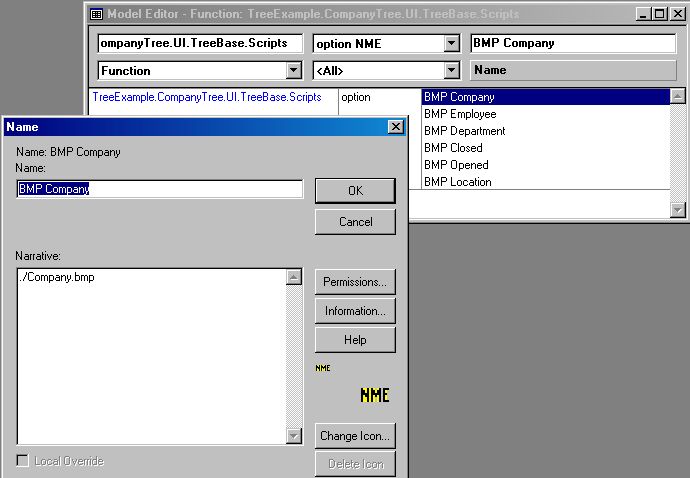
    10. The bitmap files must be defined exacly in the same way as in the standard pattern from CA. They are defined by the option triples for the scripts function. The name of the .bmp file is the defined in the narrative text of the name object.

    11. One important thing is left to do. In the entity object Abstract.TreeTag you have to add the fields that define the identity of your nodes. In our example so far this is the CompanyID. But if you use more TreeFetches in your treeview function you have to add all the fields that build the keys of the involved entities.

    12. Generate and build the funtions and than run the TreeBase functions. Have fun.
    If you have a entity with involution (refers to itself) and you want to show this in the treeview funtion you cant't set the TreeFetch comprises TreeFetch triple because this is not allowed in plex. For this reason exists another option "TreeInvolutionFetch" that you have to set in this case.

    Hosted by www.Geocities.ws

    1