| Network programming made easy using WMI - Part One |
 |
| WMI |

|
Network programming made easy using WMI � Part OneContents
Abstract of this Article
For long, software engineers have avoided network programming for 2 reasons. They either think that they
my best to give you a picture. Part Two of this article would focus on using WMI through C# and would focus more on the technical aspects.
The need
Network programming has for long been in the domain of system programmers and geeks. Application
The Solution
Traditionally, a client tool would have to be written which has to be installed on the remote machine, which Real time applications
on any machine on the network and uninstall it sitting on his/her console. Imagine an automated application doing this every night :( . The possibilities are endless. In short, you can query a remote machine for any data that it contains IF you have the access rights to that machine. You can also execute tasks on the remote machine. WMI Architecture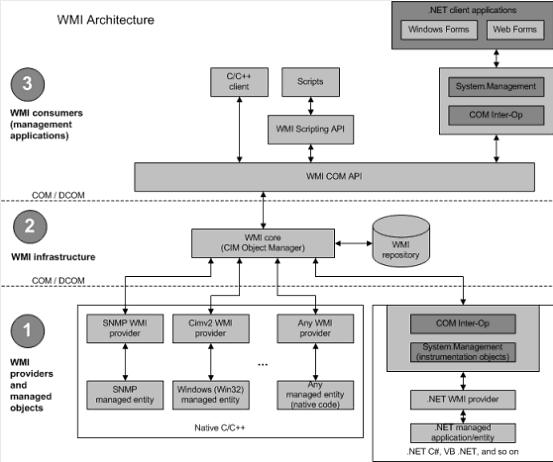 From the diagram above, we can see that using the System.Management namespace, we can access the functionality of WMI. System.Management greatly simplifies the usage. Web applications as well as windows applications can use its functionality. C++ applications can interact with the WMI core directly through the WMI COM API and Java applications can interact with it through JNI. WMI Code CreatorThe WMI Code Creator is a WYCIWYG (What You Choose Is What You Get) tool. It can generatethe code if you specify the details you need. For e.g. if you need to check the availability of a particular Serial port, you just need to select Win32_SerialPort from the �Classes� combo box and you can select all or any property that you need from the Property selection list box. The code would be automatically generated for you in the �Generated Code� edit box. To verify if the code generated is what you need, you can click the �Execute Code� button at the bottom of the window. Sample Scenario: Let us see a sample scenario. In my machine, I need to enumerate the serial ports and also need a description of each serial port to check if I can use it. To do just that, I have to open the WMI code Creator tool, select Win32_SerialPort from the �Classes� combo box and select �Caption� and "DeviceID" from the Property selection list box. The code would be automatically generated in the �Generated Code� edit box. To verify if the code generated is what I need, I can use the button �Execute Code� at the bottom of the window. 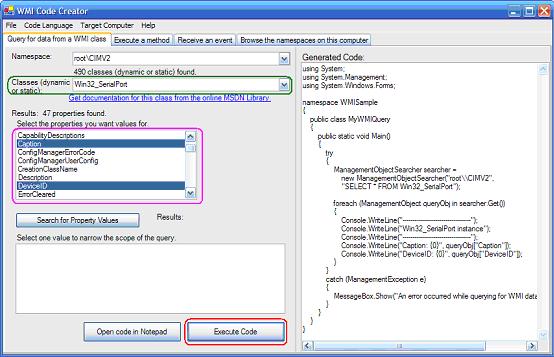 On clicking the �Execute Code� button, the output generated on my machine is shown below.  You can select any of the available 400+ classes and the properties associated with it and even write your own WQL statements when necessary to get the output you desire. To execute events on a local/remote machine, you can select the �Execute a Method� tab from the code creator to browse through the namespaces that you can use and select what you want to execute on the specified machine. To select the code language you need, you can select one of the options from the �Code Language� menu and in turn, the appropriate code would be generated for you. 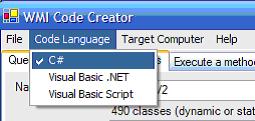 If you want to target a remote computer / local computer / a group of computers on the network, you can simply choose the �Target Computer� from the menu and the code would be generated appropriately for you. 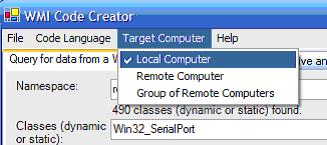 Relevant LinksDownload the WMI Code CreatorWQL Reference Guide http://msdn.microsoft.com/library/default.asp?url=/library/en-us/wmisdk/wmi/wmi_start_page.asp http://www.activexperts.com/activmonitor/windowsmanagement/wmi/samples/ http://aspalliance.com/629 http://en.wikipedia.org/wiki/Windows_Management_Instrumentation |