 |
| UAC Continued |
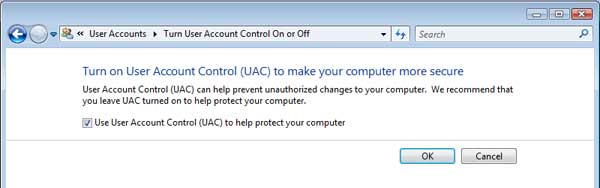
| 2. You�ll now see a tick box beside which it says Use User Account Control (UAC) to help protect your computer (Fig. 2). By default it will have a tick in the box. Click on the box to remove the tick to deactivate the UAC then click on OK.
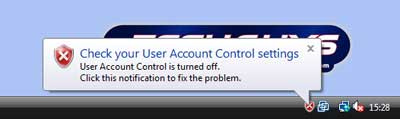
3.You�ll be prompted to restart your computer. Click on Restart Now to allow your changes to take effect. 4.When you return to the desktop the UAC will be switched off and won�t appear when you run any programs. Reasons to turn off the UAC To perform a Remote Fix If you have requested a remote fix service from The TechGuys the UAC must first be disabled before a TechGuy engineer can perform the remote fix. When the fix has been completed you should turn UAC back on. To have an easier life If the UAC becomes too frustrating it can be deactivated, such as when you are installing a lot of software that you know is safe. You should only keep it switched off if you are happy having the reduced amount of security. However, Windows Vista will continue to remind you that it is switched off and will regualarly recommend it is reactivated. Turning ON the UAC 1. To reactivate the UAC go to Start > Control Panel > User Accounts and Family Safety > User Accounts > Turn User Account Control on or off 2. You�ll now see a tick box beside which it says Use User Account Control (UAC) to help protect your computer. Put a tick in the box by clicking on it to activate the UAC then click on OK. You�ll be prompted to restart your computer. 3. Click on Restart Now to allow your changes to take effect. 4. When you return to the desktop the UAC will be working again. Where else can I turn on the UAC? A security alert warning will frequently appear on the task bar when the UAC is switched off. You can either click on the red shield or on the warning message to open the Security Center (Fig. 3). |
 |
 |
 |
| Once it is open you�ll see an option to activate the UAC (Fig. 4). Click on that and you�ll be immediately asked to restart the computer in order for the changes to take effect. |