| The role of an RTOS in an embedded system
The choice of system software affects development cost, time to
market, product quality, and unit cost
BY PETER DIBBLE
Microware Systems, Des Moines, IA
http://www.microware.com
Most embedded systems do not use a real-time operating system (RTOS),
or any commercial system software. This used to be a reasonable situation.
When software was a small percentage of the engineering effort, there were
better ways to spend time and money than looking for the optimum software
development and deployment environment
The world has changed. Now software is becoming a large part of the
engineering cost of embedded systems. That makes software a likely place
to look for engineering efficiencies and time- to- market improvements.
Efficiency and time-to-market improvements come from good methodologies,
good tools, and talented programmers.
An operating system is a development tool and also part of the end product.
The choice of system software affects development cost, time to market, product
quality, and unit cost. It is worth a little thought.
An RTOS has two defining at tributes: it is an operating system, and it
has some measure of real-time performance. Those attributes are seldom found
together. There are dozens of operating systems, but only a few of them have
real-time characteristics. There are over a hundred real-time kernels, but
only a few RTOSs.
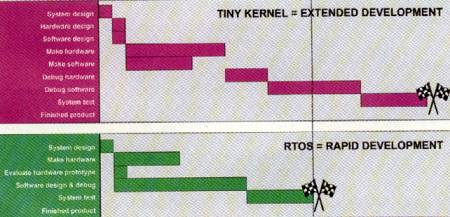 |
| The development facilities that come with an RTOS short circuit much
of the work necessarywith a simple multitasking kernel, shortening the design
process. |
Os vs. tiny kernel
In its most general sense, an RTOS is any software that hides the
complexities of computer hardware. This covers a wide range of system software.
Almost every RTOS provides threading, the illusion that the processor can
do several things at the same time, and most system software offers services
that wrap I/O in functions something like read(), write(), open(), and
close().
System software that provides little more than threading and primitive
I/O is generally called a tiny kernel. The leading commercial tiny kernels
are Nucleus and the Wind kernel.
An operating system is distinguished from a kernel by the protection
it offers. Operating systems run applications in processes. The OS expects
errors in processes, prevents processes from harming anything but themselves,
and recovers smoothly when a process terminates unexpectedly. The leading
real-time operating systems are OS-9, QNX, and LynxOS.
What ‘real time’ means
Real-time software is designed for systems that care about meeting deadlines.
All well-written system software cares about performance, but real-time software
has more complicated goals:
• It should be possible to predict the execution time of the system
accurately. Depending on the hardware, the allowable margin of error might
be 200 µs, or 2 µs. Non-real-time operating systems sometimes wander
from expected timing by a millisecond or more.
• It should be responsive. RTOS engineers make particular efforts
to reduce both context switching and interrupt response time.
• It should be fast
These three performance goals are in priority order. A conventional operating
system would reverse the order, then nearly ignore everything but typical
performance.
What good is an OS?
An RTOS or any operating system makes itself useful in hundreds of ways,
but I’ll select two: it runs binary images, and it protects them in
processes. These features seem obvious to people who use operating systems
and rather strange to kernel users, but supporting them goes a long way toward
defining the behavior of an RTOS.
Portable binaries
When you buy a program for Windows, Unix, 05-9, or any less-known operating
system, it comes as a binary image on a CD, or perhaps you download it from
a Web site. You don’t modify the source, compile it, or link it. You
just copy it onto the computer and run it. That is nice for the buyer, and
crucial for the software developer.
The developer has to test the program as the user will run it If the
final image is not determined until the application is bound to target hardware,
mass marketing of software becomes impossible. This problem is less critical
for embedded software than for consumer software since embedded systems often
deploy software for a specific hardware configuration, hut this does not
make portable binary images irrelevant:
• Software can be targeted to a development system while hardware
is being developed. When the final hardware is ready, the software can be
used without even recompiling it. This makes concurrent hardware and software
development easier and improves time to market
• Provided that they use the same processor family and have the necessary
memory and I/O resources, the same software will run across a line of similar
systems. There is no need to test, inventory, and document multiple software
versions for every hardware permutation.
• Support becomes tractable. Every customer is running a software
image that is identical to the one at the support engineer’s desk.
This degree of portability requires that the operating system hides nearly
every aspect of the platform. The processor family, total amount of RAM,
and general I/O complement have to be visible, but the operating system handles
issues related to the location of memory, the details of the I/O, and the
other software running on the platform.
In most cases it will even conceal differences between processors in
the same family. (You could run the same image on a 68000 and a 68060 even
though they have substantially different instruction sets and architectures.)
Processes
Every operating system supports processes (perhaps under another name).
A process gives the program using it the illusion of running on its own machine.
It gets a share of the available processor time, and it is given access to
other resources such as memory and I/O. Some resources are available to the
process as soon as it is created, and it can request and release resources
as it runs.
From the embedded point of view, a process is essentially a thread with
protection. This does two things:
• Since every resource is issued by the operating system to a specific
process, it can recover resources when a process terminates. This prevents
resource leaks even when processes terminate unintentionally.
• The operating system uses software techniques, the supervisor!
user distinction in the processor instruction set, and hardware memory protection
to keep accidental or malicious actions in any process from harming the operating
system or any other process. This isolates problems in the process that causes
them. This eases debugging, and improves time to market It also makes fault
recovery easier in the field. This leads to more robust systems.
RTOS vs. OS
Someone accustomed to an ordinary operating system like Unix or Windows
already takes the features in the previous section for granted. For them,
other aspects of the embedded RTOS are more interesting:
• Windows programmers would be surprised to learn that RTOSs are
expected to run indefinitely without re-booting.
• Real-time operating systems are designed for systems with much
less memory than ordinary operating systems. Less than a megabyte is fine.
Less than 100 Kbytes is probably not enough memory.
• Real-time operating systems are good at things that have to happen
in a short time. They are probably a little slower at big jobs than an ordinary
OS. They are designed more to respond to events very quickly. They are also
generally designed to run well under very heavy load.
For embedded control, real-time operating systems are often the only
practical choice, especially when multiple control loops must behave predictably,
with controlled priority.
ELCTRONICS PRODUCTS SUPPLEMENT Fall 2000
http://www.electronicproducts.com/ |