wdm architecture
comparisons
Friday April 28, 2000 15:29
Windows win32 driver model [wdm] overview
Revision 2 Tuesday April
11, 2000 15:12 1
Monday April 10, 2000 13:36
0
Monday March 27, 2000 09:33
|
|
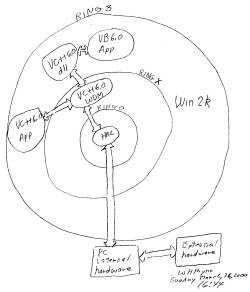
| Windows 2000 wdm hardware
access
A Visual Basic 6.0 application [app] communicates with a Visual C++ dll
which, in turn, communicates with a VC++ wdm operating at a ring above ring
0.
The wdm communicates with the Hardware Abstraction Layer [HAL] which
communicates with PC internal hardware.
C++ apps communicate directly with a wdm. |
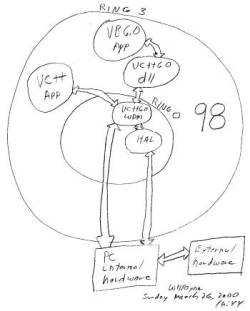
Windows 98 wdm hardware
access
Visual Basic 6.0 application [app]
communicates with a Visual C++ dll which, in turn, communicates with a VC++
wdm operating in ring 0.
The VC++ wmd can communicate directly with hardware too.
C++ apps communicate directly with a wdm.
|
| A wdm is supposed to be binary
compatible between Windows 98 and 2000.
Butthis is not mean that everything in a 98 wdm will work on a win 2k
wdm.
Here's some examples. |
| Works in 98 but not on win 2k |
Works in 98 and win 2k |
m_IoPortRange3.inb(7);
m_IoPortRange3.outb(5,0x40);
_asm
{ pushad
mov edx, 0x30f
mov al, 34h ; mode 2,
read/write least signifcant
out dx, al ; byte first, then most significant byte
sub edx, 3 ; point to counter 0 data
mov eax, DataRows * Burst ; DataRows * Burst - compensate for Burst burst.
out dx, al ; write least
significant byte
mov al, ah ; most signficant byte in al
out dx, al ; write most significant byte
popad
} |
READ_PORT_UCHAR((PUCHAR)0x707);
WRITE_PORT_UCHAR((PUCHAR)0x705,0x40);
These are HAL [hardware abstraction layer] library subroutines. |
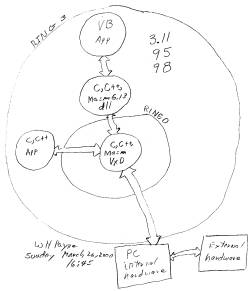
Windows 3.11, 95, and 98 vxd overview
Tuesday March 28, 2000 08:12
|
vxd structure is extremely similar
to that of
a 98 wdm. In fact, it appears that some of
the wdm services were patterned after those
in a vxd.
vxds, however, don't work with win 2k. Also
vxd are weak on such services as power
management.
All vxds need to be replaced by wdms. |
Economics of drivers is that you want a programmer to write, get
working well, then document the driver.
Then you want to get rid of the programmer. The programmer
is an expense.
You then start selling the hardware and associated driver to make
money.
Of course, some bugs may appear in the field.
The number of bugs is usually a function of the number
of lines of code in the driver.
A non-linear function. Number of bugs rises geometrically?
or exponentially? with the number of lines of
code.
Either the original programmer or some other programmer will have
to fix bugs.
Good documentation becomes critical either to train a new programmer
or refresh the original programmer's memory.
When the driver is updated it is posted on internet for download.
The internet method is relatively inexpensive compared to sending out
disks and manuals.
But then comes new technology. The driver must be updated in
a major way.
Sixteen bit Windows software is being replaced by thirty-two bit
Windows software.
Visual Basic 6.0, Visual C++ 6.0, and link 6.0 has replaced
previous versions.
Sixty-four bit Visual Studio 7.0 will happen.
But let's go backwards to see where we came from.
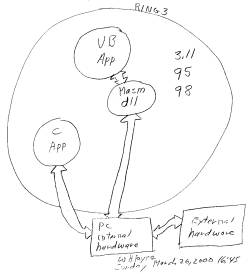
Sixteen bit Windows 3.11, 95, and 98.
In 16 bit Windows it is possible to access hardware directly from
ring 3. Here's a diagram. Thursday
April 6, 2000 20:33
Driver DLL: Interrupt Handling
This chapter will show how to build a 16-bit, interrupt-driven driver
DLL. While a polled-mode driver DLL (like that of the last chapter) is certainly
simple to build, a basic interrupt-driven version is only slightly more complex
and offers significant advantages. Interrupt-driven drivers can usually offer
improved throughput. Interrupt-driven drivers are also more “Windows
polite” than polled-mode drivers, because the interrupt-driven driver
doesn’t tie up the processor while waiting for the device.
The basic structure of a Windows interrupt-driven driver is quite similar
to the structure of a DOS driver: a real-time component (the Interrupt Service
Routine, or ISR) services hardware events, and a higher-level component (which
I’ll just refer to as the driver) handles communication with the application
or operating system. The driver and ISR typically communicate through a buffer
that must be managed as a shared resource.
| An interrupt-driven driver DLL is by definition a 16-bit DLL, because
Win32 DLLs cannot install interrupt handlers. There is no Win32 API to install
an interrupt handler — because that job should be done in a true driver
— and the DOS Set Vector call used by Win l6 DLLs is not available to
Win32 DLLs. |
Karen Hazzah Writing Windows VxDs and Device Drivers Second
Edition Expanded coverage for Windows 95 1997 © R&D BOOKS
Miller and Freeman.
1
Here's some all working code [all over the world] which sets a
16 bit Windows interrupt vector which Hazzah refers.
SetDasIntVector PROC NEAR
mov al, IrqTypeCode ; das interrupt number
push ds
mov dx, seg DasIntHandler
mov ds, dx
mov dx, offset DasIntHandler ; ds:dx point to
Inthandler
mov ah, 25h ; Set Interrupt Vector function
int 21h
pop ds
ret
SetDasIntVector ENDP
|
Here's the tools used to produce and test the above code.
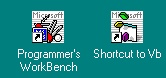
Vb is Visual Basic 3.0.
The Programmer's WorkBench is a DOS-based Windows app distributed with
Microsoft's MASM 6.10.
MASM 6.0 uses link 3.0 and is largely 16-bit oriented.
Sixteen bit code running at ring 3 was replaced by a vxd running at ring
0.
The vxd, in this application, worked about half the speed of the ring
3 dll and took about twice as much code! dll driver codes don't port
well directly to a vxd or wdm. Redesign is required.
Then came the wdm initiative.
All vxds and dll mini drivers must now be replaced by wdm drivers which
run both on 98 and win 2k. |