The process of replacing an old manual system with a new computerised system happens in stages and is known as the system life cycle. There are several ways of looking at the system life cycle, and several different sequences have been drawn up by various experts, the sequence of stages we wilt be looking at is shown below:
Project Initiation.
The start of the life cycle is normally some recognition of the fact that new technology could improve an existing system. In a company it is management who will initiate the selection of a project for investigation.
Feasibility Study.
The Preliminary Study is to establish if there is a need for a new system and to specify ills objectives. Before committing themselves to going ahead with the project management will ask the following questions:
1. Is it possible to develop the system they want?
2. How can it be done?
3. How much will it cost?
4. How long will it take?
5. How will it affect people's jobs?
6. What changes will have to be made to the structure of the organisation?
7. What are the benefits?
8. What are the risks?
9. Is it worth it?
The Feasibility Study investigates the project further so that it is possible to say whether going ahead with the project can be justified. If the feasibility study shows that the project should be abandoned then the final feasibility report should give the reasons why. This stage of the Life Cycle is carried out by a Systems Analyst; the report that is produced should contain details of:
1. The aims of the system and its main functions
2. The options considered along with advantages and disadvantages of each option
3. The recommended option, its costs, benefits and effects on the organisation
4. A suggested plan of development of the new system and how the changeover should take place
There are several important factors that must be examined during the feasibility study, these are:
Software Options:
The choice is to either use an existing software package (such as Microsoft Office), or to develop a new system designed specifically to suit the problem being looked at. It is much cheaper to use an existing package, but the advantage of bespoke software is that it does everything that is required, while general software package may not. Large organisations (such as B'!') have in-house software development departments, which reduces costs on developing theft own software, since they do not have to pay someone else to do it.
Hardware Options:
At this stage it is enough to examine the hardware requirements, rather than looking at specific systems. For example, a package may need a certain amount of RAM, or a package which requires real time interaction may need a machine with a fast clock speed, other packages may need a specific operating system to run on, etc.
Effects on the organisation:
It is important to consider how the new system will affect the running of the organisation.
There is no point in spending large amounts of money on a system that the current
employees will not be able to use.
Costs and schedule:
It is important for the analysts to give the management some sort of idea of how much the new system will cost, and how long it will take to install. Obviously the cost may mean that the company may not be able to afford the new system. The length of time it will take to install, and change over from the old system is also important to consider. The analyst has experience of changeovers and may be able to advise the management on whether or not it is safe to change over immediately from one system to the other, or if the new system should be phased in gradually.
Systems Analysis
Before a new system can be designed, it is important that the analyst works out how the current
system works and what its problems and shortcomings are. This means that when discussing
the new system with management and users, the analyst will be able to understand how the
users see the system being developed. The analyst needs to know:
1. What the system does
2. What documents are involved
3. What data is stored, input and output
4. Who sends and receives data
5. Problems experienced by users, such as delays
From discussions with users and management the analyst can build up a picture of what the requirements of the new system are. The main functions of the system must be clear, and the analyst can use this information to start to specify what exactly each section of a package should do. A final report is produced which specifies in detail what the new system will do and gives a revised estimate of costs and change over times.
Often models of the system will be produced, perhaps in the form of a flow chart. There are three types of model which are frequently used:
Designing the system.
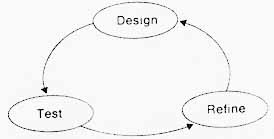
The analysis stage says what is expected of the system. The Design Stage says how it is to be done. It determines the way data is to be input and output, and how the user interface will work. The design stage is a process of design testing and refining as shown in the diagram.
The design starts from a requirements specification.
For example, a design specification for a toaster may have the following requirements:
The toaster designer takes these design specifications and designs his toaster to fit the requirements.
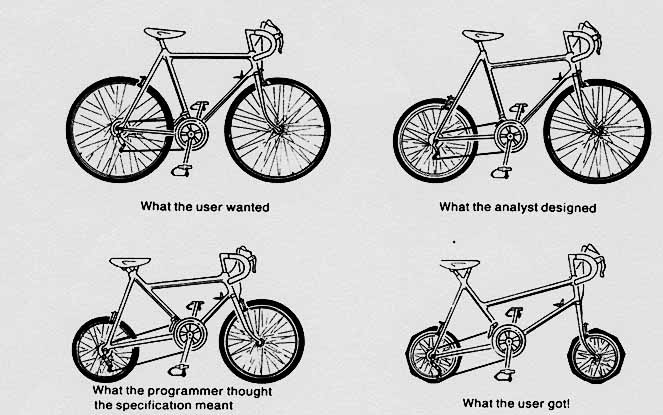
The same thing happens with a computer system. When the analyst has determined, from discussions with management and users, what the requirements of the new system are, the project team will sit down and design a system to meet the specifications. However, often the user, the analyst and the project team have different ideas of what is needed, and interpret a specification in different ways, the below diagram shows what may happen.
Prototyping may be used to help in the design. This is where the project team will produce basic versions of the user interface screens and input I output routines, which will then be presented to the user for comment before the project proceeds further.
A C.A.S.E. Tool maybe used to help with the design process. CASE stands for Computer Aided Software Engineering, and these tools can be used to help with:
The project team has to choose at this stage what software, hardware, error detection etc. to use in the system. These will be chosen according to the following criteria:
Implementation and Maintenance:
There are several steps that must be completed during this stage.
Testing.
The specifications are written in pseudocode and given to the programmers, develop and test the programs. The original design may have to be changed slightly as the programs are developed, since they may not work or be inefficient in their original form.
Each program is tested individually, and working programs are linked together until the system is complete. Test data must be used which will test all possible variations of operation required of the system. The analyst is responsible for making sure that this data is adequate. This is application testing.
Acceptance testing may be used, where the users of the system are asked to try out the new system with prepared data, Criticisms are taken into account and modifications ma be made.
Documentation
User Documentation
The people who will be using the new computer system as part of their job require this. Many of these people will not be familiar with how computers operate or how to use them. User documentation should contain:
Technical (Programmer) Documentation
This documentation is necessary in case any maintenance ( changes e.g. the rate of VAT changes from 17.5% to 19% means all EFTPOS programs will have to be changed to reflect the change in VAT) has to be performed on any of the programs or other parts of the system. I.e. it enables the system to be amended. It must be considered that the original Systems Analysts and programmers who designed the system may move jobs and may not be the people to carry out any new work on the computer system. Technical documentation is designed to be read by computer experts such as Systems Analysts and programmers. It is not designed to be read by the users and as a result, it may contain some computer jargon terms.
Technical documentation should contain:
details of any limitations of the program(s)
Changeover: How is it done?
There are several ways of changing over from the old system to the new computerised system:
Direct Changeover: The old system is shut down at the end of one day and the new system takes over the next day.
Advantages: Fast and efficient - little duplication of work
Disadvantages: The new system may not work first time, this could lead to serious problems
Advantages: Results from the new system can be checked against old system results to ensure there are no errors. If the new system is not working properly the data from the old system can be used while the problem is sorted
Disadvantages: Puts pressure on personnel to keep both systems running at once
Review
When the system has been implemented, there must be a thorough examination of the system to ensure it is working correctly. Often it is only possible to spot errors in a system after it has been running for some time. A good example of this is the Intel Pentium Processor, in which an error was found only after mar processors had been sold.
Maintenance.
This can take three forms: