Suggested IDE
Changes:


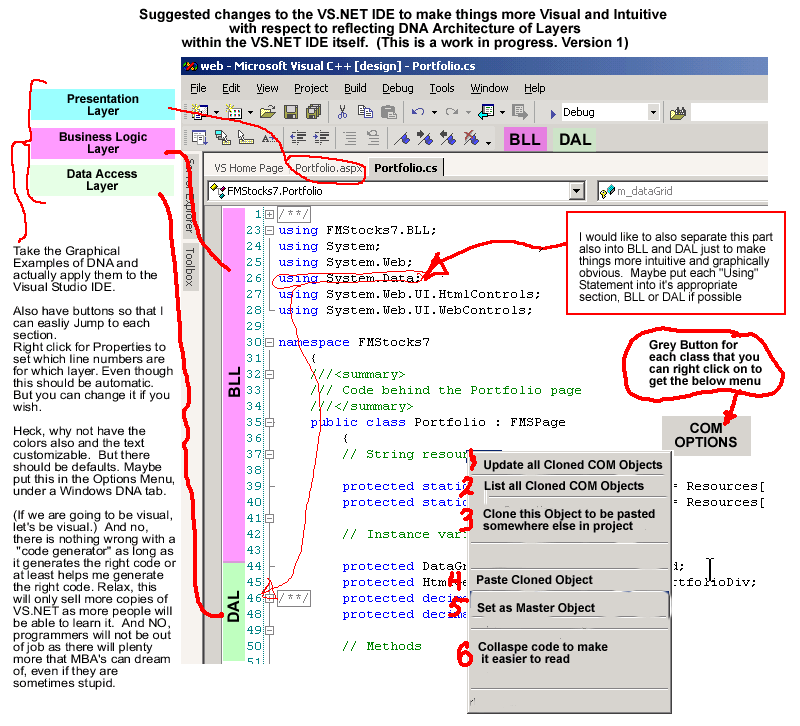
1. Make Changes to IDE to visually indicate DNA components and separation of DAL and BLL.

2. Include a COM Options Menu that updates Identical Objects created on several different web pages to minimize maintenance. (This is where you get the benefits of layer architecture in reusing objects without introducing a single point of failure or multiple version of a business object)

1. Each Object, actually "class", has a button called "COM OPTIONS" or something to describe it visually, like an Icon.

2. If you Right Click on it, it opens up a Right-click menu that allows you to easily do 3 things

  1. Update all Cloned COM Objects - Means you can edit the existing class you see and then have all other Cloned Object reflect those changes you made. this will save you time in hunting down other objects that are used in other web pages while still giving you the reliability of having a separate object for each page.

  2. List all Cloned COM objects - This will show you all the other web pages, actually the "code behind" pages that use this same object

  3. Clone this Object to be pasted somewhere else in project - This copies this object to the clipboard so that you can paste it easily somewhere else.

  4. Paste Clone Object - Pastes object into page that you did in some other "code behind page" into the present page

  5. Set as Master Object - Make this object the Master Object so that other programmers in your group won't accidently modify it. Sort of like security thing

  6. Collaspe code to make it easier to read - Uses the Collapsable feature already in VS.NET to avoid have really long pages of code.

Note: When you update a cloned object throughout a web application, there should be some procedure that allows other programmers to know a change has been made. For example, A Window pops up and asks if they wish to accept changes now or make a copy and try their changes later.

Goto Page 4 - Suggested IDE code view (with notes)


Hosted by www.Geocities.ws

1