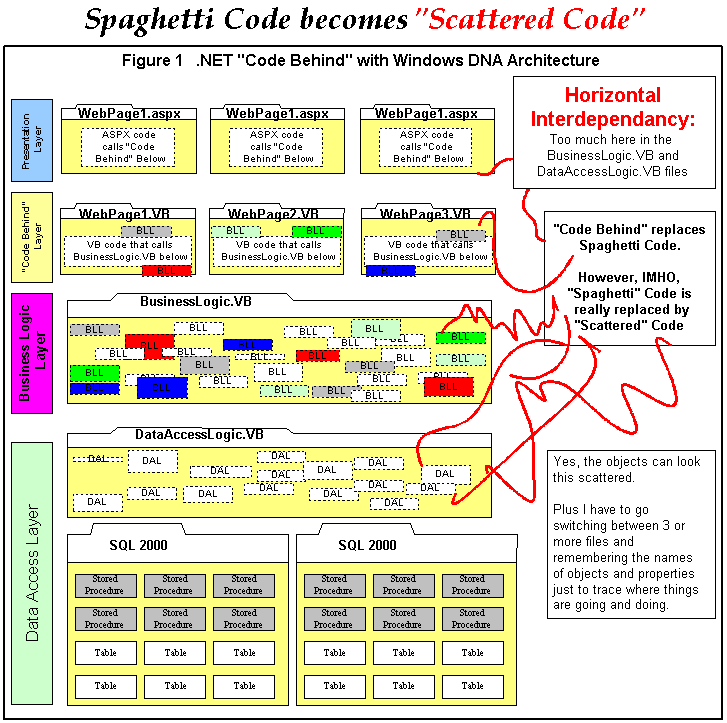
Problem:
Windows DNA Layers and "Code Behind" eliminates "Spaghetti
Code".
HOWEVER this introduces "Scattered Code"
Note: See how the BLL's with the different colors are all "Scattered" all over the place between the "Code Behind" Layer and the Business Logic Layer
Single Points of failure:
BusinessLogic.VB and DataAccessLogic.VB can take the entire web site down and
make it unavailable.
Limited Number of Programmers can
work on enterprise web site because all Business Logic and Data
Access Logic is contained with 2 files.
Not Modular in a Practical Sense:
If the Business Layer is divided into business objects like described in
IBuySpy.com
documentation, 6 business and data access classes over 13 page, then I have
a hard time finding out what goes where OR where it is in the first place.
A new programmer to the project can take a lot of time just figuring out how
the business object were made and how the objects relate to the classes.
Object Models can be very Subjective when you try
to eliminate interdependancy: Just because there is some VB7
book or C# Wrox Author that says, "Make your Object Models this way",
doesn't make it happen consistenly in the real world. There can be a lot
of overlap in the reasons to place a Business Components in like, for example,
in either Orders.VB or Customers.VB of your Object Model. Each programmer
can easily have different, yet good reasons for putting these objects here or
there. Every programmer, whether good to bad, can approach a problem and create
a totally different object model yet still come up with a workable solution.