Solution Explorer for VS.NET:
A Much Easier and more Intuitive
Solution Explorer for VS.NET:
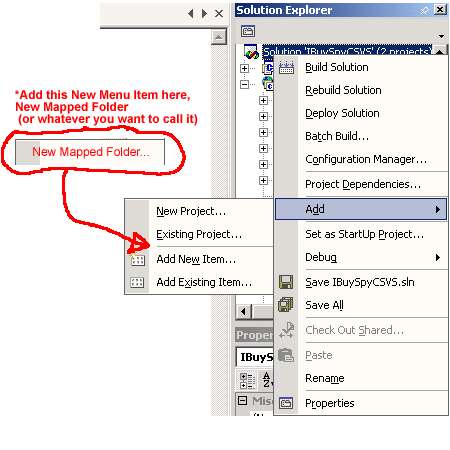
1. Keep everything the same in Solution Explorer, EXCEPT just add the Ability to add Mapped Folders (or FTP) to the Solution. So if you were to Right Click in the Solution Explorer, you see the Add Menu Item which will then give 5 choices (as opposed to the current 4 in Beta 1) as seen below:
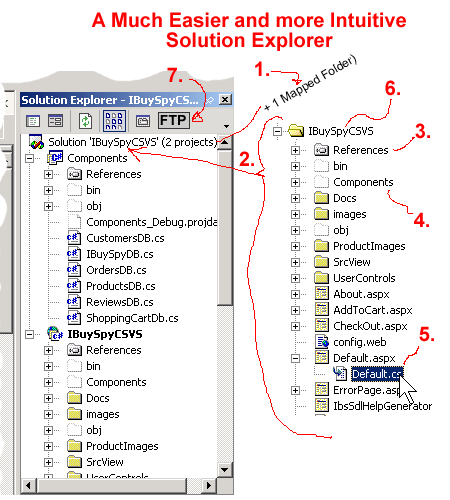
2. Also, have the Mapped Folder listed at the Top and keep the Projects at the Bottom
;-)
3. The Mapped Folder has the "References" Folder just like how Projects do.
4. The Mapped Folder displays the "Components" Folder that contains the Business Logic that's the Projects do. You can also Run and Build the Components Folder just like the Components in a Project does. If you expand the Components Folder, it will have it's own "References" folders.
5. The Mapped Folder places the "Code Behind Files" behind the .aspx files just like the Projects do.
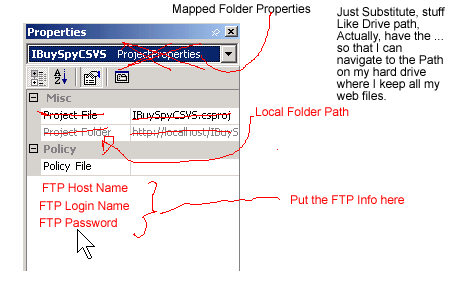
6. If you Select, Click or Right Click on the The Mapped Folder you will see the Properties of the Mapped Folder, This is so you can set stuff like the Network path, or the FTP settings (login password, etc. (Just Look at the Dreamweaver "Define Sites Dialog Box" to get all the Properties Settings.)
7. The FTP Site Files Button is Context Sensitive. That is, you only see it there when a Mapped Folder is Selected (or NOT when a Project is selected). All this Button does is open up a Separate and Larger FTP Window that shows both the Remote Server Files on the Left and the your Local Files on the Right. I can also list the files on either side by Date, Type, or ABC order or reverse order. Furthermore, if I am an Adminstrator on the Network, I can set permissions as well. (Just Look at Dreamweaver Site Files or IpSwitch WSFTP for a better look and understanding.)
FINAL NOTES
So, what you do is keep everything you had before with Solutions and Projects. HOWEVER, all that needs to be done is to add something like a Mapped Folder that also has the Properties to either connect to a FTP site or a Network Drive.You get all the Functionality of a Project but the Simplicity of a Dreamweaver Web Site Setup. PLUS, you can Put either a Project or Mapped Folder in the your Solution. Nevertheless, you have the option of just opening up the Mapped Folder without the Solution if you wish.
TUTORIALS
AS far as I am concerned, all the VS.NET Tutorials and Intros should have the New Users introduced to Mapped Folders(i.e. Dreamweaver's definition uses the name "Sites"). This will allow for the easy setup of a Web Site using FTP or a local Network as more Users are Familiar with FTP and Mapped Folders than that Nightmare way of Frontpage Extensions and InterDev.BUT, for the "so-called Advanced Users of InterDev", they can just as well select the option of Projects as before. If Solution Explorer is NOT made easier to use, you can count on a huge amount of questions regarding Solutions and Project just like it was with InterDev. (Not to mention a multitude of simple and basic Customer Service Questions just to get started with VS.NET.)
Any comments are appreciated.
THIS entire site are only opinions and suggestions to the new VS.NET
Please post comments and replies to this web page in that message that got you here from the newsgroup or mailing list so that others can comment in an open forum. Thanks.