Graphical User Interfaces for SQLite Databases
Several GUI's have been created for or can be used with SQLite databases. SQLite Manager and SQLite Database Browser are perhaps the best deal since they are free and easy to use.
SQLite Manager
SQLite Manager is a fairly intuitive and easy to use application that can be used to create and work in SQLite databases. It simplifies many tasks that involve manipulating database objects such as tables, views and indexes. Originally created as an extension of Firefox, SQLite Manager does not include the SQLite library rather it uses the SQLite files already in use by the application that it is attached to. To see what SQLite version is being currently used by SQLite Manager go to the "General" drop down menu at the top of the screen and select "SQLite Version". This extension is updated frequently, perhaps too frequently.
Drop Down Menu Listings
| Database | Table | Index | View | Trigger | Tools | Help |
|---|---|---|---|---|---|---|
| ______________________ | ____________ | ____________ | ____________ | ____________ | _______________________ | ______________ |
| New Database | Create Table | Create Index | Create View | Create Trigger | Options | Report A Problem |
| New In-Memory Database | Drop Table | Drop Index | Drop View | Drop Trigger | Shared Pager Cache | Frequently Asked Questions |
| Connect Database | Empty Table | Reindex Index | Rename View | Rename Trigger | Use Table for Extension Data | SQLite Homepage |
| Close Database | Rename Table | Modify View | Extension Homepage | |||
| Recently Used | Copy Table | Export View | About SQLite Manager | |||
| Attach Database | Export Table | |||||
| Detach Database | Reindex Table | |||||
| Analyze Database | ||||||
| Check Integrity | ||||||
| Export All Tables | ||||||
| Export Database | ||||||
| Export Database Structure | ||||||
| Import | ||||||
| Refresh | ||||||
| Reconnect Shift+F5 | ||||||
| Exit |
Home page of the SQLite Manager Extension
SQLite Database Browser
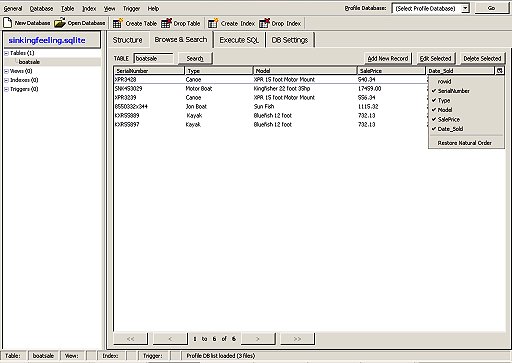
This program was developed originally by Mauricio Piacentini from Tabuleiro Producoes, as the Arca Database Browser. The SQLite Database Browser is not a shell for sqlite 3 rather it is a standalone application with the sqlite dbms embedded in it.
While it is not a bad application, it does have its limitations, the most glaring of which is the lack of support for triggers. In fact triggers attached to a table will prevent records in that table being added or changed using the dialog boxes, instead additions or changes to these table, requires the use of sql statements.
The application no longer updated, the last version being issued in 2006
Something to note is that multiple sql insert statements will not work with SQLite browser as only the first statement in the list will be written to the table. All the following sql statements will be ignored.
Home page of the SQLite Database Browser
Colin Riley -- December 2007 -- Alphabetical Subject Index -- Contact form