Introduction to Computers (semester 1)
notes for Computer Programming (semester 2)
david's website
last update:
30 November 2008
 Introduction
to Introduction to Computers
Introduction
to Introduction to Computers
This course is exactly what its title says. It's an introduction. It assumes you know nothing except how to surf and use email.
You will be given the opportunity to learn
- Teamwork
- How to make a website of your own
- How to program a computer by making a short animated cartoon using a very simple programming language designed for that purpose.
- A broader, deeper, and more perceptive understanding of what a computer is and what computers do.
A PC is only one kind of computer. And Microsoft Windows is only one kind of PC software. However, because those are the only tools we have here, that's what we will use. But this is not a "geeky" course for PC nerds, like a Microsoft Certified Engineer course or the kind of course you get in school if you do 'O' level Computer Studies.
You need to know, right now, right at the beginning, that i am
NOT going to TEACH you anything -
I won't tell you what to do and how to do it. I am not a teacher. I
am a lecturer. I will give you the opportunity to learn some
things, and help you as much as i can, but IT'S UP TO YOU what you do
with that opportunity.
 From time to time,
i will give you a homework, but i don't want you to hand in your homework;
instead, you can write your answer in the class wiki - it will have one answer,
written by everybody. You can contribute by adding something, or improving
what is already there. Doing this will help you consolidate what you have
learned so that you will retain that knowledge and be able to answer the exam
questions at the end of the semester without doing any last-minute cramming.
From time to time,
i will give you a homework, but i don't want you to hand in your homework;
instead, you can write your answer in the class wiki - it will have one answer,
written by everybody. You can contribute by adding something, or improving
what is already there. Doing this will help you consolidate what you have
learned so that you will retain that knowledge and be able to answer the exam
questions at the end of the semester without doing any last-minute cramming.
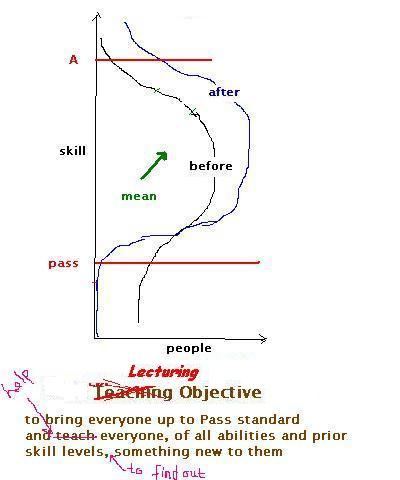
Look at the graphs. Do they make sense to you? If not, ask the person sitting next to you. And if they don't understand it either, ask the next person along. If they don't know either, don't give up and wait for teacher to hold your hand and lead you to the heavenly land of passed exams. Instead, explore the world of information on internet - Google can help you find anything you want to know (except for commercially-produced information). These notes are your "textbook".
You will need one technical term to help you get started on your websearch to make sense of the graphs. Here it is: "The Normal Distribution". If, after reading whatever you found, you still don't get it, look in our class forum. If there's nothing there to help you, post a message asking all the others in the class for help. And if nobody comes up with anything, ask your Maths teacher from school. Don't ask me. If you do, i will tell you to read this. i want you to find out for yourselves. i want you to learn how to find out things for yourself. If the thought of this makes you worried, read 'The Hitchhiker's Guide to the Galaxy' by Douglas Adams. Especially the bit at the beginning
Assessment 70% exam, 30% coursework
Schedule
This course has something for everyone. It's a "learning by doing" kind of course. There are no notes for you to cram at the last minute and forget the day after the exam, Because you decide what you put into your study and hence what you get out of it. The projects can be done by anyone who has never seen a computer before, let alone touched one. But they also provide scope for people who have some experience already to extend themselves if they so choose. The choice is yours. The forum is there for you to ask for help from your classmates and offer help to them. I keep an eye on it and contribute from time to time.
The notes on this website.provide the basic knowledge an absolute beginner needs to get started on their projects. There are no conventional lectures, where the lecturer writes notes and you copy them down and then you do a 5-minute exercise to prove to yourself you have learned how to use such and such formula or remember where Austria is. There are no tutorials where you do tons of artificial abstract problems and get marks out of ten to encourage/force you to do them. Instead, you learn by doing real things. We have mass tutorials where i show you how to do it. The video lectures show you some interesting things that computers can do.
welcome, overview
danger! crashes, bugs, hackers, ...
making web pages and publishing them I
introduction to computers I (video)
e-teamwork
making web pages and publishing them II
introduction to computers II (video)
mid-semester break
programming animations I
programming animations II
virtual reality (video)
review
robots (video)
hand in paper copy of both projects in class (not to my office)
spare
There are 2 projects. The first gives you a chance to learn how to do something that will be useful to you later on: how to create information and publish it on Internet. The second gives you a gentle and fun introduction to computer programming, which will prepare you for next semester - which will also be fun, but make you think a bit more.
Sooner or later (usually when it's too late!), people will ask "what's the exam going to be like?" Past papers are available in the library. I suggest you ignore exams before 007 as the syllabus was different then (it's got easier!). More info about exams (and projects) in the faqs - see below. Last year, everyone passed (some of them only just...). The only way to be sure to fail is to pretend to have a headache on exam day. If you are genuinely sick with a medical certificate for at least the whole week, stating the diagnosis, signed by a government doctor (not a private one), that's a different matter. Please be sure to tell this important information to your classmates - especially the ones who probably will never read this.
Click on the blue underlined text to follow a hyperlink.
faqs (frequently asked questions and their answers)
our forum ie your forum - it's for students only (although i do contribute occasionally). this is the best place to ask your questions. the idea of our forum is so you can help each other. by helping others you will greatly improve your own understanding of the subject matter (and it will help you learn to become a teacher one day) . i look at it from time to time and occasionally update these notes and the faqs file.
our wiki ie your wiki - from time to time, i will give you a homework. there are no marks for homeworks... and there is only one homework answer for the whole class - in the wiki. you contribute by editing what's already there. ...what's the point? ...what's in it for you? - this: humans learn much much more by doing than by watching. we learn more by writing than by reading. i may add questions to the wiki, but i won't tell you the answers, so don't wait for me! i will read your wiki and comment on it in class or in the forum from time to time. if you work together all through the semester, you can collectively develop a super set of notes.
a nice tutorial on the world-wide web
useful links
doing a websearch: what is gravity?
some design layout principles http://photoinf.com/General/Klaus_Schroiff/Basic_Photography_Techniques.htm
Your Projects
There are two projects: (1) Making a website and (2) Making an animation. The website can be about anything at all, but the animation must be on a subject related to one of your academic courses. You have roughly 2 hours per week x 12 weeks = 24 hours - the equivalent of 3 working days - to do them both, so start early.
Do the projects in teams of up to 4 people. You can do it alone if you prefer. But having a team-mate is better for you (even if they are useless! - learning how to cope with useless and/or troublesome team-mates is good experience for you). Don't be bossy towards your team-mates. Don't get angry if they are lazy and let you do all the work - remember that you will benefit from learning by doing, and they won't, so it's their problem, not yours.
 Rules
Rules
1. You must not contravene the laws regarding
publications.
2. Because your site or movie will not be officially approved,
it should not mention the class number, the university, or the government. In general, if you want
to publish a movie or a website, you should first have the written permission of
everyone and every organisation mentioned in it, to make sure they are
happy with what you are saying about them. This applies especially to the
authorities of your university, your country, your family, etc. This is such a
sensitive subject, it's not one on which you can rely upon your own good judgment
- somebody else may not share your opinion that something you made is just
harmless fun or a worthwhile effort; they may perceive it as
derogatory or
unworthy of being associated with them or their organisation.
Project 1 Make and publish on www a simple site on anything you like. Your website should start with your names, ids and photos and hyperlinks to your cartoon script and image files (see Project 2). Your site should be about 10 A4 pages long when printed. If it turns out to be more, just print the first 10 pages. The printout is a safeguard in case internet is not working when i have to mark it. Don't worry about making the printout pretty, i can read between the pages!
Project 2 Either: Make a short animated movie on something related to one of your your academic subjects using Dollysoft. Upload your .tal script (not the .avi file - it's too big for me to download with the connection speed we get here, and i can generate it locally from your .tal file) and any special image files you created to your website and include hyperlinks to them on the first screen of your website.
How to divide up the work amongst your group
My advice is Don't split it up! Do it all together. Share your ideas and build it together as a team. But you can organise yourselves any way you want....
What to submit on paper (one folder for one team)
1. Your projects' URL (web address) - even if you already told me before. don't hand in a CD - i won't put your foreign bodies in my computer's slot in case it catches a nasty disease from them - seriously. (please don't take this personally!).
2. One printout for one team (black and white ok) of your entire website (as viewed by a www browser such as Internet Explorer) and a listing of your Dollysoft script. This is for your assurance, in case the internet is down when i want to visit your site. Don't worry if your text is broken up across printed pages.
Please hand this in in class on or before week 13 (ie the week before the last week of semester) . Late submissions not accepted under any circumstances. Get a friend to hand yours in for you if you can't come to class because your grandmother is sick or you got run over by a bus. To be safe, hand it in a week or even a month before!
how to do project 1
Easiest way -
Use Google or another search engine to find a "free web host". Register with your host and remember your website URL (its internet address) - your host will tell you what it is. At your website host, go to Manage and Create in your (currently empty) directory an empty subdirectory called index_files (which is where you will put your picture files). Then go back (Up one level) to your main directory, which is where you will put your index.html main webpage file).
On your PC (or your pendrive, if using a campus PC), create a folder called MyProjectFolder. Open that folder and (right-click) create in it a New subfolder called index_files
Use Microsoft Word (not Microsoft FrontPage) to create a New file and Save..As index.html in MyProjectFolder.
Edit index.html.
To make a hyperlink: select the text or picture you want to make into a hyperlink, choose Insert...Hyperlink and fill in the Address (ie the filename or URL ( for a link to somebody else's website or another webpage on your own website).
To put your pictures in index.html, use Insert...Picture...From File. You can also just Copy a picture from a website and Paste it into your webpage. Be sure you don't copy a copyrighted picture! If in doubt, make a hyperlink to it instead.Go to Manage (your website) on your host and Upload index.html.
Then go to your index_files subdirectory and Upload all the files (pictures and whatever else is in there) in the MyProjectFolder/index_files folder of your PC. You will notice that the picture files are all called image001.jpg or something like that. That's because Microsoft Word creates these image files for you; they are just copies of the pictures you created or copied from somewhere else.
Go to your website with your web browser (Eg. Microsoft Internet Explorer) and see what it looks like.
Repeat steps 4 to 9 until you are happy with it.
Do you lack confidence that you can do it? Making a web page is actually so easy anyone can learn to do it by themselves. To make it even easier, I will show you how to do it in class. Try it yourself. If you get stuck, click here.
Whereas i recommend you to all work together on a single webpage, some teams will get each member to make a page on their own and link them all together. That's fine, so long as you remember that each .html file has its own associated picture folder. So if the page you are making is called fred.html, its pictures will be in a folder called fred_files whose files you will need to upload to a subdirectory called fred_files
You can use Dreamweaver or anything
else you like instead of Word. However, Dreamweaver and other fancy website builders will create
lots of different files/pages, all of which will have to be uploaded to
your website, with the exact same directory structure (which you will
have to build on your host yourself).
NB: Dreamweaver,
Microsoft FrontPage, Microsoft Publisher and other website generation tools are designed to make sites to be hosted on your own
computer. So you can't use their automatic publishing features - you will
have to upload all the files they generate (and they generate lots of them!).
Harder way - Create your site online using tools provided by your host (harder because it takes longer, but you can get a fancier site). Definitely, don't do it this way unless you are doing it from home on a broadband connection - the Internet connection from campus is too slow to do it this way.
Hardest way - Host your site on your own broadband-connected computer. You will need to install a "server", which comes with most self-publish toolsets. Actually, even this "hardest way" is fairly easy, compared to doing chemistry experiments, solving maths puzzles, or - hardest of all - finding out what you need to tell people so they won't make mistakes :)
how to do project 2
Easiest way -
Dollysoft http://www.dollysoft.com is a computer language for scripting animated cartoons. The word "dolly" refers to the cinematographer's camera dolly, a device for moving the camera around a scene. At the time of writing (August 2008), the dollysoft site seems to have disappeared, but you can copy the software from the leftmost row of PCs in the first lab on the left in campus.
Your project is to make a short cartoon by writing a .tal script from which Dollysoft generates a .avi file which Windows Media Player or RealPlayer or QuickTime or etc can show (an .avi file is a sequence of screen images, shown one after the other in rapid succession just like a movie so the viewer sees things apparently moving). .
Don't ask me how long short is. You decide.
Don't ask me how fancy it has to be. You decide.
There are no notes on Dollysoft here but plenty on its website and its "local copy of online Help" feature, which is very helpful and easy to read.
 You can be in your own
cartoon! You don't have to do this, but it's fun. Simply cut out and
shrink your picture to the size you want using Microsoft Paint or somesuch and
use the Dollysoft Use command
that i will show you in class and is explained in Dollysoft Help.
You can be in your own
cartoon! You don't have to do this, but it's fun. Simply cut out and
shrink your picture to the size you want using Microsoft Paint or somesuch and
use the Dollysoft Use command
that i will show you in class and is explained in Dollysoft Help.
To get a non-rectangular picture, save the image on the left (right-click it) to a file - it is the special "transparent colour" used by Dollysoft (ie, it will become transparent when Dollysoft uses it). Then paste your cutout on top of it. Shrink the picture to the size you want before using it in your cartoon (i will show you how to do this in class).
And if you are more adventurous, you can use Dollysoft's Tools...Actors feature to create your own actor out of different body parts! Eg you can put your own head on a space alien body, or the other way around.
Upload your .tal script (not the .avi file) and any picture files or actor folders you created to your website and include hyperlinks to them on the first screen of your website.
NB: If your host is geocities, it won't let you upload a .tal file. So, instead, Copy the text of your script and Paste it into a Wordpad .txt file. Then upload that instead (dont forget to make your hyperlink point to your .txt file!). Or zip all the files for your cartoon together and upload the .zip file.
NB: When using Dollysoft version 2.0, you may get the error "Floating point overflow". If this happens, go to Tools...Options...Speech and tick (click) the boxes at the bottom labelled Always use internal text to speech in AVI and Always use internal Text to speech in Preview. Thanks to Christopher's team for finding this solution.
Harder way - Use Alice to make a 3-D animation. It requires more learning to use than Dollysoft
Hardest way - Use another animation package from the web - see http://www.your3dsource.com/makeyourownanimation.html . For example, Google Sketchup provides a rich set of features, and they claim you can get started in just a few minutes, but be warned - there are 28 videos in its tutorial for beginners....and it's more oriented to producing static 3-D images than animations. The most powerful freeware full-featured animation package seems to be blender; suitable only for advanced users with lots of time on their hands.
previous student projects
your project will be added to this list next year. there is no significance to the order in which sites are listed - it's just the order in which the pile of papers happened to have. if your project is missing from the list, send me a private message via the forum giving me its title and URL.
if you choose a meaningful site filename, it will encourage people to surf to your effort. if you come across a dead link, tell me and i will remove it from the list.
2008
the scientific differences between boys and girls
broad educational discussion forum for teachers
earlier years
http://www.geocities.com/project_
http://www.geocities.com/janehafi
www.freewebs.com/bittersweetruffles
www.geocities.com/lovingastronomy
http://www.geocities.com/supermosquitoes
http://www.geocities.com/dah2819
http://www.geocities.com/respiratory_sys
www.geocities.com/hanif_talib2510
http://www.geocities.com/m06b0580
http://www.geocities.com/amal_sly
www.geocities.com/rosallysa/srip.html
http://www.geocities.com/joeliza213/
http://www.geocities.com/joeliza213/
http://www.geocities.com.tinatan806/
http://catchyourzzzs.googlepages.com/home
http://www.geocities.com/_m05b0713_m05b0747
www.geocities.com/leogreendaisy/carbonated_drinks.html
www.geocities.com/birth.stones
www.geocities.com/eatingless/suzi.html
http://www.geocities.com/planetsintheuniverse
www.geocities.com/mizah_abidah
www.geocities.com/ummun_nazharah
http://www.geocities.com/_syndrome/
www.geocities.com/smartdwarfhamsters
http://www.geocities.com/tinatan806
www.geocities.com/infinite_minds06
www.geocities.com?_06_bruneicoast
www.freewebs.com/aromatherapy2006
http://www.angelfire.com/planet/danialothman/
www.geocities.com/eating_lessfood
www.geocities.com/remedies_219
http://smoothcriminalmagic.googlepages.com/
http://unfortunatechildren.envy.nu
http://www.geocities.com/pwences_dkzz
http://sahproject.tripod.com/sahproject.html
http://www.geocities.com/akaz_287
www.members.tripod.com/hanie-vain/
http://www.geocities.com/cook_2_eat/
http://www.freewebs.com/basketball_1120
http://www.freewebs.com/carnasius/index.htm
http://www.geocities.com/P3arly05
http://www.geocities.com/hamster
http://www.geocities.com/crime_s_i
http://www.geocities.com/juz_mal
http://www.geocities.com/atul206
http://www.geocities.com/hepatitis_c1601/HepatitisC/blank3.html
http://chinesesuperstitions.150m.com
http://www.geocities.com/ocrenon_86/
http://protectedspp.tripod.com/
http://lovedoctor83.tripod.com
http://www.geocities.com/eating_out_for_ubdians
http://www.geocities.com/cook_2_eat
http://www.geocities.com/gastricpain_bed2yr
http://www.geocities.com/bulieh
http://www.geocities.com/bed_general_science
http://www.geocities.com/azrindante/worldofsoccerO
http://www.geocities.com/shyv_2719
http://www.geocities.com/ammiefim
http://www.geocities.com/forces_2005
http://www.geocities.com/da_silva17
http://www.geocities.com/dehelmi1412
http://www.geocities.com/marry_hmae
http://www.geocities.com/tymez_up05
http://www.geocities.com/noymiz/intropage
http://www.geocities.com/koreandramaseries/OurPage
http://www.geocities.com/nadznissa/chocolate
http://www.geocities.com/juli_172
http://www.geocities.com/ur_horoscopes
http://www.geocities.com/endangerwildlife
http://www.geocities.com/yahcat5
http://www.freewebs.com/ashyqin
http://www.freewebs.com/hfakhriah
http://www.freewebs.com/nora906
http://www.freewebs.com/kerteni05b0751
http://www.freewebs.com/psymiraclez
http://jerudongfishmarket.tripod.com
http://members.lycos.co.uk/lizapha7
Why some people like martial arts
Why women are obsessed with their appearance
Why some people like martial arts
Why there are few tourists in Brunei
Why cellphones are considered a necessity by some people
Why certain foods are necessary for health
Brunei: from 5000 years ago to today
Why girls think they need cosmetics
Why some people believe in ghosts
Why some countries ban smoking
Why The Seven Wonders of the World are Wonderful
Why teenage girls sometimes have troubled relationships
controlling stress and tension
Artificial Intelligence and Bioinformatics
Chinese Purple White Flying Stars Theory
Tangrams, an ancient Chinese game
Understanding Right-Angled Triangles
Using computers to practice Primary Maths problems
Wildlife Extinction and its conservation