|
|
|
|
|
|
|
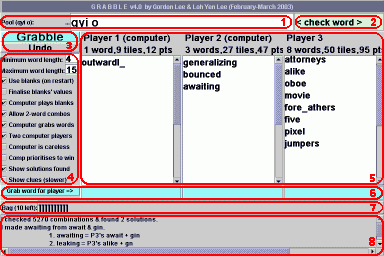
JGRABBLE INSTRUCTIONSJGrabble is our Java applet which plays a regular game of Grabble. It requires your browser to have a Java plug-in of version 1.2 or better. If you can see text entry boxes and stuff in the large box above, it should work fine. Otherwise, please get the Java plug-in from http://java.sun.com/products/plugin/ .There's a major difference between JGrabble and normal Grabble: The computer lets human players take as long as they like to grab words, and only when they pass does it grab the leftovers. It would be too unfair otherwise! :-) THE USER-INTERFACEBefore we start, you may wish to look at the GRABBLE RULES section to better understand my terminology...Welcome back! The interface is divided as follows:
USAGEKeep clicking Grabble until enough letters appear.The first player to see a word (up to you to decide how to settle this -- shouts, buzzers, fistfights etc) types it in his/her Word-grab box (the light blue box under his/her scoreboard) and presses Enter or clicks the Grab word... button. Sometimes this doesn't work, so you'll have to manually edit the pool and hands. When everyone passes, click Grabble and continue until the Bag (or everyone's patience) runs out. OPTIONSThe options marked "@" and especially "@@" should not be used together (or turned off) on slower computers or those with less memory.
ADVANCEDSeveral other options (e.g. number of players, word list, score/number of each letter and even icon to use in Bag) can be changed by editing the <param> tag in this HTML file (obviously you're not supposed to edit THIS file, so download JGrabble.zip and do it on your own computer...) I've labelled unused ones <xparam> but you may of course change them to <param>.If you wish to change the word list the computer uses to grab words, create a text file with one word per line, with each line being the sorted letters of the word, a tab character then the word itself, all in lower case (e.g. abbeglr(tab)grabble). Only the letters a to z are allowed and the whole word list must be sorted alphabetically. Change the anagramList parameter in the HTML file to point to the correct file. See the existing ispell.ana for an example. If you've access to the Java console (under Tools menu in Netscape/Mozilla, Tools>Internet Options>Advanced tab>Java VM in IE), have a look when the bag is refilled or when show-clues is on -- did somebody say, "Cheat?" |
. |
GRABBLE RULESGrabble is a fun and fast-paced game using the tiles from Scrabble or a similar board game. All players play at the same time so no more waiting for your opponents to move!As tiles are revealed one by one, players attempt to increase their score by grabbing their opponents' words while protecting their own. It helps to have quick thinking and reflexes (and a calm mind when S's or blanks appear!). LET THE GAME BEGINBefore the game starts, players agree on:
GAME PLAYIf the bag is empty, go to the END GAME section.With players taking turns, a tile is taken out of the bag, revealed to all players (at the same time) and put into the pool. The player who first shouts out a valid word (no shorter than the minimum word length) made from:
If it is doubtful who shouted first, all offending words are ignored until the next tile is revealed, but players can continue shouting other words. If noone makes any words, after a reasonable pause (5 to 10 seconds), repeat with the GAME PLAY section. END GAMEIf there are tiles left in the pool, players are given around 1 minute to make words. Scores are then calculated for each player using the agreed system.EXAMPLEAli, Bala, Carol and Ding decide to play Grabble with blanks (non-sticking values), minimum word length of 3 and simple English words.Ali picks an A then Bala picks a T. Ali shouts AT, but AT is too short, so Carol continues and picks a C. Carol yells TAC, Bala cries CAT then Ding bellows ACT. Both CAT and ACT are acceptable but TAC is not. As Bala cried first, he grabs the tiles and makes CAT in front of him. (Pool: empty, Bala: CAT) The turn skips back to Bala who picks a U. Bala bawls out CUT, but is prevented from grabbing it as it involves splitting CAT. (Pool: U, Bala: CAT) As noone says anything after several seconds, Carol picks an S. Ding screams CATS while Bala barks SCAT at the same time, then Ali exclaims ACTS. As they could not decide whether CATS or SCAT came first, both are ignored and the next word, ACTS, is accepted. Ali makes ACTS and adds a P to the U in the pool. (Pool: UP, Ali: ACTS) Ding suddenly shrieks CAST, but that is not allowed as no new tiles are added to ACTS. Unfortunately, noone sees CATSUP, so Bala continues and picks a blank. The scene is utter chaos, but somehow Ding manages to roar PUB first, using the blank as a B. (Pool: empty, Ali: ACTS, Ding: PU_) Ding grabs the tiles, but before she picks the next letter, Carol grabs both CATS and PU(blank) to form TEACUPS with the blank being the E, thanks to her years playing Countdown ;-) (Pool: empty, Carol: T_ACUPS) The game continues with CAPTURES and so on until the tiles (and the players) are exhausted. Finally, the score for each player is tallied to find the winner. | |||||||||||||||||||||||||||||||||||||||||||||||||||
JGRABBLE LIMITATIONS AND BUGS
|
|||||||||||||||||||||||||||||||||||||||||||||||||||||