
Copyright 2003 Christopher Roger Mangundjaja
Christopher Roger Mangundjaja
S2178403E
I. OVERVIEW
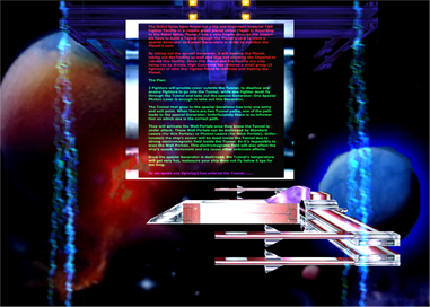
The game will allow you to fly the Xglwing2 through The Planet Tunnel to blow up the core. Inside the core there will be various obstacles (moving Energy Beams, Wall Portals, Small Generators) to be avoided. Once the core has been blown to bits, the temperature of the Tunnel will increase, thus you have to fly as fast as possible (do not go below 6 kps for too long) out of the Tunnel or risk exploding with the Tunnel.
II. DESIGN AND IMPLEMENTATION
Collisions
The collisions detections are done by using bounding boxes and spheres.bounding spheres are used to detect the collisions between the ship and the Tunnel. When the ship is colliding with the Tunnel, the Xglwing2's nose will be forced to move along the Tunnel edges and reverse the forces applied to Xglwing2 (ship) and the Xglwing2's Shield is reduced by 1 (Current Xglwing2's Shield status can be seen on the lower left Shield gui)at a time until it explodes if the user does not move the ship away. Bounding boxes are used to detect the collisions between the ship and the small Generators obstacles. Collision with the generators will cause the ship to explode. Collisions between the ship and the Wall Portals are calculated directly by using the ship's position data with the Wall's position data. The same method is also used for the Photon Lasers collision detections. Xglwing2's Lasers collisions are calculated by using its angle, z and y vector component and its length. There is atrick in using the Lasers, you must be not to close or to far from the objects that you wanted to shoot(Wall Portals). Because the Lasers needed some time to reach its maximum power and the Wall Portals are quite thick (Their thickness are not the same accross their surface), only with maximum Lasers power you can destroy the Walls Portals, that is by shooting it at a correct distance. The actual code to implement this idea is not as complex at it seem, I have simplified it.
Camera
Camera is done by using the euler angles representation. The camera will move along with the Xglwing2's movements. Although this method will have a Gimbal Lock problem, it is not effecting my game because the game is in a very tight area all the time, it is impossible to rotate 90 degree in any directions.
Xglwing2 Movements
Here vectors components are use to represent the Xglwing2's movement and euler angles for the degree of rotations. Again Gimbal Lock is not an issue here since the area is really small, it is impossible to rotate Xglwing2 more than 90 degree.
Rendering
I spent most of the time doing the Visuals. The ship is done by using OpenGL's primitives drawing commands. All the textures used in my game are done by me using Photoshop7 except for the skystar2.raw texture which is used for the background, this image is taken from Tricks of The 3DGames Programming Gurus book by Andre Lamothe that I bought. In Andre's books he said I can use all the Materials from the book, so its legal :). The ship is using multipass (2 passes) rendering for the first texture and the second moving texture(the ship's shield effects) with the geometry as well. Display Lists are used for most of the rendering to speed up frame rate.
I used 2 types of particles effects. The Ship impact effects and the explosion effects. All of these are done using moving and scaling quads with blending and changing texture effect. For the Energy Line obstacles I used moving texture effects (a cheap effect but it serves the purpose).
Lighting effect is used for the changing colour effects and the blinking light effect. Changing colour effect can be seen when the Big Generator is destroyed, where the Tunnel changes to yellow then to red when the Tunnel's temperature is increasing.Blinking effects are the sudden light blue or white light in the Tunnel.
Blur effect is used when the ship is at an area in the Tunnel where it has strong elctromagnetic waves. This is done by projecting the current screen view to a texture and attach it to the quad that is drawn on the screen combine with blending.
Small generators are done by using changing textures on a quad with blending. The same method is used for the Big Generator but without blending.
The moving Tunnel's shield effect(Tunnel's shields and the Planet's shields are use only to protect the Planet and the Tunnel from the magnetic waves from the surrounding planets, so its harmless for Xglwing2 or other objects)
are done by one side skybox with moving texture and blending.
Lasers are done using box with rotating texture and blending.
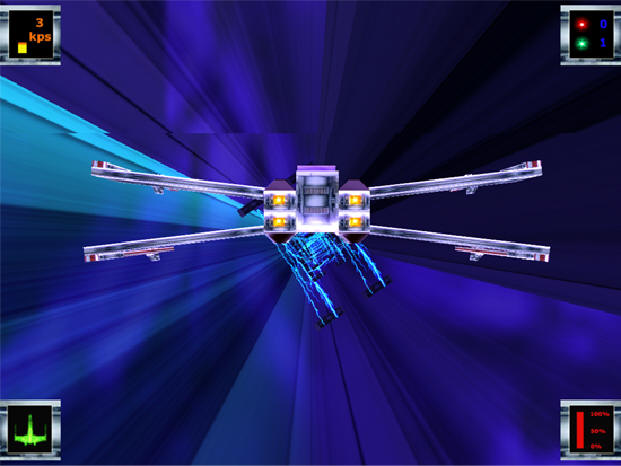
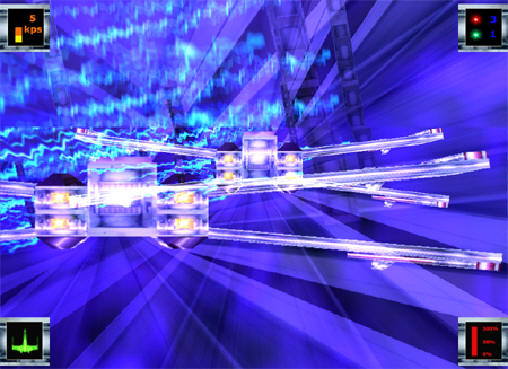
Guis are done buy using 2D images displayed on the screen with 2D view.
Before playing the game, please makesure that the keyboard repeat rate is at the maximum rate, because this effects the game.
Keyboard:
w : Rotate up and move the Xglwing2 to that direction.
s : Rotate down and move up the Xglwing2 to that direction.
a : Rotate left the Xglwing2.
d : Rotate right the Xglwing2.
j : Fires Standard Photon Laser (max 3).The ammount of Standard Photon Laser left can be seen on the top right PLasers gui (the red one).
k : Fires Special Photon Laser (this Photon Laser is enabled only when the Big Generator is in range).The ammount of Special Photon Laser left can be seen on the top right PLasers gui (the green one).
n : Increase Xglwing2's speed(maximum 6kps with wing closed, 5kps with wing opened). The Xglwing2 current speed can be seen on the top left Speed gui
m : Reduce Xglwing2's speed(minimum 3kps).
Spacebar : Fire the Lasers(wing must be opened). When firing Lasers, the Laser charge (not the power, power depends upon the Laser's length. if you allow the Lasers to be longer (if maximum range is reached, then the Lasers will have maximum power)before hitting something, the Lasers power will increase as well)
will decrease, which can be seen on the lower right Laser charge gui.
v: Open or close wing.
IV. CONCLUSION
This was a fun project to be done. I learned many new things with this project. I will make a new and better game after this one.........
V. REFERENCES
Lecture and Tutorial Notes.
People from the RTR3D Newsgroups.
People from openglforums.
Tricks of The 3D Games Programming Gurus by Andre Lamothe book.
<-------------------------------------------------------------------------------------------------------------------------------------------------------------->
Last Modified : Date: 2003/10/19 23:57:52
Author: cmangund
<-------------------------------------------------------------------------------------------------------------------------------------------------------------->