
Copyright 2003 Christopher Roger Mangundjaja
<--------------------------------------------------------------------------------------------------------------------------------------------------------------->
OVERVIEW
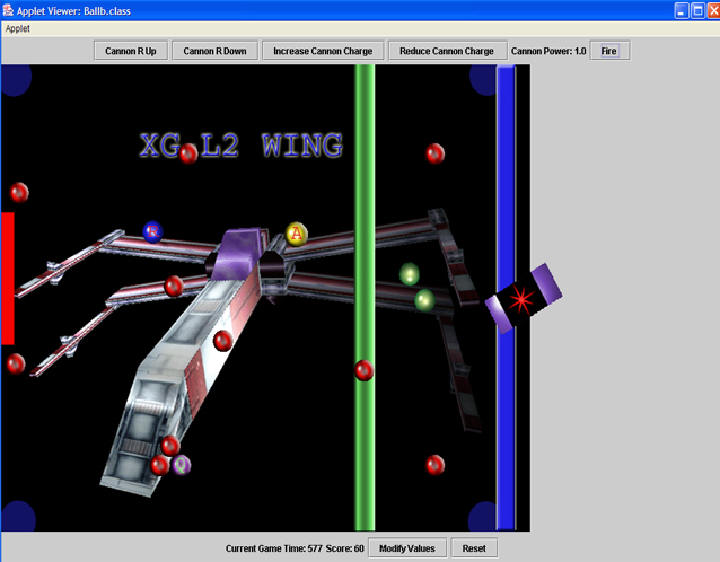
The idea of the game is you should make a much points as possible
by using shooting balls (two balls at a time) in 4000 gametime. The obstacles on the table have
different points depending on their type. Some obstacles will reduce your points, if you hit
these type of obstacles. The collisions, objects movement, cannon charge, are all calculated based on the equations of motion, athough not 100% accurate.
Get as much points as possible in 4000 gametime by shooting balls (two balls at a time).
The Points:
Wall Impeller: -1
Queller: -10
Attractor: 0
Repeller: 0
Pockets: -5
Moving red ball obstacle1 (on the green line): 20
Moving red ball obstacle2: 30
Static red ball obstacles: 10
The GameOver conditions:
1. When both balls stuck with the attractor.
2. When both of the balls passes zero acceleration (if one ball is not moving and the other ball hits this ball, there are a fraction of miliseconds where both balls have zero acceleration and this is enough for the gameover condition)or come to halt.
3. When the gametime ends.
PHYSICS AND COLLISIONS
All the numbers used are in terms of ratio, so they are not actual newton,kg,etc
The Balls move according to these equations :
vx=(float)(vx+ax*deltat*0.5);
x = (float)(x + vx * deltat);
vy=(float)(vy+ay*deltat*0.5);
y = (float)(y + vy * deltat);
First the velocity is calculated with the acceleration and the second equation
is used to calculate the position of the ball in time. Here in order to simplify things I have made
assumption that the time is increasing 1 second per repaint rate of the program.
By doing this it allows me to let the user determine the speed of the animation and the time calculation does not effected, so in
other word the user can create a slow motion animation by adjusting the repaint value
but the whole time calculation is not effected.
The velocities and the positions of the balls are calculated by using the vx and vy component of the velocity.
Here are the equations used to determine the vx and vy of the balls:
f=-sc*sx;//calculate the force of the spring
a=(float)f/Ball.massb;//calculate the acceleration of the ball
Ball.ax=(-1*(float)(Math.abs((float)a*(float)Math.cos(0.525))));
Ball.ay=-1*(float)(Math.abs((float)a*(float)Math.sin(0.525)));
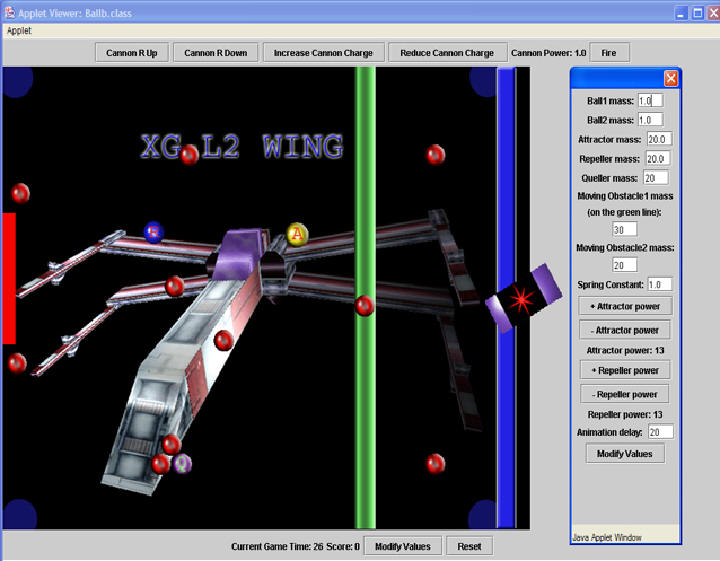
Here the spring equation is used. The spring constant can be changed by the user, this will effect how fast does the ball move after
it is being fired from the cannon. The cannon charge is also adjustable with 1.5 is the maximum. The cannon can be rotated to 30 deg maximum(up or down), 10 deg at a time. After the initial acceleration of the ball is calculated, I divided to ax and ay with * -1. the * -1 is because of the
screen coordinates that started from zero, zero on the top left (all x is positive). Without * -1 the ball will never move to the left.
The attractor and repeller forces are calculated by using these equations:
float F=(m1*m2)/(atpower*atpower);
ax=(float)((F/m1)*Math.cos(0.785f))-Math.abs(ax);
ay=(float)((F/m1)*Math.sin(0.785f))-Math.abs(ay);
Here I make assumptions that the deg between ax and ay is 45 deg although this is not accurate, the ball is attracted by the attractor. Since the ball
acceleration is reduced. This works the same with repeller, the only difference is with repeller I add instead of substract.
Friction is calculated using:
ax=ax-(float)0.05;
ay=ay-(float)0.05;
Here since friction will effect the acceleration of the balls, I simplified things by subtracting the acceleration of the ball
directly since the table surface does not change.
The velocities after collisions are calculated this way:
vy=(float)((m1-m2)/M * v1) + (float)(2.0 * m2/M*v2);
vx=(float)((m1-m2)/M * v3) + (float)(2.0 * m2/M*v4);
This is used for ball ball collisions, ball moving obstacles collisions, ball static obstacles collisions.
With ball static obstacle collisions, the velocity of the static obstacle is not calculated, since they are static.
These are the equations used when there is a change in energy after the collisions (ball and queller, impeller collisions):
keiy=(float)0.5*m1*v1*v1;
kefy=(float)(1.1*keiy);
vy=(float)(Math.sqrt((kefy/(0.5*m1))));
With pockets, I just used the coordinates of the ball, if they fits then they are in.
The collisions (between balls,balls and obstacles) are all based on bounding circle. So to check collisions I just need to calculate the distance between the radius of the ball and the obstacles, if they overlapped then collision has occurred.
SPIN
In order to implement spin, I have to take into account the angular velocitiy of the ball as well as the direction of the spin. So if the spinner is spinning in clockwise direction, when the ball hits the spinner the ball should spin in counter-clockwise direction. The speed of the spin is determine by the angular velocities of the spinner and the ball before and after collision.
So in my program I should also add an angular velocity for the ball and the spinner (another vx and vy for the spin component). This component will be calculated separately from the main vx and vy of the ball. This should also be configured with the animation of the ball, currently the ball has spin animation but it is not accurate.
THE GAME
The html file that runs the game is ball.html.
There are 3 java class files used: Ball.java, Ballb.java, Ballattrib.java.
Ballattrib handles the values modifications.
Ball handles the main calculation and drawing of the program.
Ballb is the main program that also handles the initial speed and direction of the ball.
Ball applet game.
KNOWN ISSUE
The Sticky ball problem. The balls will sometime get stuck with the other ball or with the obstacles.
I have tried my best to minimize this problem by adjusting the repaint value and the time calculations, but the problem is still there.
<--------------------------------------------------------------------------------------------------------------------------------------------------------------->
Last Modified : Date: 2003/09/05 02:46:00
Author: cmangund
<--------------------------------------------------------------------------------------------------------------------------------------------------------------->